

Apple’s iPad Pro lineup continues to evolve, and the latest M5-powered models bring meaningful upgrades over the 4th-generation (M4) iPad Pro. Whether you’re a creative professional, developer, or power user, understanding the differences in performance, connectivity, and design can help you choose the right device for your needs.
Table of contents
Quick Comparison Table
| Feature | iPad Pro M5 | iPad Pro 4th Gen (M4) |
|---|---|---|
| Chipset | Apple M5 (9 or 10-core) | Apple M4 (9 or 10-core) |
| Display | Tandem OLED | Tandem OLED |
| RAM | 12GB (base) | 8GB (base) |
| Connectivity | Wi-Fi 7, Bluetooth 6 | Wi-Fi 6E, Bluetooth 5.3 |
| Storage | 256GB to 2TB | 256GB to 2TB |
| Camera | 12MP front and rear | 12MP front and rear |
| Battery Life | Up to 10 hours | Up to 10 hours |
| Weight | 11″: 0.98 lb / 13″: 1.28 lb | 11″: 1.03 lb / 13″: 1.28 lb |
| Price | From $999 | From $999 (discounted) |
Design and Display
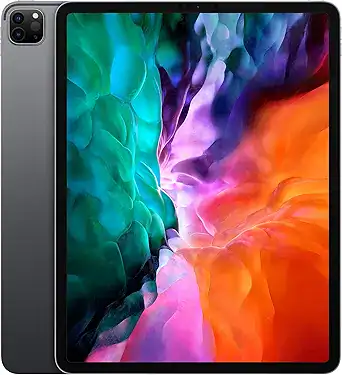
Both models feature Apple’s signature aluminum unibody with flat edges and ultra-thin profiles. The M5 iPad Pro is slightly lighter in the 11-inch variant, weighing just 0.98 pounds compared to the 4th Gen’s 1.03 pounds. The 13-inch models are identical at 1.28 pounds. These subtle weight reductions make the M5 more comfortable for handheld use and travel.
Display-wise, both use Tandem OLED technology with Ultra Retina XDR visuals, 1600 nits peak brightness, and ProMotion for adaptive refresh rates. Color accuracy and contrast are exceptional across both generations, making them ideal for visual professionals. The edge-to-edge design and anti-reflective coating enhance usability in bright environments.
Performance and Storage

The M5 chip introduces a significant leap in AI and graphics capabilities. Apple claims the iPad Pro jumped to M5 with 3.5x faster on-device AI and improved storage bandwidth, which benefits workflows involving real-time rendering, machine learning, and multitasking. The M4 chip remains powerful, but the M5’s neural engine and GPU enhancements make it better suited for future-proofing.
Storage tiers are identical—256GB to 2TB—but the M5 adds a nano-texture glass option for the 1TB and 2TB models, reducing glare in studio environments. For a deeper dive into how the iPad Pro M5 compares to the iPad Pro M4, this breakdown offers additional insights.
Connectivity
The M5 iPad Pro introduces Wi-Fi 7 and Bluetooth 6, both of which offer substantial improvements in speed, bandwidth, and device pairing stability. Wi-Fi 7 supports multi-link operation and higher throughput, which is ideal for cloud-based workflows, remote collaboration, and streaming high-resolution content. Bluetooth 6 enhances range and reduces latency, especially when using wireless peripherals like headphones, styluses, and keyboards.
In contrast, the 4th Gen iPad Pro supports Wi-Fi 6E and Bluetooth 5.3. These standards are still fast and reliable, but they lack the extended capabilities and future-proofing of the newer protocols. Both models support 5G cellular connectivity, making them suitable for mobile professionals who need high-speed internet on the go.
Accessories
Accessory compatibility is consistent across both generations. Each supports the Apple Pencil Pro, which introduces squeeze gestures, barrel roll precision, and haptic feedback for enhanced creative control. The Magic Keyboard remains a top-tier option for typing and productivity, offering a floating cantilever design, backlit keys, and a trackpad.
Both iPads also feature the Smart Connector, allowing seamless integration with supported accessories without Bluetooth pairing or charging. Whether you’re using external displays, MIDI controllers, or studio gear, the accessory ecosystem is robust and fully supported on both models.
Camera and Audio
Camera hardware is consistent across both generations. Each features a 12MP rear camera with Smart HDR 4, 4K video recording, and LiDAR for depth mapping. The front-facing 12MP TrueDepth camera supports Center Stage and Face ID. Audio is delivered through a four-speaker system with spatial audio support, dynamically adjusting to optimize sound based on orientation for an immersive experience.
Battery

Battery life is rated at up to 10 hours of web browsing or video playback on Wi-Fi for both models. While capacity remains unchanged, the M5’s efficiency gains may offer slight improvements in real-world use, especially during heavy multitasking or creative workloads.
Pricing
The iPad Pro M5 starts at $999 for the 11-inch and $1,299 for the 13-inch. The 4th Gen iPad Pro is no longer sold directly by Apple but is available through third-party retailers at discounted prices. If budget is a concern, the M4 remains a solid value.
FAQ
Yes. Both support Apple Pencil Pro, Magic Keyboard, and Smart Connector accessories.
No. Both use Tandem OLED with identical specs.
No. Camera hardware and software features are the same.
Yes. The M5 offers improved storage bandwidth and nano-texture glass options for higher tiers.
Which to Buy?
If your workflow involves AI, 3D rendering, or future-facing creative apps, the M5 iPad Pro is the clear winner. Its performance and connectivity upgrades make it ideal for professionals who need speed and reliability. However, the 4th Gen iPad Pro remains a capable device for most users, especially if you find it at a discount.
For historical context on where these models fit within all the generations, this roundup provides a complete lineage. Whether you’re upgrading or buying your first iPad Pro, understanding the generational leap helps you choose wisely.


