
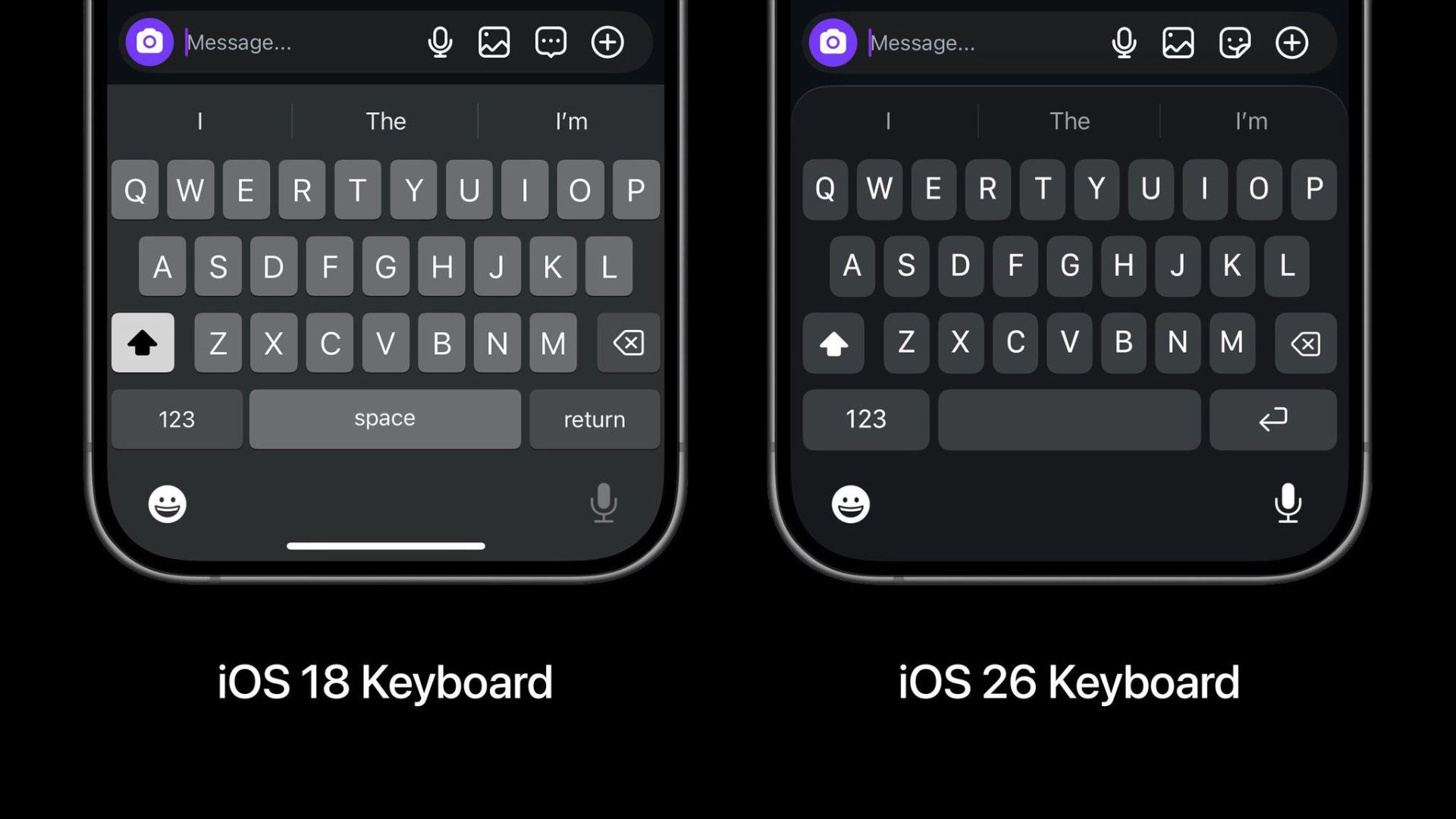
You are not imagining it. In iOS 26, Apple can show two different keyboard designs depending on the app you are using. The reason is not that Apple “forgot” to flip a switch. Apple chose a compatibility path that avoids breaking older app layouts while developers update their apps for the new Liquid Glass look.
Apple can’t force one keyboard design without breaking apps
Apple controls the system keyboard, but apps still control the space around it. Many apps attach extra UI above the keyboard, such as toolbars, reply bars, link buttons, image pickers, and custom input controls. When Apple changes the keyboard’s shape, blur, translucency, and visual depth, those attached elements can clash visually or overlap. That is how you end up with covered buttons, misaligned text fields, and unreadable UI.
Developers are already reporting edge cases where the iOS 26 keyboard’s transparency interacts badly with app surfaces, especially in custom sheets and modals.
Don’t miss the best of The Mac Observer
Set us as a preferred source and our Apple reporting ranks higher in your Google Search results and Discover feed — one tap, no account changes.
So Apple does the safer thing. It keeps older apps in a “legacy” presentation style until they ship an update built for iOS 26. That approach limits regressions and pushes the responsibility where it belongs, on each app to validate its own UI.
What decides whether you see the new keyboard
In practice, this comes down to whether the app has been rebuilt with the iOS 26 SDK and updated to match the new system design rules. Apple already signaled that developers should build and test with Xcode 26 and the latest SDKs to take advantage of the latest platform behavior.
That same submission pipeline also creates a natural dividing line for users.
- Apps that already rebuilt with the iOS 26 SDK tend to pick up more of the iOS 26 visual system, including the newer keyboard style.
- Apps still running older builds keep older UI behavior longer, because that reduces layout surprises.
Apple has used similar “old UI in not yet updated apps” tactics in the past during major visual shifts, because it avoids breaking older binaries overnight.
What you can do right now
You cannot force every app to use the new keyboard if the developer has not updated the app. What you can do is reduce the friction.
1) Update your apps aggressively
- Turn on automatic app updates.
- Manually update the apps where you notice the old keyboard.
This matters because the keyboard style change often arrives with an app rebuild, not with an iOS point update.
2) Restart the app and sometimes your iPhone
If an app cached older UI state, a force close and relaunch can refresh it after an update.
3) Check for in app A B testing
Some companies roll out UI changes in stages. Two people on the same iOS version can see different UI inside the same app. That is common in large apps, even for UI that relies on iOS frameworks.
4) If typing feels worse, reset keyboard settings
If your problem is accuracy, missed taps, or autocorrect behavior, a keyboard settings reset can help. You will find it in Settings under general reset options for keyboard related data.
5) Third party keyboards can complicate the transition
If you use a third party keyboard, test the Apple keyboard for a day. Some apps and keyboard extensions lag behind major OS UI changes, and that can amplify inconsistencies.
The short answer you can rely on
Apple can’t force the new iOS 26 keyboard everywhere without risking UI breakage in apps that have not updated for it. You will keep seeing mixed keyboard designs until more apps ship iOS 26 SDK builds, and Apple tightens submission requirements over time.



Discussion