

Apple is bringing back a familiar Safari feature in macOS 26.4 and iPadOS 26.4. The compact tab bar, which disappeared with earlier versions of macOS Tahoe and iPadOS 26, is now available again.
The feature is being reintroduced following strong user feedback in favor of the cleaner layout. With this update, Apple restores choice inside Safari instead of forcing a single design.
The compact tab bar combines the address bar and tabs into one single row. This reduces the space taken at the top of the browser and gives more room for web content.
Don’t miss the best of The Mac Observer
Set us as a preferred source and our Apple reporting ranks higher in your Google Search results and Discover feed — one tap, no account changes.
In simple terms, you see more of the webpage and less of the browser interface.
- Tabs sit inside the address bar
- Fewer visual layers at the top
- More screen space for content
- Cleaner and minimal look
When Apple introduced macOS Tahoe and iPadOS 26, it redesigned Safari with the new Liquid Glass interface. During that transition, the compact tab bar option was removed.
Many users did not like that decision. The compact layout had been available for years, so its removal felt unnecessary.
Now, with version 26.4, Apple has reversed that change and added the option back.
How to enable compact tab bar

You can switch to the compact tab bar in a few quick steps.
On Mac:
- Open System Settings
- Go to Safari
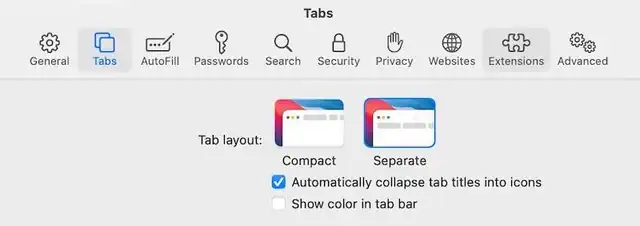
- Look for Tab Layout
- Select Compact Tab Bar
On iPad:
- Open Settings
- Tap Safari
- Find Tab Layout
- Choose Compact
Once enabled, Safari immediately switches to the single-row layout.
Compact vs separate tab bar
Apple still keeps the default “Separate Tab Bar” option for users who prefer a traditional layout.
Here is how they differ:
- Compact tab bar
- Single row design
- Saves space
- Cleaner interface
- Separate tab bar
- Tabs and the address bar are split
- Easier to manage many tabs
- More familiar layout
macOS 26.4 and iPadOS 26.4 focus on refining the experience rather than introducing major new features. Bringing back the compact tab bar shows Apple is paying attention to user feedback.
If you liked the older Safari layout, you can switch back right away. If not, the standard layout stays unchanged. Let us know which Safari tab style you prefer.



Discussion