

Ever since the COVID-19 pandemic started, people have been struggling to unlock iPhones that use Face ID whilst wearing a mask. You can try and enter passcode screen in a more efficient way, but ultimately you’re still typing in the passcode. However, a look through the iOS 14.5 and watchOS 7.4 developer betas indicates Apple may be about to fix that.
Unlock iPhone Whilst Wearing a Mask With iOS 14.5 and watchOS 7.4
The latest developer beta shows that there is an option to unlock your iPhone with your Apple Watch when you’re wearing a mask using Face ID. Go to Settings > Face ID & Passcode and scroll down to Apple Watch. Tap the switch next to the option so it’s green.
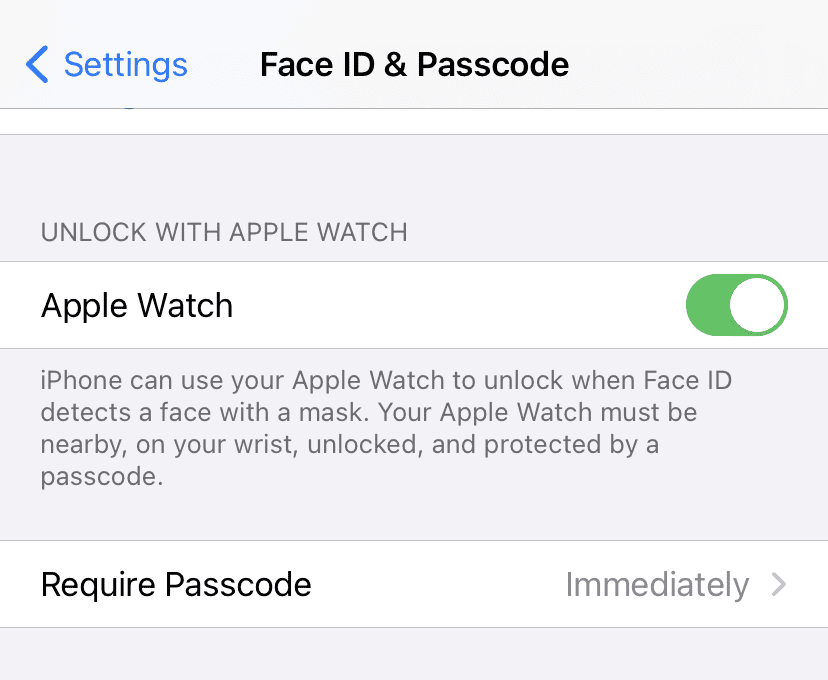
When you do this, the next time you go to unlock your iPhone wearing a mask, Face ID will recognize that and your Apple Watch will vibrate. Your phone is now unlocked.
The feature only works in a relatively limited set of circumstances. For instance, you can’t use it to pay for things, but it helps when doing quick tasks like making a call or checking a notification whilst wearing a mask. You will also notice that it says the wearable has to be nearby, being worn, and have a passcode. It makes no reference to recognizing any or all of your face.
Don’t miss the best of The Mac Observer
Set us as a preferred source and our Apple reporting ranks higher in your Google Search results and Discover feed — one tap, no account changes.




To pay for something I.e. use Apple Pay, use your Apple Watch. No need to unlock your phone. The watch just has to be unlocked.