
If you got a charge from Apple and don’t know why, the most common reason is a subscription, Family Sharing purchase, or app store charge tied to your Apple ID. To find out what Apple billed you for, and how to resolve it, you can check your purchase history, cancel subscriptions, or request a refund through Apple’s support portal.
Table of contents
Why Did Apple Charge Me?
Step 1: Check Your Apple Purchase History
Start by reviewing your Apple ID’s purchase history on your iPhone, iPad, or Mac:
Don’t miss the best of The Mac Observer
Set us as a preferred source and our Apple reporting ranks higher in your Google Search results and Discover feed — one tap, no account changes.
- On iPhone or iPad: Go to Settings > [Your Name] > Media & Purchases > View Account > Purchase History.
- On Mac: Open the App Store > Your Name > Account Settings > Purchase History
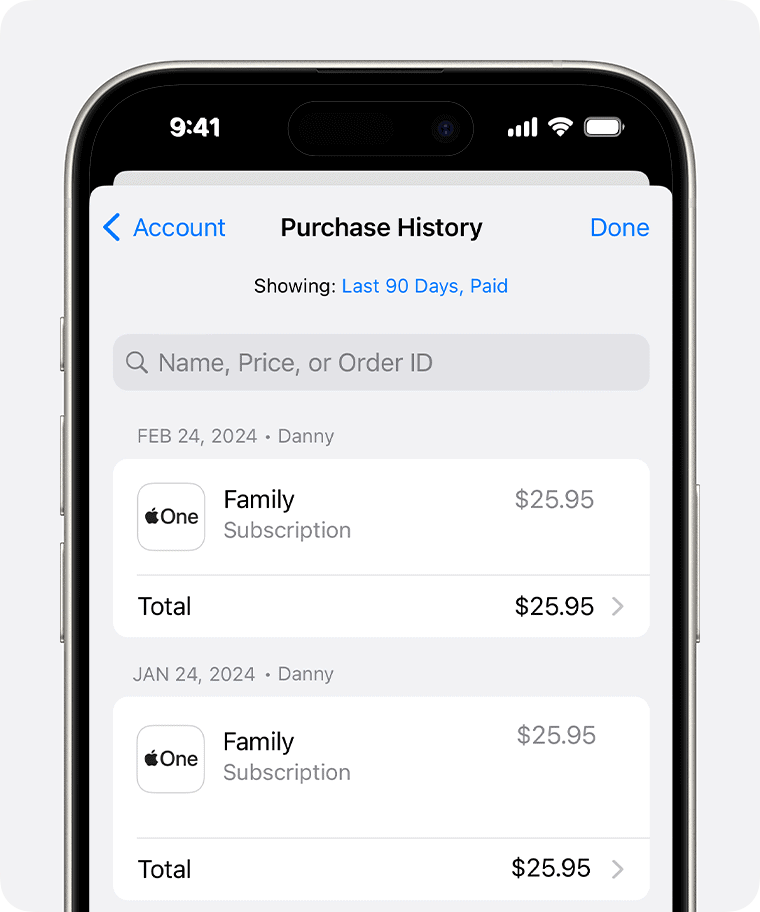
This shows charges for apps, music, movies, subscriptions, and more. Look for dates and amounts that match your billing statement.
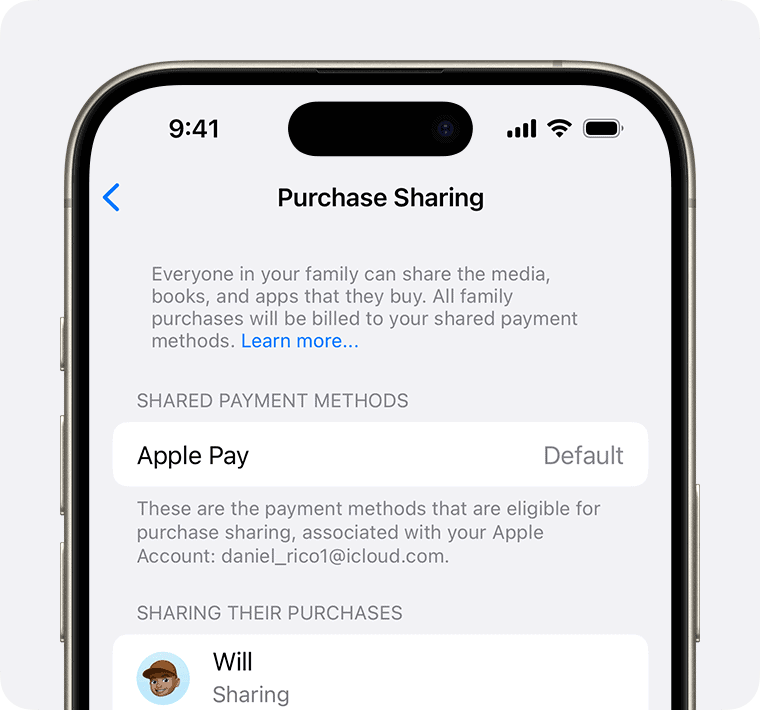
Step 2: Look Into Family Sharing Purchases
If you’re part of a Family Sharing group and Purchase Sharing is enabled, someone else’s purchase might be billed to you.
- Go to Settings > [Your Name] > Family Sharing > Purchase Sharing.
- See if Purchase Sharing is turned on.
- Tap each family member to check their purchase activity (if applicable).
Even if you didn’t make the purchase, it could have come from a child or another family member’s device.
Step 3: Review Active Subscriptions
Apple subscriptions renew automatically unless canceled.
To check:
- Go to Settings > [Your Name] > Subscriptions.
- You’ll see all current and expired subscriptions tied to your Apple ID.
- Cancel any services you no longer use (like iCloud+, Apple Arcade, or third-party apps).
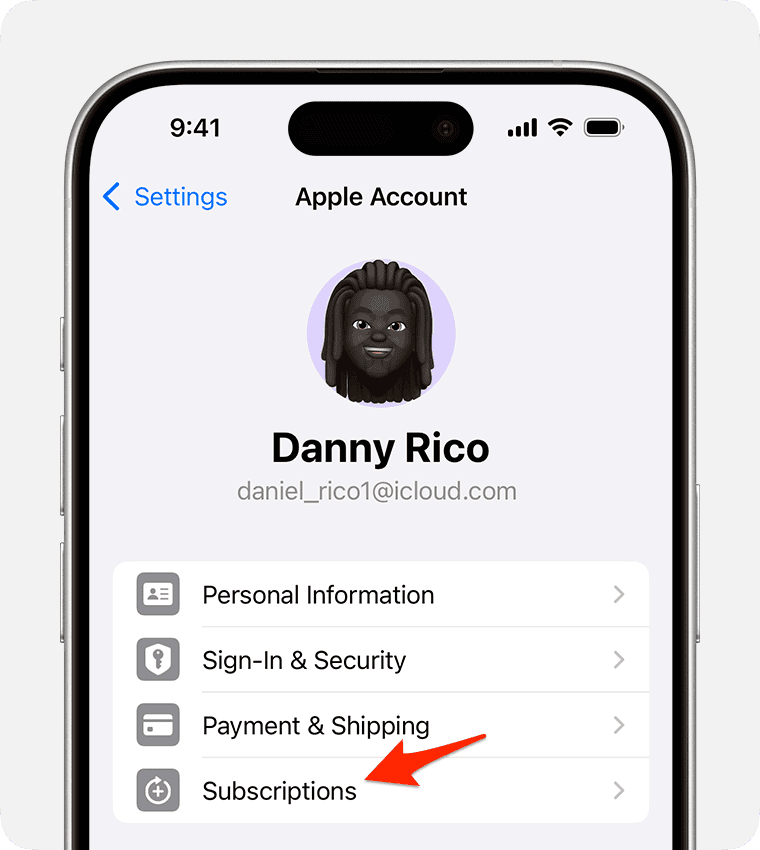
Look for services with similar billing dates to the unknown charge.
Step 4: Compare Apple ID Activity to Bank/Card Statement
Sometimes a charge appears on your bank or credit card statement but isn’t immediately visible in your Apple ID’s purchase history.
- Double-check if the charge was from another Apple ID (e.g. your child’s old device or a shared iPad).
- Look for family purchases or secondary Apple IDs you may have forgotten about.
- Use the last four digits of the card to match against your Apple billing account.
Step 5: Use Apple’s Report a Problem Website
If you’re still not sure where the charge came from, or if something looks suspicious, go to reportaproblem.apple.com.
- Sign in with your Apple ID.
- You’ll see a full list of your purchases, subscriptions, and app transactions.
- You can request a refund, report a billing error, or dispute a charge here.

This is the fastest and most official way to resolve billing problems with Apple.
Tips for Avoiding Future Apple Billing Confusion
- Disable Purchase Sharing: In Family Sharing > Purchase Sharing, toggle it off if you don’t want to cover other family members’ purchases.
- Use Ask to Buy: For children under 18, turn on “Ask to Buy” so nothing gets charged without your approval.
- Cancel unused subscriptions: Regularly visit Settings > Subscriptions to avoid being charged for services you’re no longer using.
- Use gift card balance: Add funds to your Apple ID via a gift card to avoid surprise charges on your credit card.
- Review emails from Apple: Apple sends a receipt for every purchase—check your inbox for billing breakdowns.
Frequently Asked Questions
Check your Apple ID’s purchase history or visit reportaproblem.apple.com for a full breakdown.
Yes. If Purchase Sharing is enabled, your payment method is used for all family purchases unless otherwise specified.
Yes. Go to reportaproblem.apple.com, find the item, and select Request a Refund. Refunds aren’t guaranteed but are often granted for accidental or unauthorized charges.
Summary
- Check your Apple ID’s Purchase History.
- Review Family Sharing settings and shared purchases.
- Inspect your Subscriptions for automatic renewals.
- Compare card statements to Apple receipts.
- Use reportaproblem.apple.com to request refunds or resolve issues.
Whether the charge comes from Family Sharing, a subscription you forgot about, or an app purchase made on another device, the tools above will help you figure it out.




I’m apparently going to be charged $5 for chatting with an expert who was totally unhelpful and obviously not capable of resolving my issue.
Apple charged me for a subscription that I clearly canceled before the end of the trial period.
The cancelation (including date) is detailed among my inactive subscriptions.