
When you buy a Mac, it already comes with a solid lineup of built-in tools. But sooner or later, you’ll run into the question of licensed software—apps that aren’t free, that come with usage rights, and that often define the real working power of your Mac. Licensed software is everywhere, from the creative apps you open daily to the quiet background utilities that keep your system running smoothly. Knowing which ones are worth paying for and how they differ from free alternatives can save you time, headaches, and sometimes money.
Let’s break down what licensed software actually means, then explore some of the best examples available for Mac across different categories.
Table of contents
What Licensed Software Means
Licensed software isn’t about ownership—it’s about permission. When you buy or download an app like Microsoft Office or Adobe Photoshop, you’re not purchasing the software itself; you’re buying the right to use it under specific terms. Those terms can vary: some licenses last forever (a one-time purchase), while others follow a subscription model where you pay monthly or yearly.
Don’t miss the best of The Mac Observer
Set us as a preferred source and our Apple reporting ranks higher in your Google Search results and Discover feed — one tap, no account changes.
The license might limit how many devices you can install the app on, how you can use it (personal vs. commercial), or whether you can share it. Apple’s ecosystem is built around this model. Apps from the Mac App Store are all licensed under Apple’s terms, and even independent software developers sell licenses through their own systems.
Licensed software exists for a reason. It funds development, ensures updates and security patches, and often gives you access to support when things go wrong. It’s the trade-off for reliability, professional-grade features, and peace of mind that your tools will keep working.
Productivity Powerhouses
Let’s start with the apps that help you get things done—writing, planning, communicating, and staying organized.
Microsoft Office 365
For decades, Microsoft Office has been the backbone of professional work environments. On the Mac, it’s no different. Office 365 is a subscription-based license that includes Word, Excel, PowerPoint, Outlook, and OneNote. The license covers automatic updates and cloud storage through OneDrive. Whether you’re building reports, tracking data, or running presentations, this suite is still the standard.
Fantastical
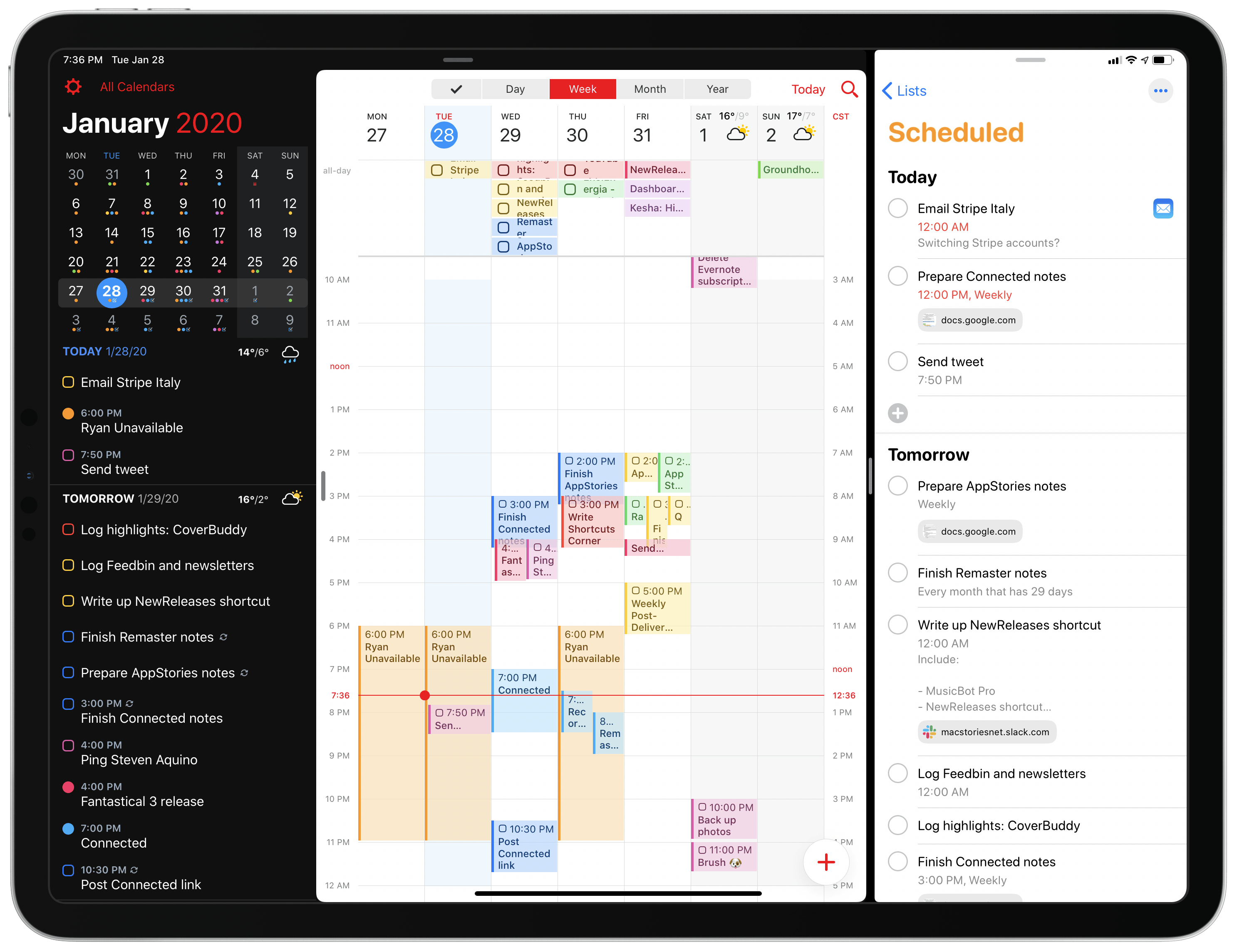
Image Source: Macstories
Calendar apps are everywhere, but Fantastical is licensed software that earns its price. It syncs with iCloud, Google, and Exchange calendars, adds natural language input (“Lunch with Sarah at 1 p.m.” just works), and provides clean widgets for quick viewing. You pay for a subscription, but you get an experience that’s smoother and smarter than Apple’s built-in Calendar.
Things 3
If you’re serious about task management, Things 3 is one of the best examples of well-designed, licensed Mac software. It’s not free, and it’s not trying to be. What you get is a beautiful interface, deep organization tools, and syncing across iPhone, iPad, and Mac. It’s the kind of app that makes staying productive feel good instead of stressful.
Creative Software That Defines the Mac Experience
Macs have long been associated with creativity—music, design, video, photography. Licensed software is what makes that reputation real.
Adobe Creative Cloud

Source Image: YouTube
You can’t talk about creative software without mentioning Adobe. Photoshop, Illustrator, Lightroom, Premiere Pro, After Effects—the list goes on. Adobe’s Creative Cloud subscription gives you access to these apps with frequent updates and deep integration across tools. Professionals rely on it for a reason: precision, consistency, and features that free alternatives rarely match.
Final Cut Pro

Image Source: Apple
Apple’s own Final Cut Pro is a licensed app worth every cent for video editors. Unlike Adobe, you pay once and own the license indefinitely. It’s fast, optimized for Apple Silicon, and widely used by content creators who prefer efficiency over endless subscription costs. Its timeline tools, background rendering, and color grading features make editing intuitive without feeling watered down.
Logic Pro
For musicians and audio engineers, Logic Pro is a no-brainer. It’s the industry standard for Mac-based music production, offering an enormous sound library, advanced mixing tools, and a workflow that feels both powerful and natural. This one-time licensed app turns your Mac into a full studio, whether you’re recording a podcast or producing an album.
Affinity Suite (Photo, Designer, Publisher)
Serif’s Affinity apps are often seen as the independent competitor to Adobe’s ecosystem. Each one—Affinity Photo for image editing, Affinity Designer for illustration, and Affinity Publisher for layout design—is a licensed, one-time purchase. They’re fast, affordable, and fully Mac-optimized. For freelancers and small teams, they offer professional results without the recurring bills.
Utilities and System Tools Worth Licensing
Not all software needs to be flashy. Some of the most useful licensed apps for Mac work quietly in the background, keeping your machine healthy or expanding its capabilities.
CleanMyMac X
This utility keeps your system clean, optimized, and free from junk files. It’s a licensed app that many users swear by because it actually works. It scans for unnecessary data, manages startup items, monitors memory use, and even protects against malware. You can buy a one-time license or subscribe yearly, depending on your needs.
Parallels Desktop
If you ever need to run Windows or Linux on your Mac, Parallels Desktop is the go-to tool. It’s a licensed virtualization software that lets you switch between macOS and Windows seamlessly, without rebooting. Perfect for developers, designers, or anyone who occasionally needs access to Windows-only software.
1Password
Password management isn’t optional anymore. 1Password is a licensed app that safely stores your credentials, syncs across devices, and auto-fills securely. It’s more polished and private than free browser-based alternatives, and the subscription model covers updates and secure cloud storage.
Bartender
Simple, but essential. Bartender is a tiny licensed utility that organizes your Mac’s menu bar. It hides icons you don’t need, keeps things tidy, and saves you from visual clutter. It’s the kind of app that makes you wonder why Apple hasn’t built it in yet.
Development and Professional Tools
Licensed software also powers the technical side of the Mac world. Developers, designers, and engineers rely on tools built for performance and dependability.
JetBrains IntelliJ IDEA / PyCharm / WebStorm
JetBrains builds some of the most respected development tools on the planet. Their licensed Mac apps—IntelliJ IDEA for Java, PyCharm for Python, and WebStorm for web development—offer deep code intelligence, refactoring tools, and integrations that make coding faster and cleaner. You pay for the license, but you save hours of time.
Sketch

Image Source: Sketch
For UI and UX designers, Sketch was a game-changer for Mac. It’s a licensed app focused on digital design, prototyping, and collaboration. Unlike heavy alternatives, it runs smoothly, supports plugins, and exports designs efficiently. Teams often use it alongside tools like Zeplin or Figma.
OmniGraffle
When you need diagrams, charts, or wireframes, OmniGraffle stands out. It’s precise, customizable, and Mac-native. The licensed version offers professional-grade tools for designers, architects, and system planners who want visual clarity without complexity.
Why Licensed Software Is Still Worth It
Here’s the thing—free apps are great for casual use, but when your work, time, or data depend on reliability, licensed software pays for itself. You get updates, customer support, and stability that freeware can’t guarantee.
Mac users have always valued quality tools, and most of these licensed apps are built with that same attention to detail. Whether you’re editing a film, running a business, or coding the next big thing, having the right licensed software turns your Mac from a good computer into a serious workstation.
The Bottom Line
Licensed software on Mac isn’t just about paying for convenience—it’s about investing in performance, support, and trust. Apps like Microsoft Office, Adobe Creative Cloud, Final Cut Pro, and CleanMyMac X show how licensing fuels innovation and keeps your tools sharp.
So when you’re choosing between a free workaround and a licensed app, think about what your time and peace of mind are worth. Often, the price of a license is the cheapest way to get both.




Discussion