
If you entered another person’s Apple ID on your device and want to fix the issue, the correct steps depend on whether the account owner still controls the device. If a scammer convinced you to enter their Apple ID and then locked your device, the recovery process is different and may be limited.
Table of Contents
Apple ID Actions for Shared or Mistaken Sign-ins
Remove Another Person’s Apple ID From Your Device
Removing another person’s Apple ID restores full access so you can use your own Apple account again. This should be done if you, e.g., logged into a friend’s or relative’s Apple ID. These instructions assume you can contact them to remove the device from their account or ask them to put their password so you can log out of their Apple ID on your device.
Time needed: 5 minutes
- Open Settings on your device and tap the person’s name.
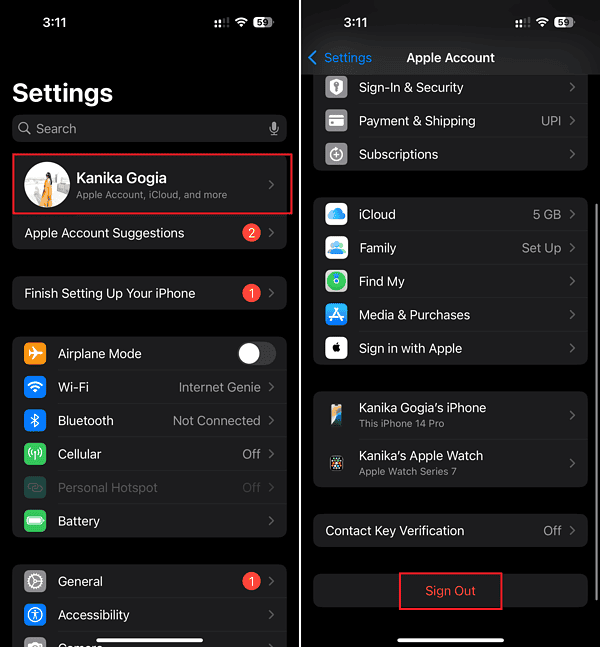
- Scroll down and tap Sign Out.
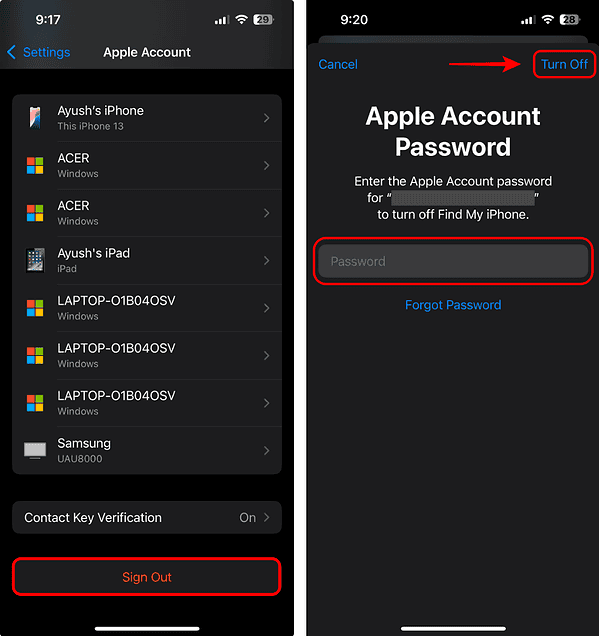
- Enter the password of the Apple ID currently linked to sign out.
Remove a Linked Apple ID Using Another Device or the Web
If someone else’s Apple ID is linked to your device, the owner can remove it using another device or Apple’s website.
Don’t miss the best of The Mac Observer
Set us as a preferred source and our Apple reporting ranks higher in your Google Search results and Discover feed — one tap, no account changes.
- Ask the owner of the other Apple ID to open Settings > Their Name > Devices in any Apple device they own.
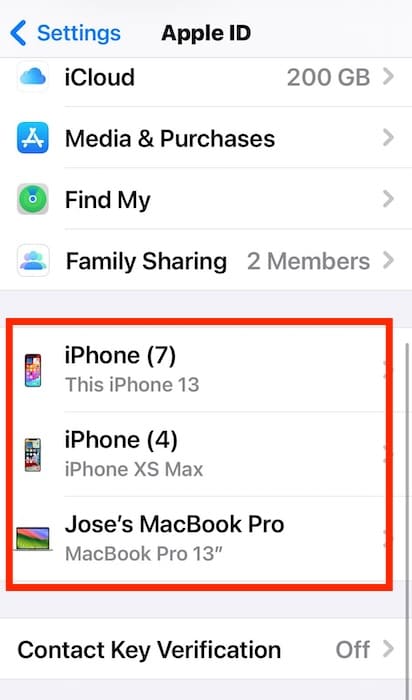
- They should select your device from the list.
- They must tap Remove from Account to release the device.
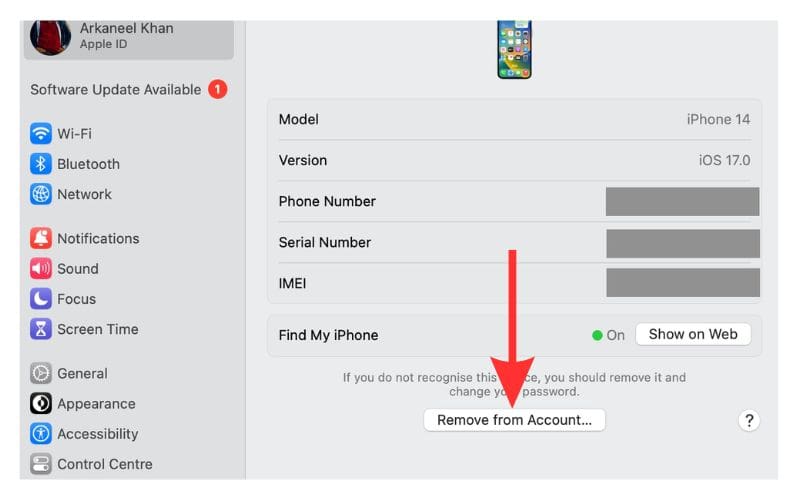
- The content linked to that Apple ID, like Messages conversations, rented movies, or app purchases and subscriptions, will be removed from your iPhone. This will also disable Activation Lock for your iPhone until you sign into your account.
- When you sign in with your own account, the corresponding content from your account will be synced to the device.
Apple ID Scam Locks and Activation Lock Recovery
When a Scammer Controls the Apple ID on Your Device
A scammer may convince a victim to sign into their own iPhone using the scammer’s Apple ID. Once signed in, the scammer can lock the device with Activation Lock and/or enable Lost Mode. They may then demand payment to unlock the device.
Have in mind that there’s no guarantee they will unlock it after payment. They may simply keep extorting you for more money, whilst keeping you locked out of your iPhone. Therefore, it’s not advised you pay the scammers or give them whatever they ask to give your access to the device back.
Recover a Device If Lost Mode Is Not Active
Apple can help restore access only if the scammer did not enable Lost Mode and you can prove ownership.
- Gather proof of ownership, such as receipts or carrier paperwork. Receipts and invoices should always feature the device’s IMEI, MEID, or serial number.
- Contact Apple Support online or schedule in-store verification.
- Present proof that the device belongs to you.
- Apple can disable Activation Lock if ownership is confirmed, but only if Lost Mode is not active.
Understand When Recovery Is Impossible
Activation Lock protects the rightful owner. If Lost Mode is active under the scammer’s Apple ID, recovery is not possible.
- Check the device lock screen for Lost Mode messages.
- If Lost Mode is active, Apple cannot remove Activation Lock.
- Activation Lock cannot be bypassed under any circumstance.
- The device cannot be recovered in this situation.
Tips
- Avoid entering another person’s Apple ID on your device, even if they claim to be an Apple employee, law enforcement officer, or anything that could convince you to give someone access..
- Never pay unlock fees to unknown individuals.
- Confirm any request involving Apple ID sign-in before acting.
- Store receipts safely for ownership verification.
- Enable two-factor authentication for your own Apple ID.
FAQ
You cannot use most features without their password. You must sign out or erase the device to restore access.
Apple can remove Activation Lock only if Lost Mode is not active and you can prove ownership.
No. Payment does not guarantee unlock access and may lead to more demands.
Summary
- Remove the other Apple ID
- Use official removal tools
- Check for scam activity
- Confirm if Lost Mode is active
- Contact Apple with proof
If you entered another person’s Apple ID on your device, remove it through Settings or device removal tools. If a scammer controls the Apple ID and has locked the device, you may recover it only when Lost Mode is not active and proof of ownership is available. This ensures you can return to using your own Apple ID safely.




Discussion