
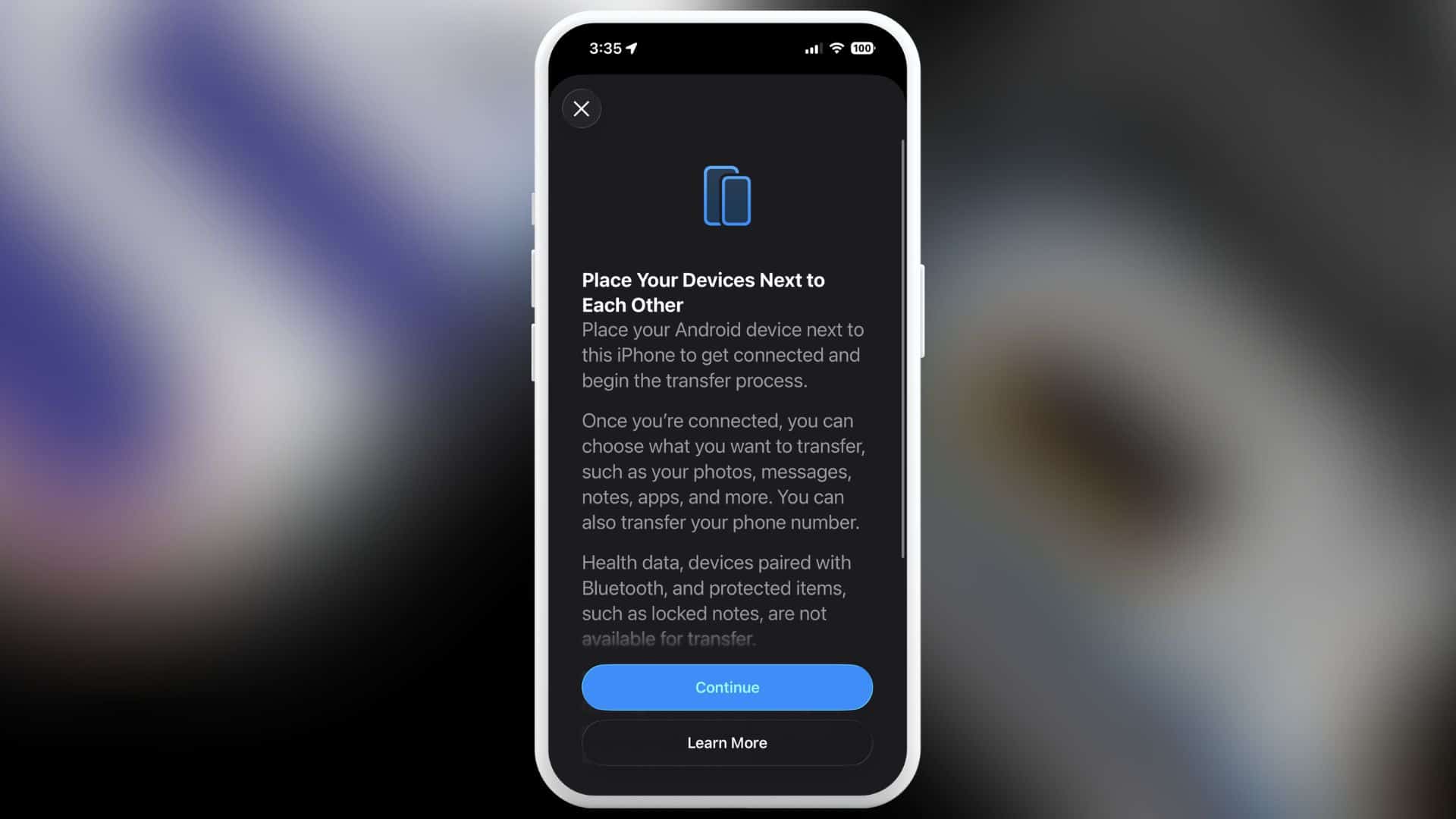
Apple is making it easier for you to move from an iPhone to an Android phone with iOS 26.3. The update adds a built-in transfer tool that helps you move your data without extra apps. As a result, switching platforms takes less time and fewer steps.
How the new transfer tool works

First, you place your iPhone next to an Android phone. Then, you start the transfer directly from your iPhone settings. Once the devices connect, you can move photos, messages, notes, apps, passwords, your phone number, and more. Because the tool is built into iOS, you do not need to download a separate app.
Next, the transfer happens wirelessly. You only need Wi-Fi and Bluetooth turned on. You can either scan a QR code shown on the Android phone or use a session ID with a pairing code to begin. As a result, the process stays simple and guided.
Don’t miss the best of The Mac Observer
Set us as a preferred source and our Apple reporting ranks higher in your Google Search results and Discover feed — one tap, no account changes.
However, not everything moves over. Health data stays on your iPhone. Bluetooth-paired devices also do not transfer. In addition, protected items like locked notes remain on your Apple device. You should check these items before switching so you know what to keep.
To begin, both phones must run the latest software. Your iPhone needs iOS 26.3, and your Android phone needs an updated version that supports the feature. Without the current software, the transfer option will not appear.
Google has already added a similar tool that helps you move data from Android to iPhone. As a result, you now get easier switching in both directions. This change reduces friction when you decide to change platforms.
Why Apple added this feature
The European Commission said Apple and Google designed this system to meet Digital Markets Act requirements in the European Union.
Still, this feature is not limited to Europe. Apple has made it available worldwide in the iOS 26.3 beta. You can find it by going to Settings, then General, then Transfer or Reset iPhone, and finally “Transfer to Android”.
Overall, iOS 26.3 gives you a clearer and faster way to leave your iPhone behind if you choose to switch to Android.


Discussion