

If Apple Music suddenly refuses to play through your headphones, you’re not alone. This is one of those problems that feels bigger than it is. The good news is that most fixes are quick and boring in the best possible way. Let’s break it down step by step and get your music back where it belongs.
Table of contents
Start With the Obvious (Because It Actually Matters)

Before digging into settings, make sure the basics aren’t tripping you up.
Restart your iPhone or iPad. Yes, really. Audio bugs love fresh reboots.
Don’t miss the best of The Mac Observer
Set us as a preferred source and our Apple reporting ranks higher in your Google Search results and Discover feed — one tap, no account changes.
Update iOS or iPadOS. An outdated system can quietly break audio routing, especially with Bluetooth and wired accessories.
If that alone fixes it, you’re done. If not, keep going.
Check the Headphones Themselves

Here’s the thing. Most Apple Music issues blamed on software turn out to be hardware problems.
For wired headphones
- Look inside the headphone port. Pocket lint is the enemy here.
- Check the cable, connector, and earbuds for fraying or damage.
- Plug them in firmly. Thick cases can prevent a full connection, so try removing the case.
For wireless headphones
- Make sure they’re charged.
- Turn them off and back on.
- Put them close to your device and reconnect.
- If one side works and the other doesn’t, that’s usually a headphone issue, not Apple Music.
Make Sure Audio Is Actually Going to Your Headphones
Sometimes Apple Music is playing, just not where you expect.
- Open Control Center while a song is playing.
- Tap the audio output icon and confirm your headphones are selected instead of the phone speaker, car system, or another Bluetooth device.
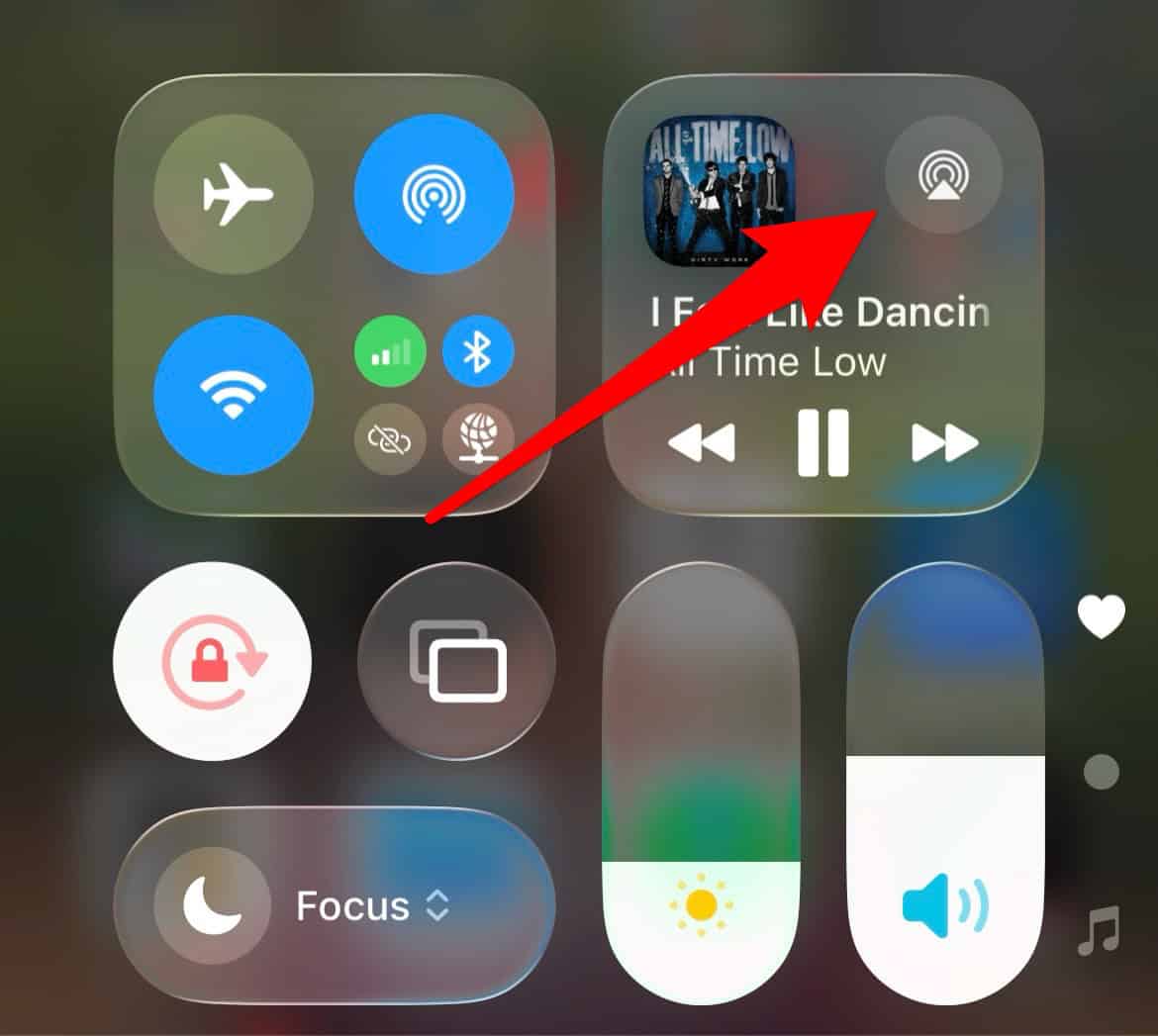

This matters more than people realize, especially if you switch between AirPods, speakers, and cars often.
Test With Another Pair of Headphones

This step saves time.
If a second pair works, your original headphones are likely the problem.
If no headphones work, the issue is probably with the device or settings.
At that point, it’s time to look deeper.
If the Microphone Isn’t Working Either
If calls or voice notes also fail through your headphones, check this.
- Confirm your headphones actually have a microphone.
- Inspect the mic opening for lint or debris.
- Test with another pair.
If microphones fail across multiple headphones, that points back to the device.
Bluetooth Headphones Not Connecting at All
If Apple Music won’t play because your Bluetooth headphones won’t connect, focus on Bluetooth itself.
- Turn Bluetooth off and back on.
- Unpair the headphones, then put them back into pairing mode and reconnect.
- If they’re paired with another device, disconnect them there first.
- Check Settings → Privacy & Security → Bluetooth and make sure Apple Music has access if required.
If Bluetooth is grayed out or no accessories connect at all, that’s a system issue worth escalating.
When to Contact Support
If you’ve tried wired and wireless headphones, restarted, updated, cleaned ports, and reset Bluetooth, there’s not much left to troubleshoot.
At that point:
- Contact Apple Support if no headphones work at all.
- Contact the headphone manufacturer if only one specific pair fails.
You’re not missing some secret toggle. You’ve already covered the important stuff.
The Bottom Line
When Apple Music doesn’t play through headphones, it’s rarely Apple Music itself. It’s usually debris, a loose connection, Bluetooth confusion, or a tired pair of headphones.
Slow down, test one thing at a time, and you’ll almost always find the culprit. And once you do, Apple Music goes back to doing what it does best: playing music, not causing stress.




Air pods are only not working with Apple Music. Everything appears okay in terms of connections and accessibility etc but the audio output icon on Apple Music is not showing the air pods