

Designing a logo that actually works on websites, social profiles, business cards, and signage, is harder than it sounds. The problem isn’t creativity; it’s execution: ensuring balance, readability, and adaptability without a background in design. BrandCrowd approaches this by blending template depth with AI-assisted suggestion and customization. Rather than asking users to start with a blank slate or answer long questionnaires, it presents real designs you can tweak, reuse, and export immediately.
In this review, I tested BrandCrowd’s logo maker and AI logo generator on macOS, focusing on how it performs in practice: from discovering initial logo options and adjusting details to exporting files you can use across platforms and understanding what you pay for when you upgrade.
Table of contents
First impressions: browsing and idea discovery
When you land on BrandCrowd from a Mac browser, the first task is entering your brand or business name. That’s it. Instead of bombarding you with questions about style preferences, industries, or vibes, BrandCrowd surfaces a wide array of complete logos almost immediately.

You won’t see a few minor variations of the same concept. Instead, you’ll scroll through fundamentally different layouts, typography treatments, and visual balances.
On macOS, this grid of logo options loads quickly and remains smooth even when filtering by keyword or icon type. Scrolling through dozens or hundreds of concepts doesn’t trigger lag, and opening multiple logo candidates in separate tabs feels natural in a Mac browsing workflow.
Moreover, filters let you refine logo results by visual style, icon type, and color palette, making it easier to cut through the noise and focus on designs that actually fit your brand.
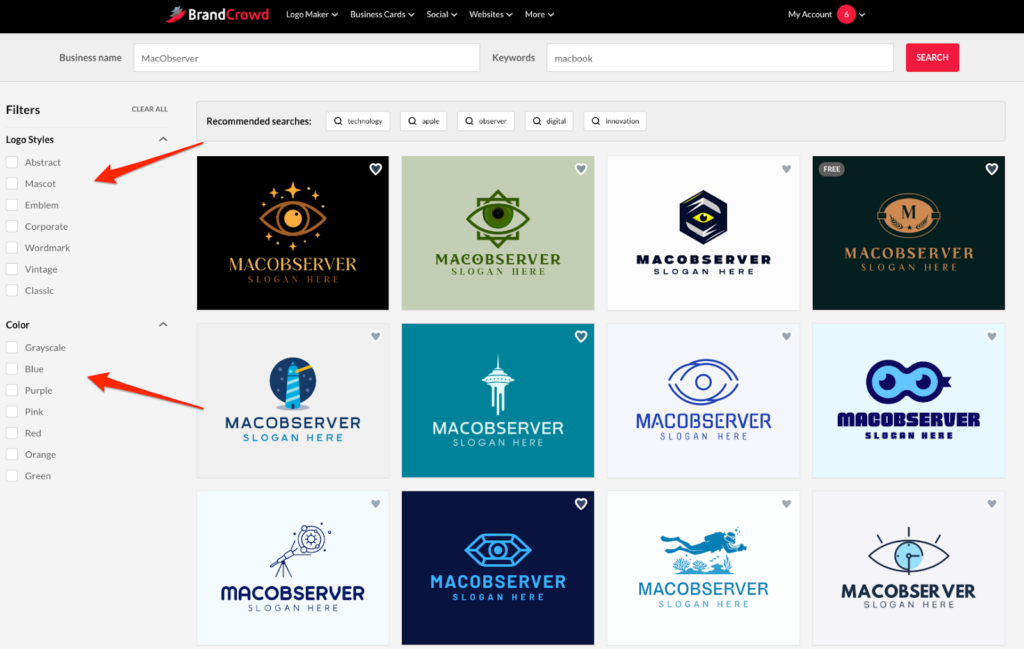
This design-first entry point changes the mindset from “what should I like?” to “what actually works visually?” and helps you make faster choices without agonizing over technical design jargon.
Logo generation quality and the role of AI
BrandCrowd’s AI logo generator doesn’t create designs from abstract shapes or random symbols. Instead, it leans on a large library of professionally designed templates and uses AI to match, recommend, and adapt existing layouts to your brand name and keywords. You still see complete logos, not just icons dropped next to text blocks.
The result feels more curated than some generative tools that deliver generic icons with mismatched fonts. Logos from BrandCrowd tend to have sensible spacing, proportionate text hierarchy, and compositions that work across use cases: from mobile headers to printed materials. Seeing real-world previews and multiple structural directions early helps you avoid falling in love with a concept that won’t scale beyond a favicon or social avatar.
Customization: shaping logos without chaos
Selecting a logo is just the start. BrandCrowd is a logo generator whose editing environment focuses on controlled customization rather than open-ended design play. You can adjust text size, switch colors, choose new fonts, or slide icons around, and the editor takes care of recalibrating spacing and alignment behind the scenes.
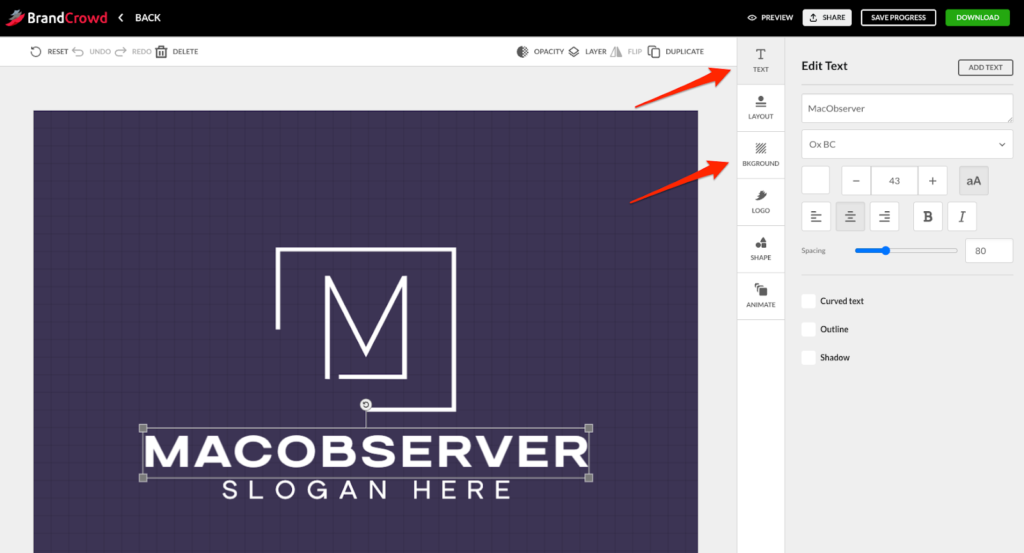
That “design safety net” is especially helpful for users without formal training. It means you can experiment without accidentally making something unreadable or badly balanced. That said, it’s not a replacement for vector design software; granular control over kerning or path editing isn’t part of the flow. This is intentional: the platform prioritizes visual stability over unlimited freedom.
Export options and how well files translate
A logo’s usefulness is determined by how you can use it. BrandCrowd exports a robust set of formats compatible with everyday workflows: scalable vectors like SVG and EPS for print or signage, PDFs for stationery or PDFs, and PNG/JPG for digital use. Transparent backgrounds and multiple layout variations (horizontal, centered, icon-only) give you flexibility without bouncing between tools.
On macOS, these files integrate cleanly into apps like Keynote, Pages, or even third-party editors like Affinity Designer and Adobe Illustrator. You can drop a vector SVG right into a web project or scale up an EPS for a poster without losing clarity.
Licensing is straightforward: paid downloads come with commercial rights, and if you want exclusivity, removing the logo’s template from future use by others, that’s an extra option you can select during checkout.
Pricing and what you pay for
BrandCrowd lets you design and modify logos without paying anything until you’re ready to download the final files. The pricing structure is tiered and designed to accommodate different needs:
- The free tier lets you explore designs, make customizations, and see how final logos might look. You only pay when you decide to export files you plan to use publicly.
- Paid plans on annual billing start at $5 per month for the Premium Logo Pack, which includes high-resolution and vector logo files, unlimited edits, and access to the broader design tool library.
- If you want to pair logo creation with a basic website builder, the next tier typically runs $6 per month when billed annually and bundles both branding and site tools.
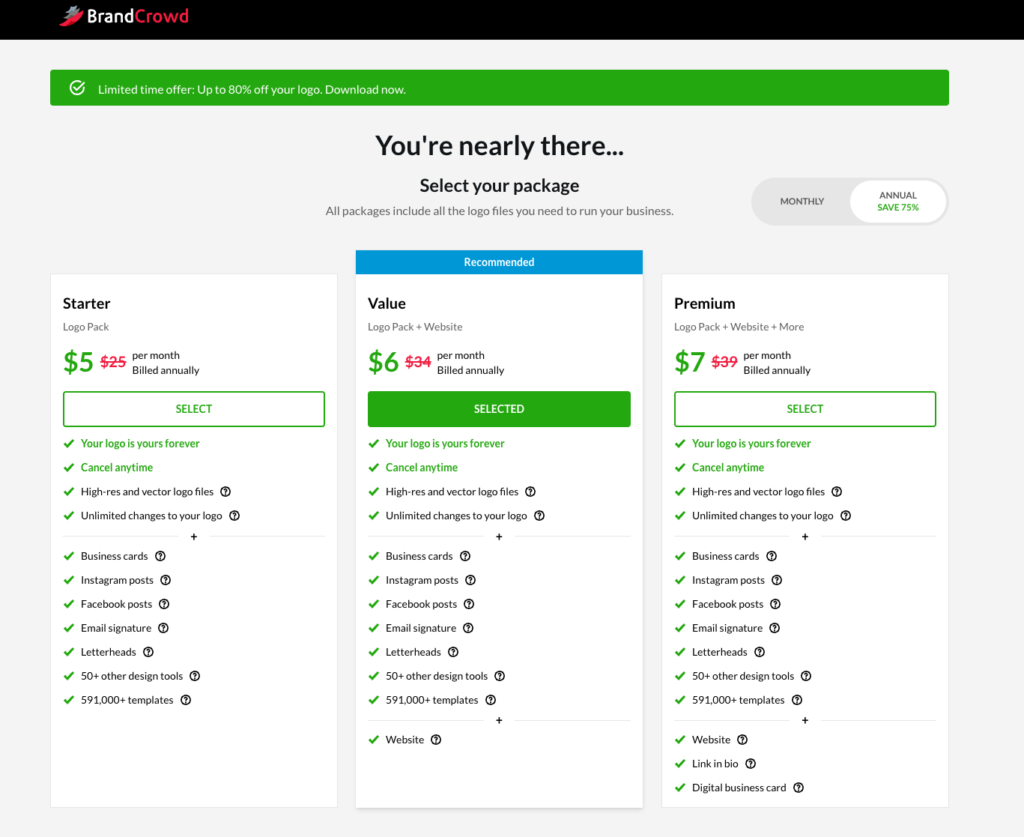
Choosing annual billing represents significant savings compared with month-to-month, and the ecosystem includes more than just logo files: you get business card templates, social graphics, and access to over 50 design tools that match your logo’s visual identity.
This setup makes it easy to test the platform and only pay once you’re confident the logo you’ve designed matches your vision and practical needs.
Performance on macOS
Because BrandCrowd is web-based, its performance on macOS comes down to how well it plays with Safari and Chrome. In my testing, the site responded quickly, drag-and-drop felt natural, and editing didn’t induce the stutters or input lag that can make browser editors feel clunky.
Downloads happen instantly, and macOS handles all exported formats without complaints. Whether you’re dropping an SVG into a web project or previewing a high-res PDF for print, the experience feels native rather than patched together.
For users who prefer browser tools over native apps but still expect professional results, BrandCrowd hits a sweet spot: simple enough to navigate easily, and powerful enough to produce outputs that stand up in professional contexts.
Final verdict
BrandCrowd tackles two of the hardest parts of DIY branding: helping non-designers see good options early, and then letting them refine without breaking the design. Its use of template-driven logos combined with AI suggestions feels practical rather than flashy, and the result is a workflow that gets you from idea to finished files with minimal friction.
For macOS users who value speed, visual stability, and usable exports over endless design freedom, BrandCrowd provides a grounded, no-nonsense path from concept to real-world application. If you’re ready to evolve beyond low-quality DIY logos and want something that works across digital and print, it’s one of the more reliable browser-based logo tools you can choose in 2026.


