

iPadOS 26.4 public beta is now available, and it lands one day after the first developer beta. If you test software early, this is the first public build in the 26.4 cycle and it brings a bigger set of visible changes than the prior 26.3 update.
You can expect a mix of app updates, small interface options, and a few early hooks for features that will likely expand in later betas. Since this is public beta 1, more changes can arrive in the next releases before 26.4 ships to everyone.
One thing to note up front: this build does not add the new Siri capabilities tied to Apple Intelligence. Those upgrades still look delayed, so do not install 26.4 expecting a brand-new Siri experience today.
Don’t miss the best of The Mac Observer
Set us as a preferred source and our Apple reporting ranks higher in your Google Search results and Discover feed — one tap, no account changes.
How to install iPadOS 26.4 public beta
- Back up your iPad (recommended before any beta).
- Go to Apple’s public beta site and enroll your iPad.
- On your iPad, open Settings.
- Tap General.
- Tap Software Update and install iPadOS 26.4 public beta.
All the changes in iPadOS 26.4 public beta
Safari: compact tab bar option returns
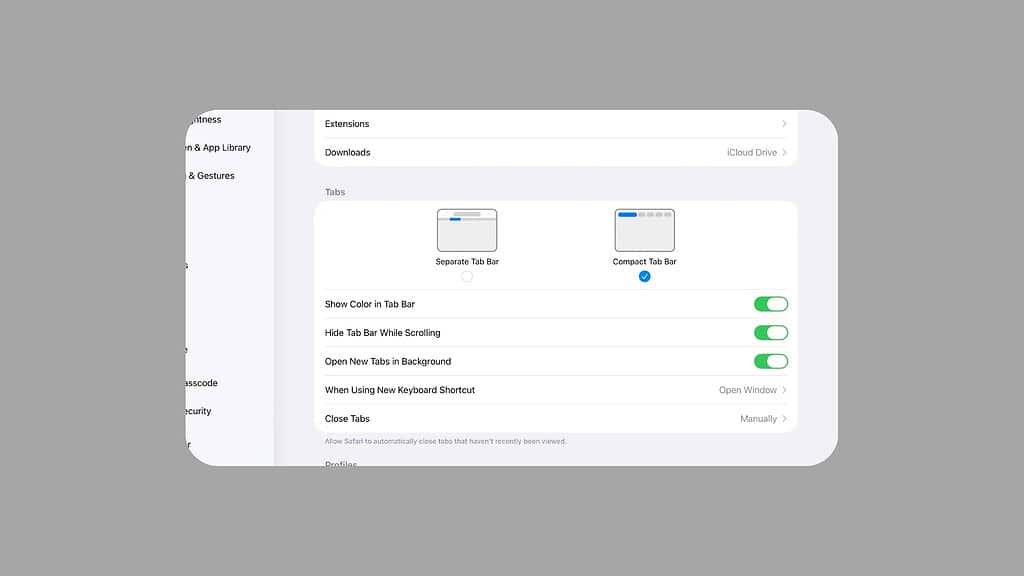
Safari now lets you switch back to a compact tab bar. If you prefer a tighter layout that keeps more of the page visible, this setting is the one to check first after updating.
Apple Music: bigger visuals and smarter playlist tools
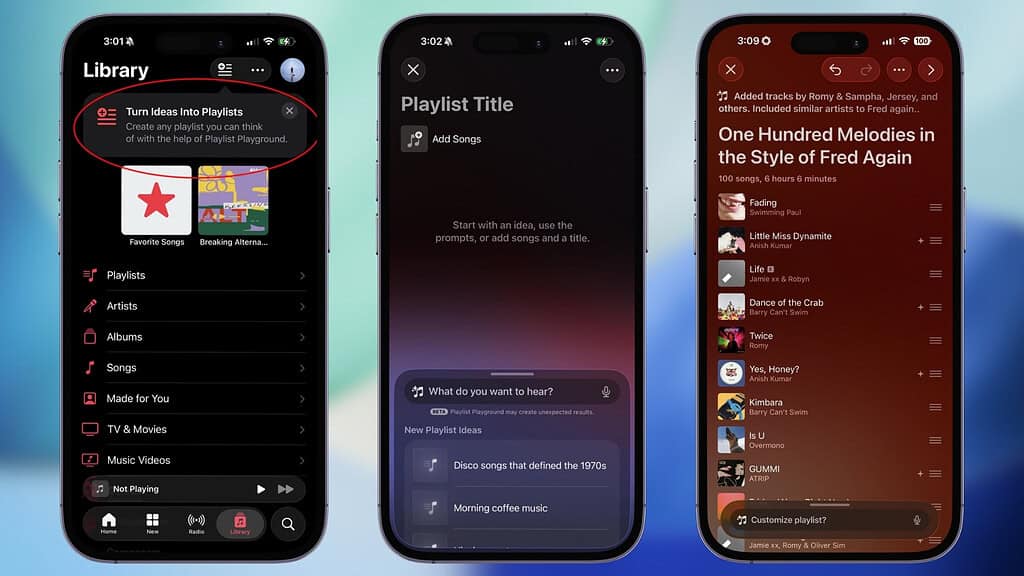
Apple Music gets a new full-screen design for albums and playlists with more prominent artwork. You can also add the same song to multiple playlists more easily.
There’s also Playlist Playground, which creates playlists from a text prompt. You type what you want, like a mood, a time period, or a theme, and the app generates a playlist to match.
Apple Podcasts: video playback built in
The Podcasts app now supports native video podcast streaming, with video episodes showing up directly inside the app instead of pushing you elsewhere.
Wallpaper gallery: refreshed layout
The wallpaper gallery has been revamped, so browsing and picking wallpapers should feel more modern and organized in this release.
Reminders: an “Urgent” smart list
Reminders adds an Urgent smart list, which helps you separate time-sensitive items from everything else without manual sorting.
Widgets and Freeform updates
A new Ambient Music widget is available. Freeform also lays groundwork for upcoming Creator Studio features, which looks like preparation for bigger changes later in the 26.4 cycle.
Siri and Apple Intelligence: what changed, and what did not
This public beta does not include new Siri capabilities. Reports still point to Apple Intelligence Siri upgrades landing later than expected, so this section is mostly a status check rather than a feature drop.
If you installed iPadOS 26.4 public beta, share what you noticed, especially any smaller changes that are easy to miss.

Discussion