

If CarPlay stopped working after an iOS 26 dot update, start by resetting the connection and checking restrictions. These steps can help you fix CarPlay on iOS 26.2 or newer, including common breakages seen after iOS 26.3.
Table of Contents
- Solutions To Fix CarPlay on iOS 26.2 or Newer
- Restart Your iPhone and Reboot the Car Infotainment
- Switch Wireless to Wired, or Replace Your Wired Cable
- Check Screen Time Restrictions for CarPlay
- Forget Your Car and Pair CarPlay Again
- Install the Latest iOS Update, and Update the Head Unit Firmware
- Reset Network Settings on Your iPhone
- Confirm Whether the Issue Is Your iPhone or Your Car
- Fixing CarPlay Issues in iOS 26: Tips
- FAQ
- Fix CarPlay in iOS 26: Summary
Solutions To Fix CarPlay on iOS 26.2 or Newer
Restart Your iPhone and Reboot the Car Infotainment
This clears temporary glitches that can appear right after an update.
Time needed: 5 minutes
- Open Settings > General > Shut Down, then power off your iPhone.
- Wait 10 seconds, then turn your iPhone back on.
- Turn your car off fully, open the driver door, then wait 30 seconds.
- Start the car, unlock the iPhone, then try CarPlay again.
Switch Wireless to Wired, or Replace Your Wired Cable
Wireless CarPlay can fail after an update due to pairing timing changes. A wired test often restores CarPlay quickly, and it helps confirm where the problem sits.
Don’t miss the best of The Mac Observer
Set us as a preferred source and our Apple reporting ranks higher in your Google Search results and Discover feed — one tap, no account changes.
- If you use wireless CarPlay, connect a known good USB cable and test wired CarPlay.
- If you already use wired CarPlay, try a different cable from Apple or a reputable MFi brand.
- Make sure the cable supports data, not just charging.
- Try another USB port in the car, if your vehicle has one.
- Connect the iPhone before starting the car, then wait for CarPlay to launch.
Check Screen Time Restrictions for CarPlay
Restrictions can block CarPlay, even if it worked before the update.
- Open Settings.

- Tap Screen Time.
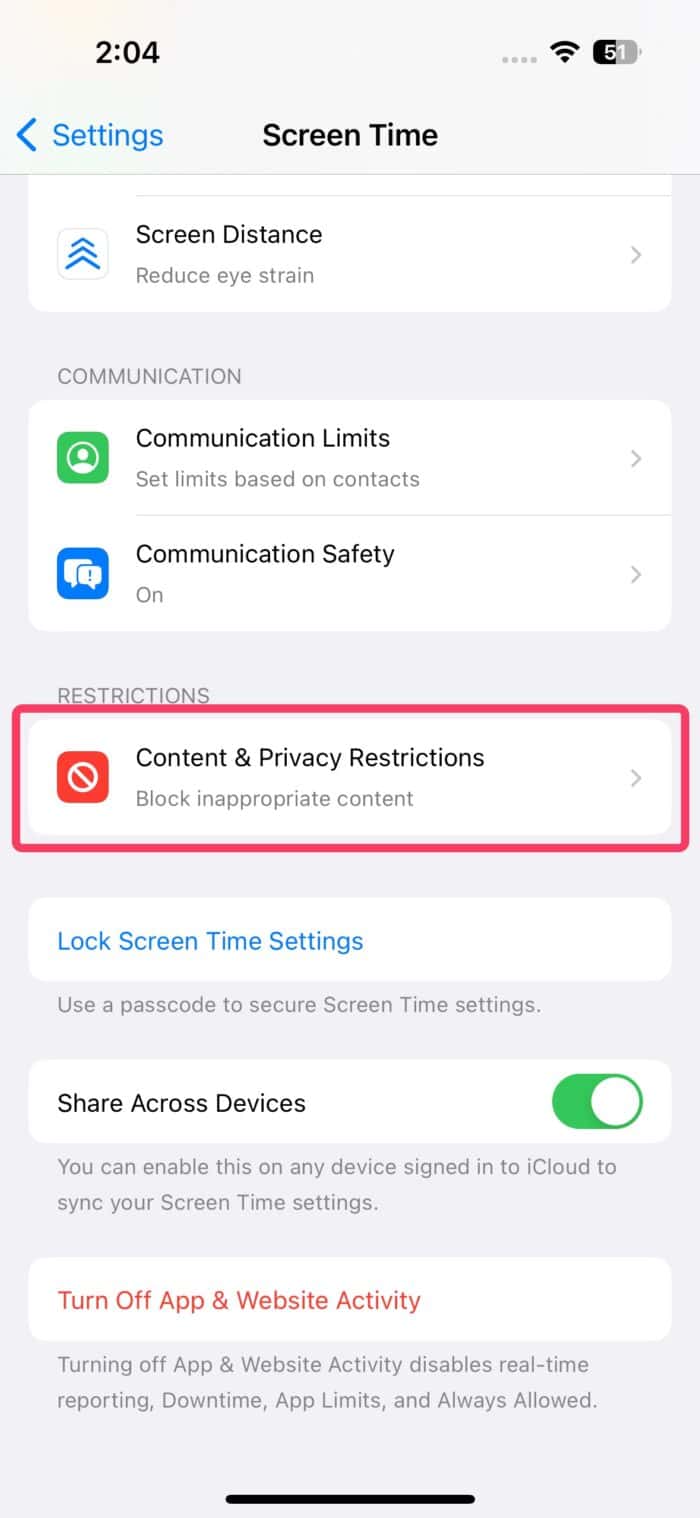
- Tap Content & Privacy Restrictions.
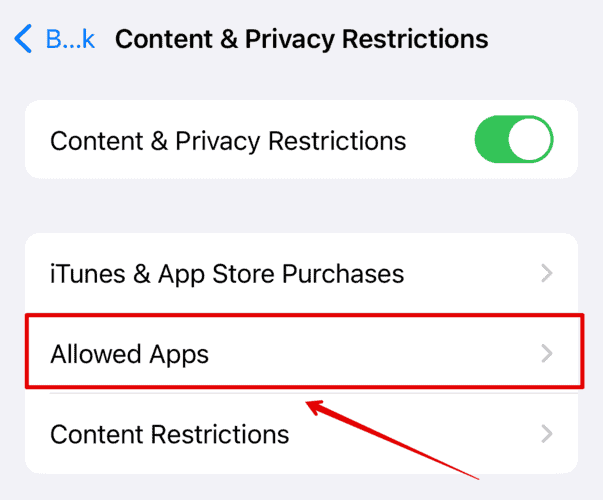
- Tap Allowed Apps, then make sure CarPlay is enabled.


Forget Your Car and Pair CarPlay Again
This refreshes permissions and fixes broken handshakes after iOS 26.2 and later updates.
- Go to Settings > General > CarPlay.
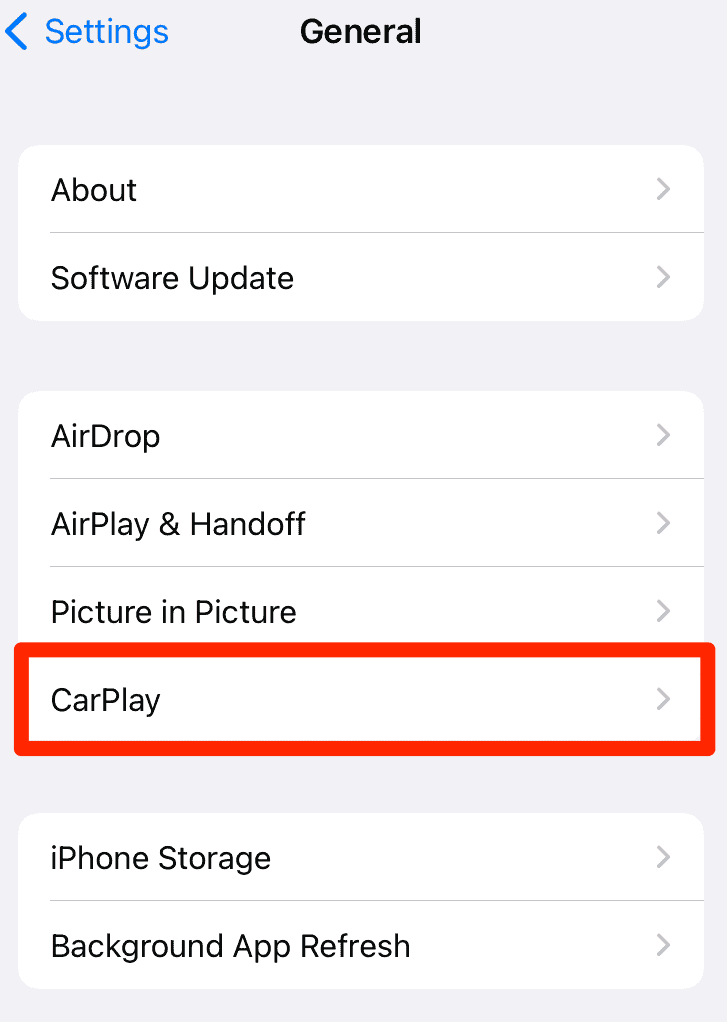
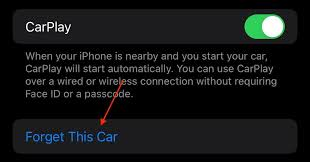
- Tap your car, then tap Forget This Car.
- On the car screen, remove the iPhone from the Bluetooth or phone list, if available.
- Pair again from Settings > General > CarPlay, or from the car pairing menu.

Install the Latest iOS Update, and Update the Head Unit Firmware
Apple often addresses CarPlay bugs in later dot releases, so iOS 26.3 or newer may help. Some vehicles also need infotainment firmware updates to stay compatible.
- Go to Settings > General > Software Update, then install any available update.
- Check your car maker support site for infotainment or head unit firmware updates.
- Restart the iPhone and the car system after updating, then test again.
Reset Network Settings on Your iPhone
Wireless CarPlay relies on Bluetooth and Wi-Fi, so network settings can break after updates. One possible fix for that is resetting the network settings on your iPhone. This reset removes saved networks and VPN settings, so plan to reconnect afterward.
- Open Settings > General > Transfer or Reset iPhone.
- Tap Reset, then tap Reset Network Settings.
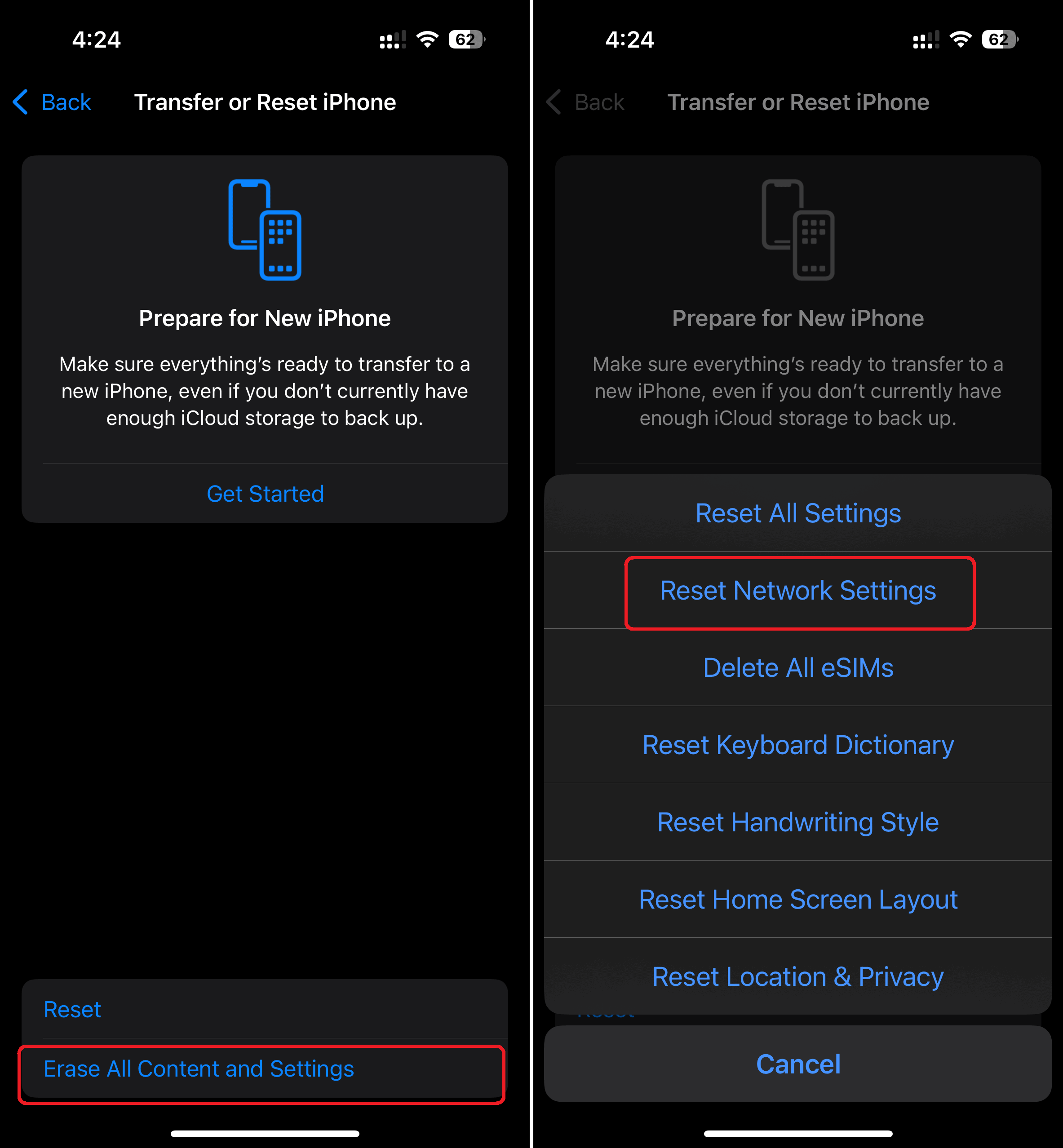
- Enter your passcode, then confirm.
- Set up CarPlay again in Settings > General > CarPlay.

Confirm Whether the Issue Is Your iPhone or Your Car
This saves time when CarPlay works in one vehicle, but fails in another.
- Test your iPhone with another CarPlay vehicle, if possible.
- Test another iPhone with your car, if possible.
- If only your car fails, focus on head unit firmware, cable, ports, and the car pairing list.
Fixing CarPlay Issues in iOS 26: Tips
- Keep Wi-Fi and Bluetooth enabled for wireless CarPlay.
- Pause any VPN app while testing CarPlay, then turn it back on after connecting.
- Unlock your iPhone before connecting, especially when CarPlay fails to launch.
- Remove old vehicles from Settings > General > CarPlay before pairing again.
FAQ
iOS updates can change connection timing and permissions, which can expose car firmware issues.
It can help on some setups, but results vary by vehicle and head unit firmware.
No, but it removes saved Wi-Fi networks, VPN settings, and some connectivity preferences.
Try a different data cable, a different USB port, and re-pair CarPlay after forgetting the car.
Fix CarPlay in iOS 26: Summary
- Restart the iPhone and reboot the car infotainment system.
- Switch connection type, and verify your cable supports data.
- Check Screen Time restrictions, then forget and re-pair the car.
- Update iOS and the head unit firmware, if available.
- Reset network settings if wireless CarPlay still fails.
If CarPlay still fails after these steps, contact Apple Support, and your car makers infotainment support team.


I updated to IOS26.3 and my carplay doesn’t work and I’ve tried everything plus I’m nor sure if it’s a car problem or iphone problem.I can’t even connect my iphone to the car system. this all starte when the iphone failed the ios update and the progress bar stalled. I did an itunes ios update but lost all my settinegs. I restore a back uo I hade only 1 day old. Then I lost my carplay
We have (2) Iphone 17 Pros. They worked perfectly in a 2020 Rav4 on IOS 18. On IOS 26.x the only reliable means of connection is to plug in the USB cable before starting the car. We have tried all the fixes listed here and in hundreds of other posts – new cable, forget-and-setup-new, reset all various things, but none work. There are very limited firmware updates for older cars, and the issue is clearly a software bug in IOS 26, as the same hardware worked on IOS 18.
Apple is alienating a big user base here – drivers of 3+ year older cars!
Indeed, there seems to be a widespread issue. The fact that iOS 26.3 fixed it for some users but not for everyone might indicate that there are multiple causes, just like the fact that some users had everything working fine in iOS 26 and 26.1, with issues starting only in 26.2.
My guess is that Apple tried to change something in the way iPhones connect wirelessly to CarPlay in iOS 26. At that point, the first bugs appeared, and, when the company tried fixing it in 26.2, things got even worse. Then, with 26.3, a new change reportedly fixed for very few people, but most affected users are still facing issues.
At this point, I wouldn’t even recommend updating without confirming whether other users with the exact same car and phone models got the issue fixed, because it could even risk breaking wired CarPlay as well.
The good news is that I haven’t seen anyone saying this isn’t Apple’s fault and that people should just buy a new car… Yet.