

Apple has released the second developer beta of iPadOS 27, giving developers another early build to test before the public release later this year. The update focuses on bug fixes, performance improvements, and refinements to the new iPadOS 27 features.
How to Update
- Open the Settings app on your iPad.
- Go to General.
- Tap Software Update.
- Select Beta Updates.
- Choose iPadOS 27 Developer Beta.
- Go back and tap Download and Install.
Make sure your iPad is backed up before installing the beta, as developer builds can include bugs and battery issues.
All the Changes in iPadOS 27 Beta 2
- Smoother performance: The second beta should feel more stable than the first beta, with fixes for early crashes, lag, and app issues.
- Siri AI improvements: iPadOS 27 brings Apple’s new Siri AI experience, and this beta likely improves early reliability and response behavior.
- Liquid Glass refinements: Apple continues to improve the new visual design with better readability, cleaner icons, and smoother system animations.
- Better multitasking: iPadOS 27 adds more desktop-style improvements, including a menu bar option that can stay visible while using apps.
- Resizable iPhone apps: iPhone apps can now be resized on iPad, making them easier to use on larger screens.
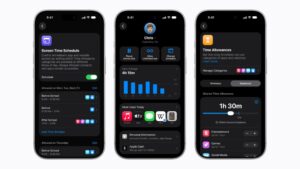
- Screen Time updates: The update includes new parental control tools, including Time Allowances for app categories like Games, Entertainment, and Social Media.
- Bug fixes: As usual, this beta also includes under-the-hood fixes for developers testing apps on the new iPadOS version.
Final Thoughts
iPadOS 27 beta 2 is mainly for developers, so most users should wait for the public beta or the stable release. If you’ve already installed the update, let us know your experience in the comments.
Don’t miss the best of The Mac Observer
Set us as a preferred source and our Apple reporting ranks higher in your Google Search results and Discover feed — one tap, no account changes.



Discussion