
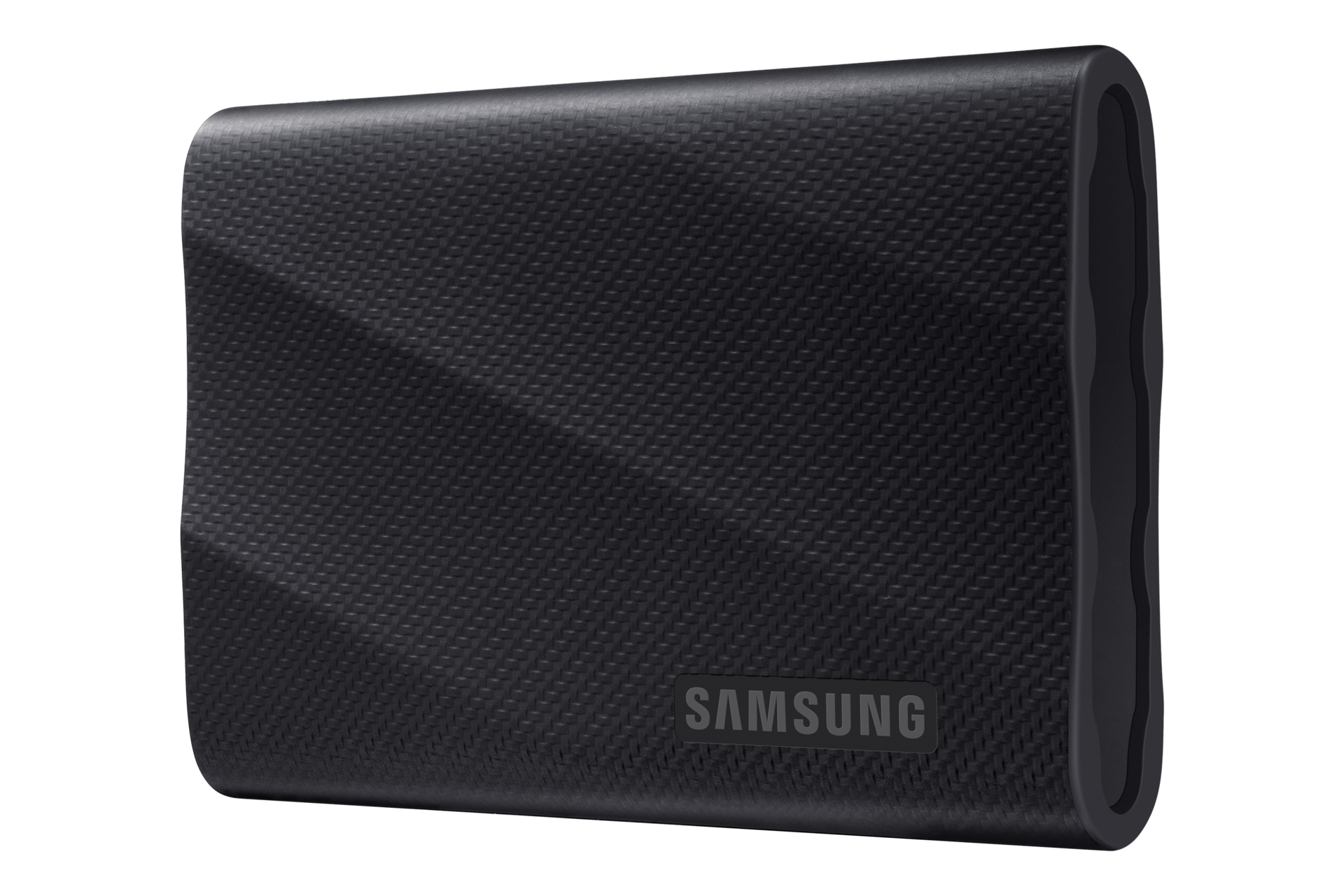
The Samsung T9 Portable SSD 2TB is $349.99 on Amazon, down from a $489.99 list price, so you save $140. The SanDisk Extreme Portable SSD 1TB (the new 2,000MB/s model) is $198.55, down from $299.99, a $101.44 saving. Both are for Mac owners who bought the base storage and are now staring at a full drive, plus anyone about to buy a Mac and wondering whether to pay Apple for a bigger SSD.
We checked the price, seller and stock on Amazon on November 21, 2026. Amazon.com is the seller on both, and both listings showed in stock. Amazon tags the Samsung T9 as a Black Friday Deal. Samsung’s own store still lists the T9 2TB at $489.99, so Amazon’s price is the one to take.
What Apple charges for more MacBook storage compared with these two drives
Apple’s prices make the case for an external drive by themselves. On the 13-inch MacBook Air with M5, Apple’s configurator shows the 1TB model dropping by $300 if you pick 512GB instead. Going from 1TB to 2TB adds $500. Going to 4TB adds $1,500 over the 1TB model.
Don’t miss the best of The Mac Observer
Set us as a preferred source and our Apple reporting ranks higher in your Google Search results and Discover feed — one tap, no account changes.
The MacBook Neo is cheaper to upgrade, but there’s a catch. Apple sells the 256GB Neo for $699 and the 512GB Neo for $799, and the $100 step also adds Touch ID. You can’t buy more than 512GB in a Neo at all.
| Option | Extra storage | Price |
|---|---|---|
| SanDisk Extreme Portable SSD | 1TB external | $198.55 on Amazon |
| Samsung T9 Portable SSD | 2TB external | $349.99 on Amazon |
| MacBook Air M5, 512GB to 1TB | 512GB more inside | $300 at Apple |
| MacBook Air M5, 1TB to 2TB | 1TB more inside | $500 at Apple |
| MacBook Neo, 256GB to 512GB | 256GB more inside, plus Touch ID | $100 at Apple |
So the SanDisk gets you a full 1TB of extra space for $101.45 less than Apple charges for 512GB more on an Air. The Samsung gives you 2TB for $150.01 less than Apple charges for one extra terabyte. Apple’s internal SSD is faster, always there and can’t fall off a desk. But for a photo library, video projects or Time Machine backups, the math favors the drive in your bag. We’ve made the same point about Apple storage pricing on iPhone.
Samsung T9 and SanDisk Extreme specs from the makers, and the Mac speed caveat
Samsung rates the T9 at up to 2,000MB/s sequential read and up to 1,950MB/s write over a USB 3.2 Gen 2×2 (20Gbps) interface. It weighs 4.3 ounces, survives drops up to 3 meters, has AES 256-bit hardware encryption and lists macOS support. Amazon’s listing shows a five-year limited warranty.
SanDisk rates the new Extreme Portable SSD at up to 2,000MB/s read and up to 1,700MB/s write on the 1TB to 4TB models. It weighs 46.9 grams, carries an IP65 rating and 3-meter drop protection, adds 256-bit AES encryption with password protection and comes with a five-year limited warranty. SanDisk lists macOS 12 or later, iPadOS 15 or later and the Files app on iOS 17 or later.
Now the honest bit. Those 2,000MB/s figures are best-case numbers. SanDisk’s own footnote says performance may be lower depending on the host device and interface. Apple’s MacBook Air spec sheet lists Thunderbolt 4 and USB 4 ports at up to 40Gb/s, and it doesn’t list USB 3.2 Gen 2×2, the standard Samsung names for the T9’s top speed. Neither Samsung nor SanDisk promises the full rated speed on a Mac. On a MacBook Neo the limit is plainer: Apple’s Neo spec sheet rates its fast port at up to 10Gb/s, half of the T9’s 20Gbps interface, and the second port is USB 2 at up to 480Mb/s. Plug the drive into the USB 3 port.
Which portable SSD to buy for your Mac, and who should pay Apple
- Buy the Samsung T9 2TB at $349.99 if you shoot or edit video, keep a big Photos library or want one drive for Time Machine and project files.
- Buy the SanDisk 1TB at $198.55 if you travel and want the lighter drive with an IP65 rating.
- Pay Apple for internal storage if you hate cables and want everything on one machine with nothing to plug in.
If you’re still choosing a Mac, check our M5 MacBook Air 1TB deal first, then decide how much storage you want inside and how much you’d rather carry.
MacObserver may earn a commission when you buy through links on this page. It doesn’t change the price you pay.
Discussion