
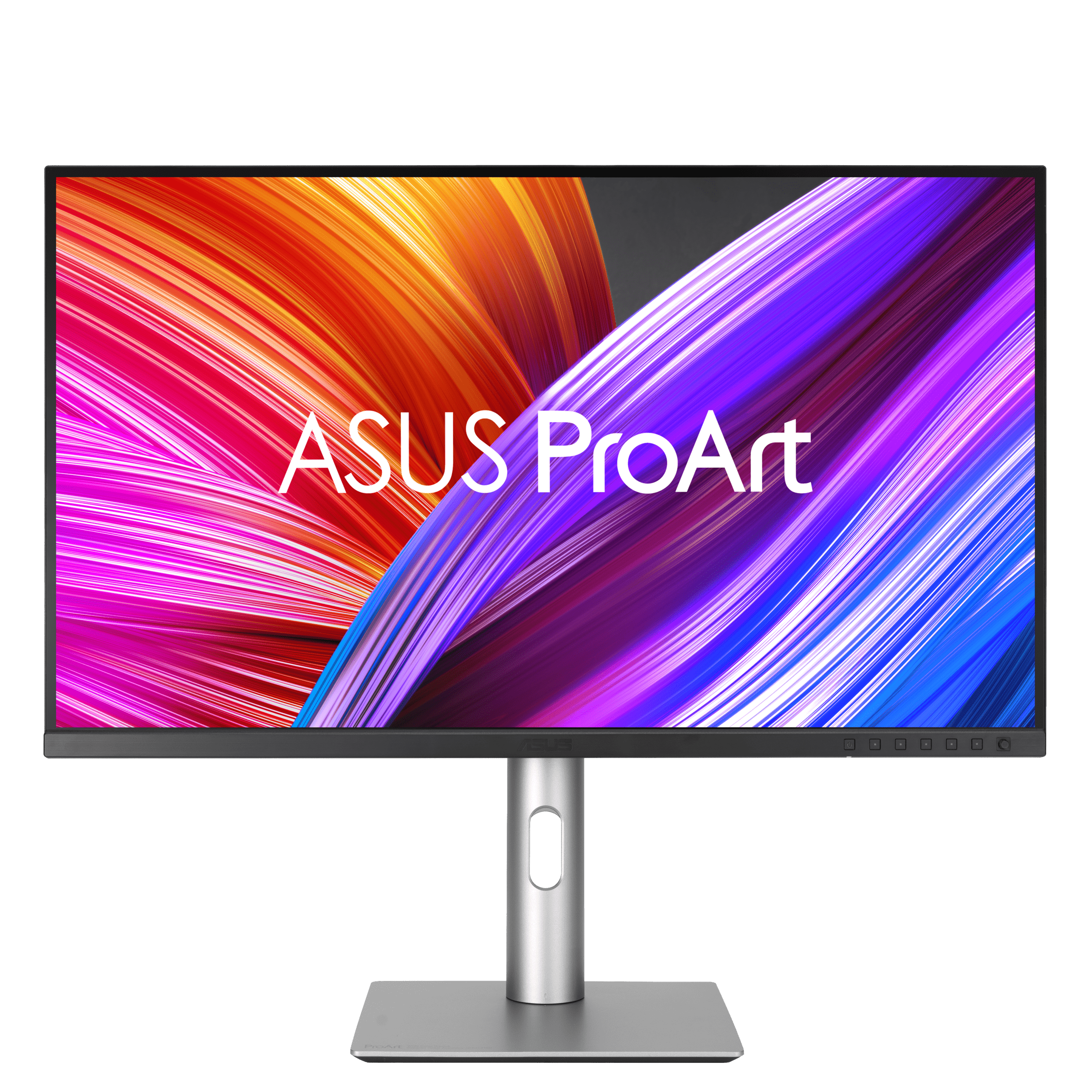
The ASUS ProArt PA279CRV is $349 on Amazon, down from a $429 list price. That saves you $80, and Amazon has it tagged as a Black Friday Deal. This is a 27-inch 4K monitor built for photo, video and design work, so it suits a Mac owner who edits images and wants the colors on screen to match what ends up in print or on the web.
We checked the price, seller and stock on Amazon on November 23, 2026. Amazon.com is the seller, and the listing showed the monitor in stock with no low-stock warning. Specs below come from ASUS’s PA279CRV spec sheet and the listing.
ASUS calibrates every PA279CRV at the factory and ships the color report in the box
Cheap 4K monitors look fine for email. The trouble starts when you edit a photo on one and the print comes back too red. ASUS goes after that problem directly. The panel covers 99% of DCI-P3, 99% of Adobe RGB and 100% of sRGB, and ASUS pre-calibrates each unit to a Delta E under 2. The calibration report comes in the box.
Don’t miss the best of The Mac Observer
Set us as a preferred source and our Apple reporting ranks higher in your Google Search results and Discover feed — one tap, no account changes.
The presets help too. You can switch between sRGB, Adobe RGB, DCI-P3, Rec.709, Rec.2020, DICOM and an HDR mode, plus two user modes. Gamma runs from 1.8 to 2.6. So if a client wants an sRGB web export and the print shop wants Adobe RGB, you flip a preset instead of guessing. The panel shows 10-bit color, about 1.07 billion shades, and the spec sheet lists HDR10 and VESA DisplayHDR 400.
ASUS lists Mac Compliance among the monitor’s certifications, and the Amazon listing pitches it as a monitor for Mac. Amazon adds a free three-month Adobe Creative Cloud subscription and a five-year warranty, three years plus two more when you register online.
Studio Display costs $1,250 more and gives you a sharper 5K panel, a camera and Thunderbolt 5
Apple sells the Studio Display from $1,599 with the tilt-only stand. That’s $1,250 more than the ASUS. Want height adjustment? Apple’s tilt- and height-adjustable stand pushes the price to $1,999, which is $1,650 over this deal.
| ASUS ProArt PA279CRV | Apple Studio Display | |
|---|---|---|
| Price | $349 on Amazon | From $1,599 at Apple |
| Panel | 27-inch 4K IPS, 3840 x 2160 | 27-inch 5K Retina, 5120 x 2880 |
| Pixel density | 163 ppi | 218 ppi |
| Brightness | 350 nits typical, 400 nits HDR peak | 600 nits |
| Color | 99% DCI-P3, 99% Adobe RGB, 100% sRGB, 10-bit | Wide color (P3), 1 billion colors |
| Calibration | Factory calibrated to Delta E under 2, report in the box | Reference modes, including Photography (P3-D65) |
| Laptop charging | 96W over USB-C | 96W over Thunderbolt 5 |
| Stand | Tilt, swivel, 90-degree pivot, 130 mm height | Tilt only, height stand costs $400 more |
| Camera and speakers | No camera, 2W x 2 speakers | 12MP Center Stage camera, six speakers |
The sharpness gap is real. Apple’s Studio Display spec page lists 218 pixels per inch against 163 on the ASUS, so text and fine detail look crisper on the Apple screen. It’s also brighter at 600 nits, and it adds a 12MP Center Stage camera with Desk View, a six-speaker system and a three-mic array. The ASUS spec sheet lists no webcam at all, only two 2W speakers.
But the ASUS wins on the stand and the ports. Its stand tilts, swivels, pivots 90 degrees into portrait and rises 130 mm. Apple’s optional height stand gives you 105 mm and doesn’t rotate. For portrait you need the VESA mount adapter version and your own arm. The ASUS also takes two HDMI 2.0 inputs and two DisplayPort 1.4 inputs alongside USB-C, so a second computer can stay plugged in.
One USB-C cable charges a MacBook at 96W and runs the PA279CRV’s USB hub
The USB-C port carries video, data and up to 96W of power. That’s the same 96W figure Apple quotes for charging a Mac from the Studio Display. Plug in your MacBook with the included USB-C cable and the monitor powers it, drives the screen and lights up its hub of one USB-C and three USB-A ports.
A few things to know. ASUS lists daisy chaining on the two DisplayPort 1.4 ports, not on USB-C. Picture-in-picture and picture-by-picture let you view two inputs at once. The refresh rate tops out at 60Hz, which is fine for editing but a letdown if you also want a gaming screen. A 100 x 100 mm VESA mount lets you move it to an arm later.
Who should buy the ASUS ProArt PA279CRV and who should save up for Apple’s display
- Buy it if you edit photos or video on a MacBook and want factory-calibrated color for $349.
- Buy it if you need portrait mode for long timelines, code or page layouts without paying for a VESA arm.
- Buy it if you switch between a Mac and a PC or console, since you get HDMI and DisplayPort inputs too.
- Skip it if you want Retina-level sharpness, a built-in camera or speakers good enough to replace a separate set.
- Skip it if you plan to game, because 60Hz is the ceiling.
At $349, the ProArt PA279CRV gives you color tools that most monitors near this price skip, and it charges your MacBook while it works. If you would rather have a 5K screen for far less than Apple charges, our Samsung Odyssey G8 5K deal is the other route. The BenQ PD2706U deal covers another 4K monitor with a Mac-friendly USB-C setup.
MacObserver may earn a commission when you buy through links on this page. It doesn’t change the price you pay.
Discussion