
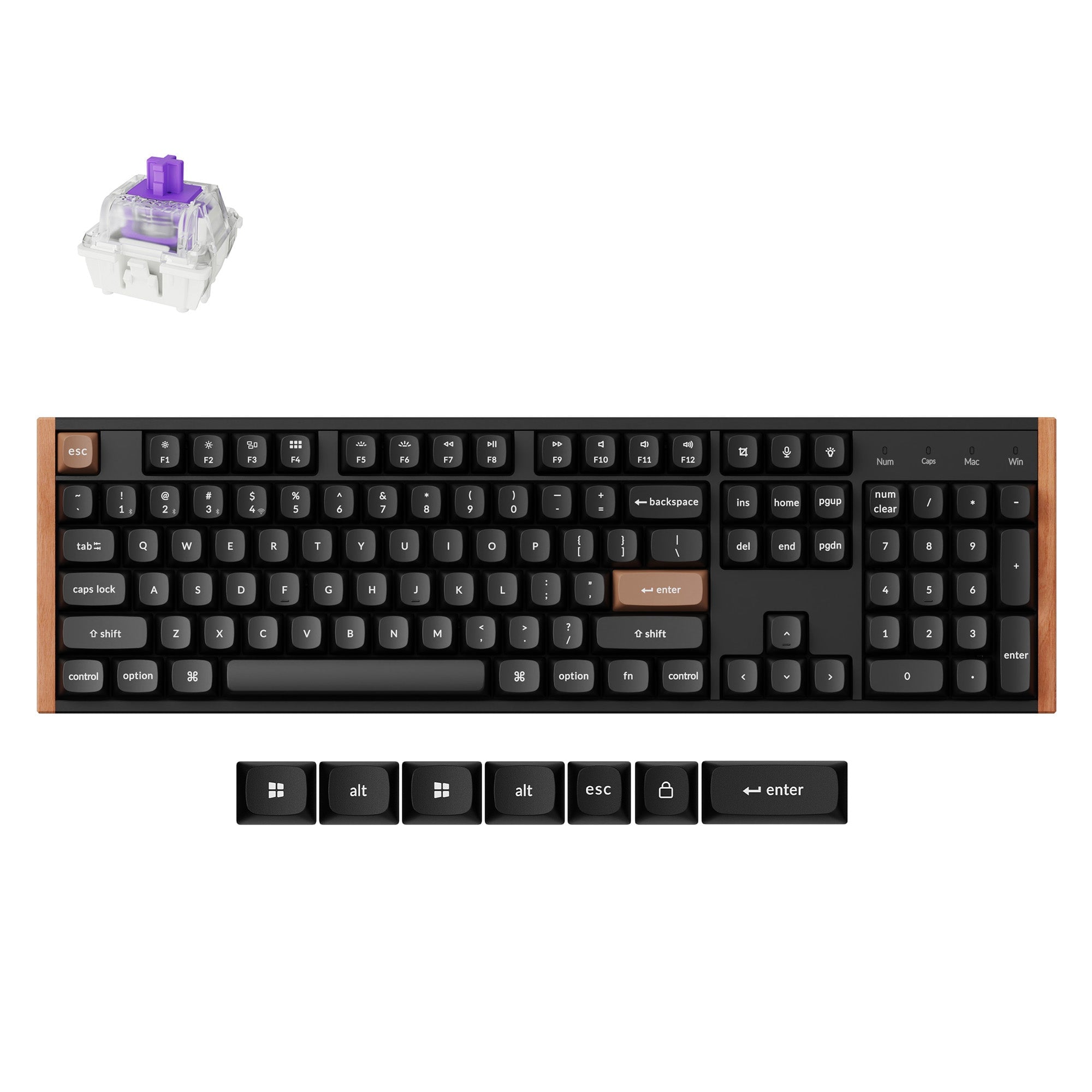
The Keychron K10 HE is $115.99 on Amazon, down from a $144.99 list price. That’s $29 off a full-size wireless keyboard with magnetic Hall Effect switches, a number pad and Mac keycaps in the box. It’s for Mac users who want a numpad and a mechanical feel, and who balk at paying Apple $179 for its own full-size keyboard.
We checked the price, seller and stock on Amazon on November 23, 2026. The seller is the Keychron Store, the brand’s own storefront on Amazon, and Amazon handles shipping. It showed in stock in Black with Gateron Double-Rail Nebula magnetic switches. Keychron’s own K10 HE page charges the same $115.99 sale price against a $144.99 regular price, so the $29 saving is real. One more thing we spotted there: Keychron’s store lists its Nebula switch versions as sold out, so Amazon is the easier place to get this exact build.
What $115.99 buys you next to Apple’s full-size Magic Keyboard with Touch ID
Apple’s keyboard lineup starts at $99 for the plain Magic Keyboard and $149 for the version with Touch ID. Add a numeric keypad and the Magic Keyboard with Touch ID and Numeric Keypad costs $179 with white keys or $199 with black keys. The K10 HE matches that full-size layout for $63.01 less than the white model and $83.01 less than the black one.
Don’t miss the best of The Mac Observer
Set us as a preferred source and our Apple reporting ranks higher in your Google Search results and Discover feed — one tap, no account changes.
The two boards aim at different people, though. Here is how the specs line up.
| Keychron K10 HE | Apple Magic Keyboard with Touch ID and Numeric Keypad | |
|---|---|---|
| Price | $115.99 on Amazon | $179 white keys, $199 black keys |
| Regular price | $144.99 | $179 or $199 |
| Layout | 100% full size with number pad | Full size with numeric keypad |
| Switches | Hall Effect magnetic, hot-swappable | Apple’s own keys |
| Actuation | Adjustable, 0.2mm to 3.8mm | Fixed |
| Connection | Bluetooth 5.2 (3 devices), 2.4 GHz, USB-C cable | Wireless, USB-C charging |
| Battery | 4000 mAh, up to 120 hours | About a month or more per charge |
| Touch ID | No | Yes, for Macs with Apple silicon |
| Backlight | RGB | Not listed by Apple |
Magnetic switches let you choose how far each key travels before it registers
Hall Effect switches read a keypress with a magnetic sensor instead of a physical contact, and Keychron says that cuts down on wear. You set the actuation point anywhere from 0.2mm to 3.8mm in 0.1mm steps, so a light typist can make keys fire early and a heavy one can push it deep to stop typos. Rapid Trigger and snap action are there too. Those are mostly for gamers, and the board polls at 1000 Hz.
All of that lives in the Keychron Launcher, a web app that handles remapping, macros and actuation tuning on top of QMK firmware. The Amazon listing tells you to clear your browser’s cookies and cache before you use Launcher, which hints that it can be fussy. The switches are hot-swappable without soldering, but Keychron says the Gateron Double-Rail version only takes Gateron Double-Rail magnetic switches. Other magnetic switches won’t work in it.
How the K10 HE works on a Mac and what you lose without Touch ID
Keychron lists macOS, Windows and Linux support. The Amazon listing says the board ships with extra keycaps and dedicated media keys for both macOS and Windows, and its spec table lists macOS 10.12 Sierra as the minimum. You can pair three devices over Bluetooth 5.2, switch to the 2.4 GHz wireless mode, or plug in a USB-C cable. That makes it handy if a work PC and a personal Mac share your desk.
The big trade is Touch ID. Apple only builds it into its own Magic Keyboards, and only for Macs with Apple silicon. If you use a Mac mini, a Mac Studio or a MacBook with the lid shut, you go back to typing your password. Battery is the other catch. Keychron rates the 4000 mAh battery at up to 120 hours, while Apple says its keyboard goes about a month or more between charges. The two companies measure differently, but you’ll plug the Keychron in more often.
Size is worth a look before you order. Keychron lists the K10 HE at 440.2 by 129.2 mm with a metal and wood frame, so it’s a desk keyboard, not something you toss in a laptop bag.
Buy the Keychron K10 HE if you want a numpad and tunable keys for less than Apple charges
- Buy it if you type all day, want a full-size board with a numpad and prefer a mechanical-style feel over Apple’s flat keys.
- Buy it if you switch between a Mac and a Windows PC, since it pairs with three devices and comes with keycaps for both.
- Buy it if you also game and want Rapid Trigger and adjustable actuation on the same keyboard you work on.
- Skip it if you lean on Touch ID with a desktop Mac. Apple’s $179 Magic Keyboard with Touch ID and Numeric Keypad is the better fit.
- Skip it if you want a slim keyboard that charges once a month and needs no setup.
At $115.99 for the Keychron K10 HE, you pay $29 less than Keychron’s regular price and well under Apple’s numpad keyboard, and you get far more control over how each key behaves. If you’d rather keep a low-profile Mac layout, our Logitech MX Keys Mini for Mac deal is the compact pick, and we covered the first discount on Apple’s Glyph Magic Keyboard too.
MacObserver may earn a commission when you buy through links on this page. It doesn’t change the price you pay.
Discussion