
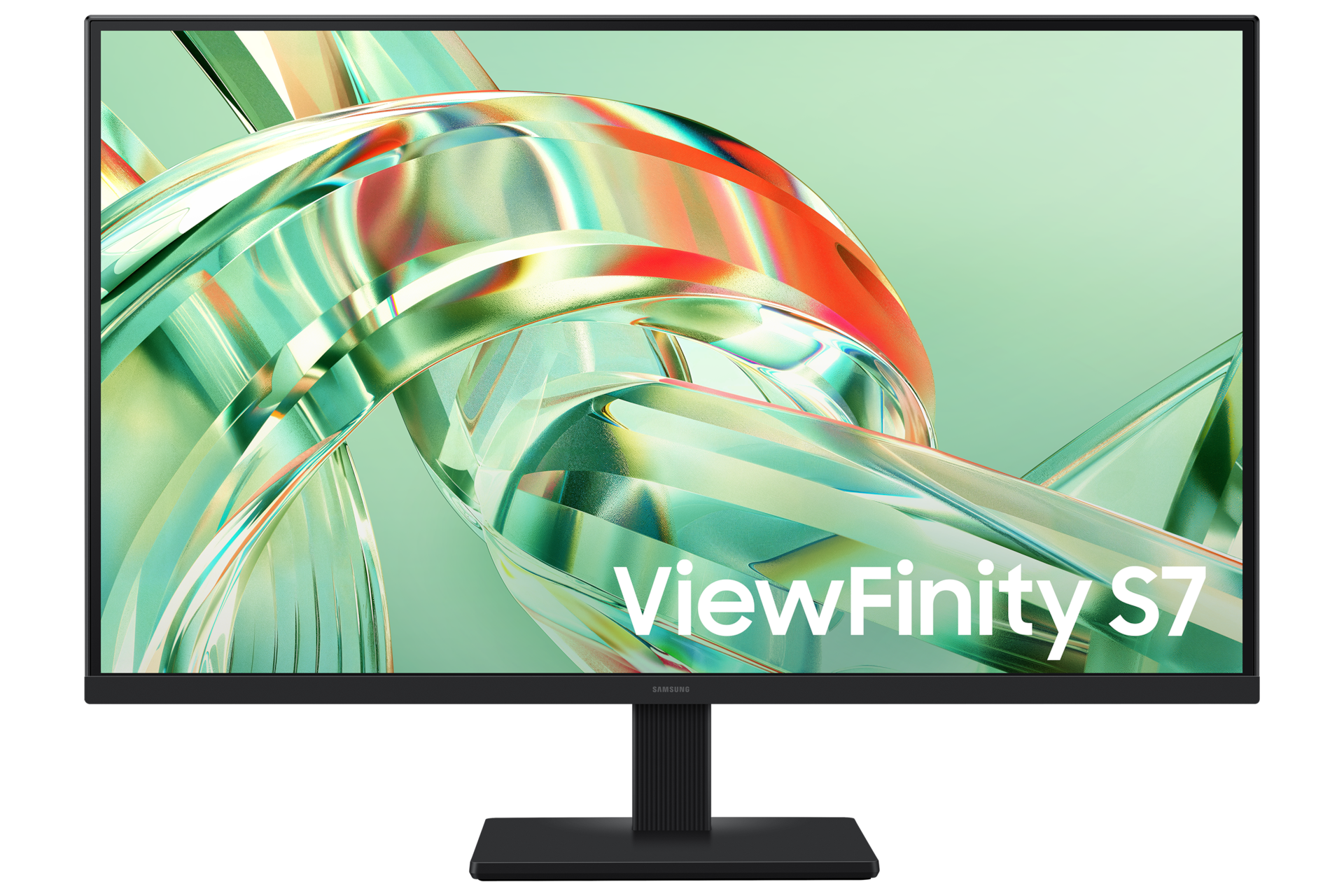
The Samsung ViewFinity S7 32-inch 4K monitor (S71H) is $199.99 on Amazon, down from a $289.99 list price. That’s $90 off, and Amazon labels it a Black Friday Deal. Samsung’s US store doesn’t list the S71H at all, so Amazon’s list price is the only US reference we could find. This one is for you if you run a Mac mini or a MacBook Air at a desk and want a big 4K screen for spreadsheets, side-by-side browser windows and photo edits, without spending Studio Display money.
We checked the price, seller and stock on Amazon on November 26, 2026. Amazon.com is the seller, the monitor shows as in stock, and the Black Friday Deal badge sits on this exact listing. The same page also sells the 27-inch S71H for $179.99, down from $249.99, so make sure the 32-Inch size is selected before you check out.
The ViewFinity S7 only has HDMI and DisplayPort, so a MacBook Air needs a USB-C to DisplayPort cable
Most deal listings skip this part. Samsung’s spec sheet lists one DisplayPort 1.4 input, one HDMI 2.0 input and a headphone jack. There’s no USB-C port, and Samsung lists an HDMI cable in the box. What you plug in depends on your Mac:
Don’t miss the best of The Mac Observer
Set us as a preferred source and our Apple reporting ranks higher in your Google Search results and Discover feed — one tap, no account changes.
- Mac mini with M6: Apple’s Mac mini specs list an HDMI port that drives a 4K display at 60Hz. Use Samsung’s included HDMI cable and you’re done.
- MacBook Air with M5: Apple’s MacBook Air specs list two Thunderbolt 4 (USB-C) ports and MagSafe 3, with no HDMI port. Apple says those ports support native DisplayPort 1.4 speeds, so a USB-C to DisplayPort cable into the monitor’s DisplayPort 1.4 input is the clean match. A USB-C to HDMI cable also works if that’s what you already own.
- Any Mac laptop: that cable carries picture only. The monitor can’t charge your MacBook or act as a USB hub, so keep MagSafe or your charger plugged in.
The monitor tops out at 60Hz. Apple says the MacBook Air can drive a 4K display at up to 144Hz, but you won’t see more than 60Hz on this panel. For documents, email and photo work, that’s fine. For fast games, it isn’t.
For $199.99 you get a 32-inch IPS 4K panel at 300 nits, with a stand that only tilts
Samsung and Amazon list these specs for the 32-inch S71H:
- 3840 x 2160 IPS panel, 16:9, matte finish
- 300 nits typical brightness, 1,000:1 contrast, 99 percent sRGB coverage, up to 1.07 billion colours
- HDR10 support, 5ms response time, 60Hz maximum refresh rate, 178 degree viewing angles
- Picture-by-Picture and Picture-in-Picture, so a Mac and a second computer can share the screen
- TÜV-certified Eye Saver Mode and a flicker-free backlight
- Tilt from -2 to 18 degrees, 100 x 100mm VESA mount, 5.5kg with the stand
Two catches. First, the stand only tilts. There’s no height adjustment, so plan on a monitor arm or a riser if the screen sits too low. The VESA mount makes an arm easy. Second, HDR10 at 300 nits won’t give you the punchy highlights of a bright HDR screen. Treat this as a sharp, big SDR screen with an HDR badge.
| Monitor | Price | Screen | How a MacBook Air connects |
|---|---|---|---|
| ViewFinity S7 32-inch (S71H) | $199.99 (list $289.99) | 32-inch 4K IPS, 60Hz | USB-C to DisplayPort or USB-C to HDMI cable |
| ViewFinity S7 27-inch (S71H) | $179.99 (list $249.99) | 27-inch 4K IPS, 60Hz | USB-C to DisplayPort or USB-C to HDMI cable |
| Apple Studio Display (apple.com) | From $1,599 | 27-inch 5K Retina, 12MP Center Stage camera | Apple’s own Mac display |
Apple’s Studio Display costs $1,399 more and gives you 5K and a camera
Apple’s Studio Display starts at $1,599 on apple.com. That’s $1,399.01 more than the ViewFinity S7 for a smaller 27-inch screen. In return you get 5K resolution and a 12MP Center Stage camera with Desk View built in. If you edit photos on a Mac every day, that sharper 5K panel is the upgrade you’d notice most.
There’s a middle option, too. We covered the Samsung ViewFinity S8 5K at $499.99 on November 25, which gets you 5K for $300 more than this S7. And back on November 14, the older S70H version of the 32-inch ViewFinity S7 sold for $249.99, so this S71H deal costs $50 less.
Buy the ViewFinity S7 for a Mac mini desk, skip it if you want one cable that charges your MacBook
Get the ViewFinity S7 32-inch at $199.99 if you have a Mac mini, since the included HDMI cable gets you 4K at 60Hz with nothing else to buy. It’s also a good fit for a MacBook Air owner who doesn’t mind adding a USB-C to DisplayPort cable and keeping a separate charger on the desk.
Skip it if you want a single USB-C cable that carries picture, power and USB to your MacBook. This monitor can’t do that. Skip it too if you need height adjustment and don’t want to buy an arm.
MacObserver may earn a commission when you buy through links on this page. It doesn’t change the price you pay.

Discussion