

Over the past week, MacObserver has observed a noticeable spike in “Apple Weather is broken” posts, especially around snow totals and precipitation reporting in U.S. cities (Boston included). The pattern is not “the app is down,” but “the numbers look wildly wrong, then swing around.”
What triggered the fresh wave of complaints
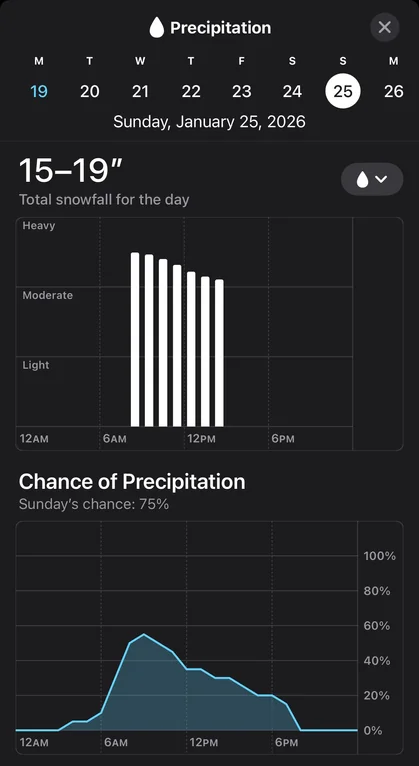
Most of the threads on Reddit this week cluster around a possible winter storm window (Jan 24–26) in parts of the U.S., where snow/ice placement can shift a lot with tiny temperature changes. When that happens, weather apps that rely on different models (or display model output differently) can look like they’re “broken,” even if they’re technically functioning.
You can see that broader storm uncertainty being discussed outside Reddit too (forecasts warning of snow/ice potential and model swings).
Don’t miss the best of The Mac Observer
Set us as a preferred source and our Apple reporting ranks higher in your Google Search results and Discover feed — one tap, no account changes.
Apple Weather wrong snow and weather report in January 2026
Here’s the core set of “Apple Weather is way off” posts from the last several days, including Boston:
| Location | What Apple Weather showed | What users complained about |
|---|---|---|
| Boston | Snow totals that felt implausible + bad “last 24 hours” values | People reported several inches on the ground while Apple showed tiny amounts (example: “0.35 inches”), and said the forecast oscillated a lot leading into snow. |
| Pittsburg | Around 18 inches for Sunday (far out) | Users compared it to other apps/local guidance showing much less and questioned how far out forecasts are reliable. |
| Staten Island / NYC area | Roughly 16–19 inches | Users noted big gaps vs other sources and tried to sanity-check with local expectations. |
| St. Louis | 13–16 inches, then later 0 inches | Users pointed out the number “wasn’t there yesterday,” then disappeared, which reinforced the “Apple is glitching” vibe. |
| Fort Mill, SC area | About 10–12 inches | People called it unrealistic and compared it to smaller totals elsewhere. |
| Nashville | Very high totals (teens to 20s) | Similar theme: “too early to be sure,” “Apple is way higher than everyone else.” |
| Roanoke | “Apple Weather having a stroke” style reactions | Mix of skepticism + “some models are high” comments. |
Boston wasn’t a one-off. It matched a multi-city pattern: Apple Weather showing eye-catching snow totals several days out, often higher than competing apps, plus confusing “precipitation” numbers during/after snow.
The most common “symptoms” with Apple Weather issues
1) Snow totals look exaggerated (especially 4–7 days out)
Across threads on forums, people repeatedly describe Apple Weather posting very high snow totals for a day that’s still far away, while other apps (or local forecasts) show a lower range.
This is exactly the kind of forecast window where snow vs sleet vs freezing rain placement is still shaky, so apps can diverge hard.
2) Forecasts “whipsaw” (numbers jump, then collapse)
The St. Louis thread is a clean example: users saw a big snow number appear, then later the app switched to 0 inches.
Boston users also described big swings leading into snow events.
3) The “last 24 hours” precipitation number looks wrong during snow
Boston users described having inches of snow on the ground while Apple Weather showed something like 0.35 inches in the last 24 hours.
A common interpretation (also seen in other Apple Weather complaints) is that the app may be surfacing liquid-equivalent precipitation prominently, which will always look smaller than snowfall depth.
If you got ~6–7 inches of fluffy snow, the liquid equivalent can easily be a fraction of an inch depending on snow ratio. So the number can be “technically defensible,” but still feels wrong to normal users because it’s not what they mean by “how much snow fell.”
4) Precipitation type looks wrong (rain/sleet labels)
Boston commenters also mentioned the app calling it sleet when it didn’t match what they saw.
This matters because if a model thinks you’ll get a lot of sleet, some snowfall products can get weird (more on that below).
So is Apple Weather actually “broken,” or just “showing a bad number”?
Based on the threads this week, it looks more like model/display behavior than a service outage.
There’s a specific explanation Redditors keep circling back to: “Apple Weather is reading a raw model snowfall product”
One of the most concrete explanations appeared in an r/rva storm thread: a commenter argued Apple Weather’s huge totals were because it was “literally reading the GFS model’s snowfall forecast,” and that the snowfall product can inflate totals by counting sleet as snow (so you see 20+ inch “snow” totals even when the real-world outcome might be a messy mix).
Important note: that’s not an Apple confirmation. It’s a user explanation. But it matches what people were observing: Apple being dramatically higher than other sources, especially in a storm setup where sleet/ice is on the table.
Storm setups like this do cause huge swings
A local TV meteorology post about the Jan 24–25 setup explains why forecasts jump around: small changes in the warm layer aloft can flip precipitation type (snow vs sleet vs freezing rain), and models will still fluctuate until you get closer and higher-resolution guidance comes in.
That helps explain why Apple’s number could be “wild” one day and “gone” the next.
What Apple says about its weather data
Apple’s own documentation says the Weather app provides forecasts using Apple Weather data, and it also lists how alerts/next-hour precipitation availability varies by country and source.
That tells you two useful things:
- The forecast pipeline is Apple-run (even if it’s built on multiple upstream datasets/models).
- Apple does not publicly give an easy “this is exactly the model blend we use for snowfall totals” explanation inside normal user-facing docs, which is why Reddit speculation fills the gap.
What to do if you’re trying to use Apple Weather for real decisions (snow/ice travel, school closures, etc.)
When you’re in that 3–7 day window for a winter storm, treat Apple Weather’s snow inches as a signal (something might happen) rather than a number (this exact total will happen). Here’s a practical way to use it without getting burned:
Best practice checklist (simple and fast)
- Check timing and precip type first (snow vs sleet vs freezing rain). That drives impact more than the total.
- Compare at least two sources:
- a local TV meteorologist forecast
- National Weather Service products (or your country’s official weather agency)
- one extra app you trust
- Re-check in the 48–72 hour window. That’s when totals usually start converging.
- If Apple shows a tiny “precipitation” number after heavy snow, look for whether it’s showing liquid equivalent vs snow depth (the UI can be confusing).
If your issue is “current conditions are wrong”
Try this before assuming the forecast itself is bad:
- toggle location permissions off/on for Weather
- remove and re-add the city
- check if it’s pulling the right station/location (especially if you live near water or elevation changes)
These won’t fix a flawed model output, but they do fix “wrong place” errors.
FAQ
Is Apple Weather having an outage right now?
As of today (Jan 23, 2026), Apple’s system status page lists Weather as available, so there’s no obvious official indication of a Weather outage.
Why would Apple Weather say “0.35 inches” when I got 6–7 inches of snow?
Because that smaller number can be liquid equivalent precipitation (melted water), not snow depth. Users complain that this presentation is confusing, because most people care about snow depth.
Why does Apple sometimes show huge snow totals days out?
In this week’s threads, the most repeated explanation is that Apple may be surfacing a snowfall output that can skew high in mixed-precip setups (snow/sleet/ice). A detailed Reddit comment specifically blamed the GFS snowfall product behavior (including sleet).
Why do different weather apps disagree so much?
Different apps:
- ingest different models
- update on different schedules
- use different snow-to-liquid ratios
- handle mixed precipitation differently
During borderline events, that creates big disagreement until closer to the event.
Bottom line
In the last week, users report a clear cluster of Apple Weather complaints (Boston included) centered on:
- exaggerated snow totals several days out
- rapid swings (high totals → suddenly low/zero)
- confusing precipitation reporting during/after snow


My Boston location in weather app has been wildly wrong ESPECIALLY for current conditions : saying it’s cloudy when it is bright sunshine no clouds in sight or sunny when it’s very cloudy. The number of times the app has been obviously wrong seems worse than it was a year ago. I am considering deleting the app entirely and relying on internet sites or local news only.
*Yikes, sorry I need to amend that last post! My app was set to Boston when I checked the updated numbers this morning. Apple still reads that there has been 29” inches of snow in the past 24 hrs despite personal measurements disagreeing and other websites saying we got <11” over the same time span. Anyone know why this might be happening?
Last night my Apple weather app claimed we had gotten 27” of snow in Amherst, MA over the past 24 hours. This morning, the app says there has been 12” of snow in the last 24 hours (snow started <24 hrs ago). How are its retrospective numbers off by 15”?? Is this more than a modeling problem?
Apple Weather’s past snowfall totals aren’t a single fixed measurement. They’re a rolling estimate that gets revised as better data comes in. Early on, the app often leans on radar-based and model estimates, which can badly overcount snow (especially with heavy bands, mixed precipitation, or compaction). As official surface observations and cooperative station reports arrive, Apple recalculates the “last 24 hours” total, sometimes cutting it dramatically. So yes, it’s more than just a simple modeling glitch, it’s a data-source reconciliation problem, and snow is one of the hardest things to estimate accurately in real-time.
My Apple Weather app always shows very very low snow totals for instance, this weekend we should get about a foot of snow my app says less than an inch