
Many users updating to iOS 26 have reported that the “Block Caller” option seems to be missing from the Phone app. The change is intentional. Apple adjusted how call blocking works in the latest update, and several familiar menus were reorganized.
If you’re trying to block a number and can’t find the option anymore, here’s exactly what changed and how to get the feature back.
Table of contents
- Why “Block Caller” Seems Missing in iOS 26
- Where the “Block Caller” Option Lives Now in iOS 26
- How to Block a Caller in iOS 26 (Updated Method)
- If the Option Still Doesn’t Appear: Troubleshooting Steps
- Why Apple Moved the Option in iOS 26
- When You Should Expect the Option to Return in the Phone App
- The Bottom Line
Why “Block Caller” Seems Missing in iOS 26
In iOS 26, Apple quietly moved the blocking menu out of several locations inside the Phone app. Instead of showing “Block Caller” inside the contact card or Recents menu, the system now routes everything through a centralized privacy panel.
Don’t miss the best of The Mac Observer
Set us as a preferred source and our Apple reporting ranks higher in your Google Search results and Discover feed — one tap, no account changes.
This shift is part of Apple’s broader attempt to simplify blocking and make it consistent across Phone, FaceTime, and Messages, a change highlighted when Apple introduced a more streamlined blocking flow in the iOS 26 update to blocking contacts.
Where the “Block Caller” Option Lives Now in iOS 26
Instead of blocking from inside the Phone app, the option now appears in:
Settings → Privacy & Security → Blocked Contacts
From here, you can add:
- Phone numbers
- Contacts
- Email addresses (used in iMessage)
You can also reach the same list through:
Settings → Phone → Blocked Contacts
This is now the main place Apple displays your blocked list, which aligns with the steps shown when checking blocked lists in how to check blocked numbers on iPhone.
How to Block a Caller in iOS 26 (Updated Method)
Here’s the new flow:
- Open Settings
- Tap Privacy & Security
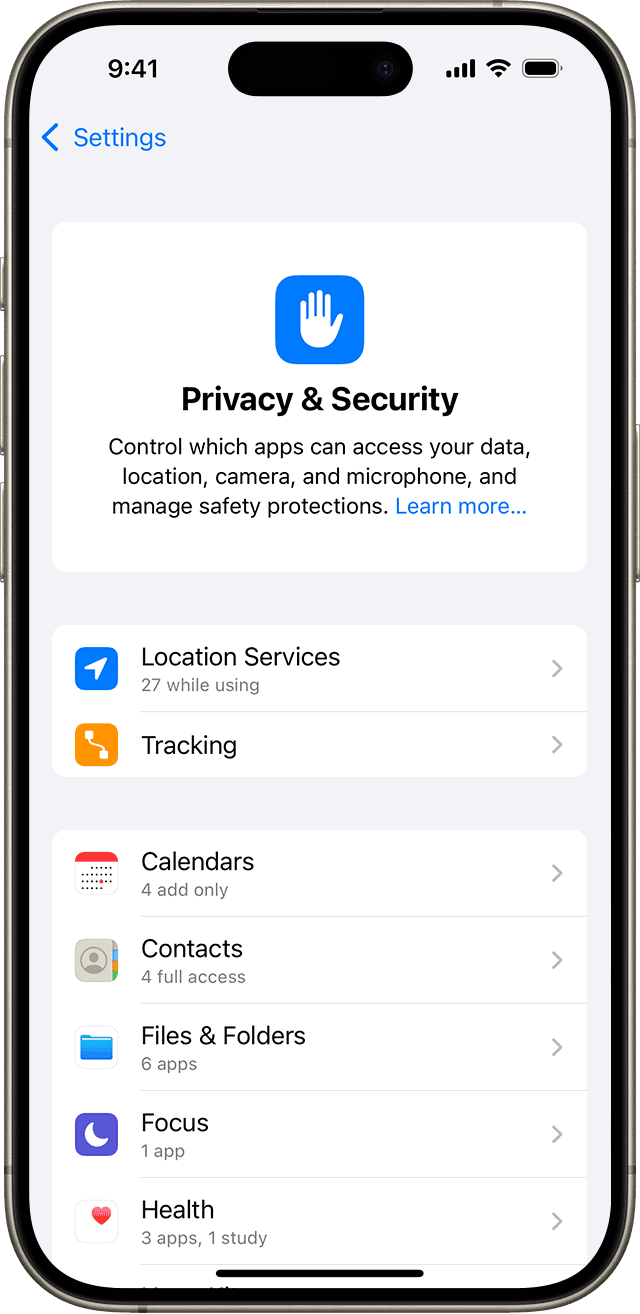
- Select Blocked Contacts
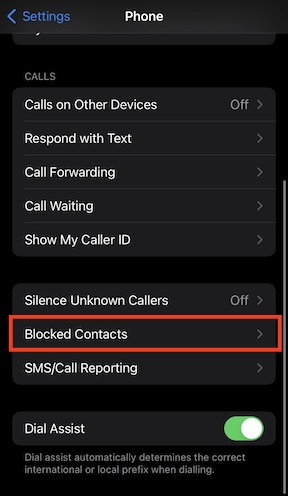
- Tap Add New
- Choose the contact or number to block
You can still block from the Phone app, but the option now appears only after expanding the contact details submenu; it is no longer displayed prominently.
Apple’s official documentation on blocking phone numbers and contacts also reflects this shift toward centralized management.
If the Option Still Doesn’t Appear: Troubleshooting Steps
Some users report that even after updating, the blocking menu still doesn’t show up. Try these steps:
1. Restart Phone App + Device
iOS occasionally hides submenu items after an update until the Phone app refreshes.

2. Check for Restrictions That Disable Blocking
iOS 26 may hide or disable “Block Caller” if your device has restrictions from:
- A work/school management profile (MDM)
- Screen Time content restrictions
To check for MDM restrictions:
Settings → General → VPN & Device Management
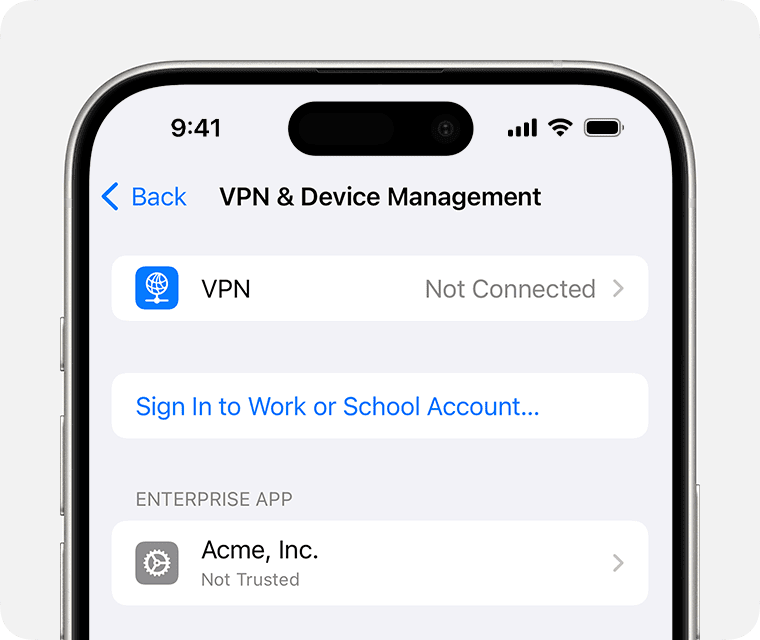
Image Source: Apple
If you see a configuration profile installed, it may be controlling Phone settings.
To check for Screen Time restrictions:
Settings → Screen Time → Allowed Apps → Content & Privacy Restrictions
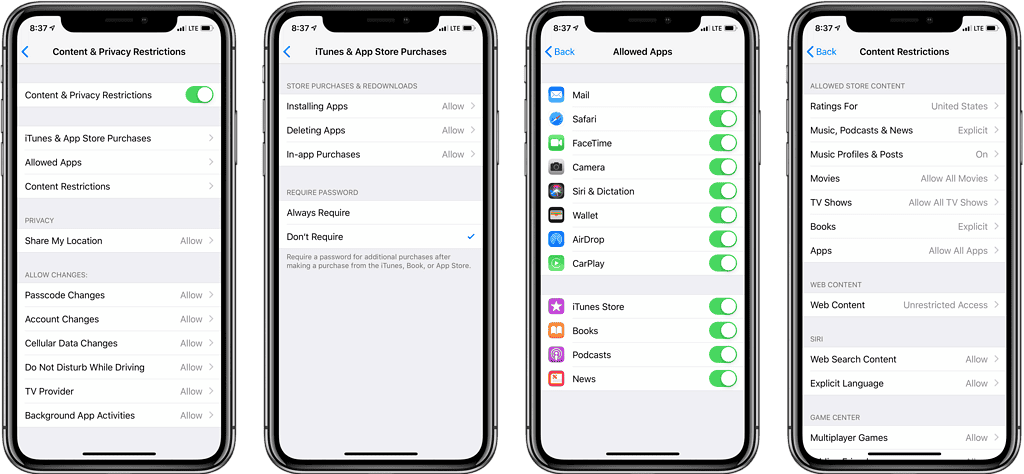
Image Source: Mac Stories
Make sure Phone, Contacts, and Privacy settings are not restricted.
3. Confirm Caller ID & Call Blocking Services Are Enabled
If Caller ID services or carrier settings are outdated, iOS may hide blocking options until the system verifies call identification.
How to check:
Settings → Phone → Call Blocking & Identification
Ensure your carrier’s call-blocking services (if any) are active.
4. Confirm You Are Not Using “Silence Unknown Callers” Instead
This setting auto-screens calls and is often confused with blocking.
See Apple’s explanation of Silence Unknown Callers to check whether it’s enabled.
Why Apple Moved the Option in iOS 26
Apple’s new approach groups all blocking and filtering into one hub, so it works uniformly across:
- Phone app
- Messages
- FaceTime
- Email addresses used in iMessage
Instead of managing blocked contacts in several separate menus, everything now lives in one place. It’s cleaner, but only after you know where to look.
When You Should Expect the Option to Return in the Phone App
Right now, Apple has not removed the ability to block callers from within the Phone app; they’ve simply hidden it behind the expanded contact panel. Some users may see the option return as Apple adjusts the interface in incremental iOS 26.x updates.
The Bottom Line
If the “Block Caller” option is missing in iOS 26, don’t worry, the feature isn’t gone. It has simply moved into the system’s privacy settings, and Apple now centralizes all blocking activity in one place.
Once you know where to find it, the blocking workflow becomes more predictable and consistent across apps.



The new blocking system does not allow you to simply block a number. You have to add it to contacts first.
To be very cliché, if it ain’t broke don’t fix it. Now you’ve made it possible for MORE spam calls to get thru. This is very annoying when you get 3-6 a day that you want to block easily and effectively. Apple you f*cked up this time. not the first time and not the last time, but this one’s a biggie.
Ah…yes. iPhone life was great (sort of) before iOS 26?
The option to block has been effectively removed since is it so difficult and convoluted to access. The current version of IOS 26 no longer matches the explanations in this article, and I still can’t figure out how to block numbers form calling and texting me. I suspect Apple and the cell carriers want to remove blocking as an option.
I fvking hate when they pull this crap. I just want to block from the phone. It shows me if I hit the I in the circle, I can block, then when I go to delete, it’s not blocked. FU Apple!
This change is sacrificing customer satisfaction for programmer satisfaction. It’s unacceptable.
Apple, what dumbass thought this was a good idea?! Absolutely STUPID! Put it back the way it was, NOW!!!!!! Fire the idiot engineer who put this, “fix,” in the last change. You went from something that working fine and SCREWED IT UP!
I still have the block option on my Iphone 14 Pro, but it doesnt work for either cals or email . I block and when i go back and check ithe number isnt blocked. This is si stupid.
So very true!! I’m OLD and didn’t grow up with this crap and Apple makes it more difficult ever time they screw around with it!! “Put it back the way it was” to quote a well-known musical’
Surprised that after months of criticism, this is still not fixed. I have a call blocker app, but still some calls get through. Now I can’t block them. Shame on Apple
I agree! I am no longer able to block scam emails after I updated to (26) last night! Every single time I update I lose something important!
Fuck apple. Moving to Europe and getting actual privacy protections. I used to love them, now going to go with the cheapest, dumbest phone and disconnect. Already left all the social media sites. Time to get back to reality and stop giving these fuckers money. Apple won’t even let my VPN block. So done with the nanny surveillance state. My family has money, not going to spend it on all this stuff.
I seems to me Apple is being run by idiots and morons of late. They keep taking easy to use items such as block contacts and making it exponentially more difficult to use. Before, after receiving a call from an unknown number I just press and hold after the (i) after the number in recents and click block. NOW, click on recents, memorize or write down unwanted phone number, exit recents go to settings then privacy and security then blocked numbers then click on add number and finally enter the memorized or written phone number.
YEAH IDIOTS!!! that is so much easier than before you should all get a pay raise for you genius insight into simplifying my life as it pertains to stopping unwanted calls
Well, if this is the Mac Intellect at work, I’m done with them. I switched to Macs back when Win95 came to be (yep, I’m old as dirt), and have grumbled for a few years now about Mac desktops (iPads are worthless), and now, my poor old, ‘smart’phone is beyond idiotic.
One has to wonder if spam callers are paying Apple to make it more difficult to block them.
One has to wonder if Macs (perhaps all computers – hey, I remember life without them, and yes, everything was okay! really!) are worth the hassle. They obviously are not worth the money.
I’m done.
So, Apple decided to get rid of the simplist and most commonly used functions in order to make it harder to use? Why? Just…why?
Some suit got an attack of the stupids(and probably a raise).
Make blocking span numbers simple again.
I agree. One of the most asinine things they’ve ever done. I hate this iOS 26. They’ve made everything harder. I think the reason is now that Apple is worth nearly $4 trillion they don’t care about their customers. Because of this release I’m thinking of switching to an android.
I think I’ll go back to a rotary phone and answering machine! Yep I’m old and don’t need Apple’s ridiculously idiotic “smart” phone!!
Good news, i have solution. First step : Turn off your iphone. Second step : Buy new android phone. 3rd Step : say goodbye to apple phone.
4 th step—LIVE WITH AN EASILY HACKED 2ND RATE OS.
A 4 yr old iphone is now a relic of the past ?!?!?!
My iphone SE 3 can’t block numbers with one tap anymore. Must drill down in settings for an obscure item concerning contacts. My contacts have absolutely nothing to do with spam calls. Not only that but because this phone doesn’t have a silicon chip, I don’t have settings > phone and the two choices offered there on newer phones with silicon chips. Makes no sense why Apple said this phone was a candidate for iOS 26. Now the phone is “broke” as Apple wishes but unlike as Apple wishes, it will not induce me to replace an otherwise perfectly good small form factor, lightweight phone for several hundred dollars, with a phone I don’t want or need. Buh Bye iphone. Back to my Motorola Edge 2024.
I also want to block spam phone numbers, not contacts. Apple techs have too much time on their hands. If they weren’t monkeying with the form they would not have a job.
In the meantime, do what is available from the instructions provided. It works. One trick, search for privacy as it is buried.
Apple keeps breaking things that don’t need fixing! Every time we get an update we waste days trying to find out how to do what we’ve always done before since they keep playing around with things!!! They must hire a bunch of 13-year old idiots who love to play around and screw things up since they don’t have anything important do to in life and don’t care if things go nuts. APPLE IS GETTING MORE AND MORE CRAZY!!!!!
So, now I need to add an unwanted caller to my contacts list. Then go through a bunch of settings steps to find the blocking option, then go to my contacts list to try and identify the unwanted number in order to block it?? How efficient!
Agree! This is 10 steps backwards! End users are your best advisors! Thx for posting this! I am so frustrated with IOS 26! NOT USER FRIENDLY like it used to be. What do they say? “if it ain’t broke, don’t fix it”!
I’m amazed. If all it took to work at apple was to have shit ideas, I should’ve applied years ago. The unreadable, laggy UI, the lack of control on opacity, and now the complete removal of key features, hidden 4 layers deep in a barely releated submenu.
Welcome back, Windows Aero, now piss off.
I switched my iPhone off and on again three times, and the block number facility returned back in the usual place.
No it didn’t
The direction to be able to block calls from the phone app DO NOT WORK. You predict seeing choices and app settings that aren’t even there. AND CALL BLOCKING still DOES NOT APPEAR IN CONTACT DETAILS. Cathc up reality, don’t just give us what theoretically SHOULD work. Please!
I have the same issue and have go e through the described process 3 times!
agreed. I show none of those options they are talking about.
Neither do I! So frustrating!
This is the last straw. Every time they upgrade it lands me with things I don’t want or need and makes life more difficult in terms of those things I do need to use.
Yes, very so, spend too much time on this stupid update that does not allow the disturbing phone number to appear in the new location and you can’t copy the number either!
Who of all idiotes inventer this?
Agree
You are so right. Since the updater my phone (SE) is nearly useless. I get at least 15 phishing calls, all from different numbers, per day. Now I cannot block these numbers. I tried the restart to get blocking back for phone but it did not work.
There is no way whatsoever to block an unknown caller on iPhone SE anymore. FIX IT!!!!!!!!!!!!
I agree, this is most annoying. If they don’t fix it promptly, I know what my next phone will NOT be. Are they turning into Microsft 2??
Hopefully the next iOS 26 update will fix this glitch. Pressing the home button on my iPhone SE and then returning to the phone contact—doing this a few times worked in displaying a tab for blocking the caller
Yes, that does work, if you push the home button and then phone app several times.
Just tried that and it worked in messages on my SE 👍🏻.
I had already deleted the 3 potential spam numbers In recents so couldn’t try copying them to the block new number area in privacy settings.
Yes, this does work, if you repeatedly press the home button and then the phone app contact.
Not on my iPhone SE
That makes it official; Apple have gone loopy!
What an insanely stupid and tedious UI. It’s been in place since the infamous Tahoe 26.0, and still there in 26.2. We know that Apple don’t listen to their users, perhaps they will when we’ve all moved over to Android .
I get 3 or 4 spam calls every day. Blocking used to be simple and easy. Now I have to make jerks in India and Pakistan contacts!! This change is horrible. Put the Block button back where it used to be. Or my next phone will not be iPhone.
Ditto!!!!
Yes, Yes and YES!!!
This change is crap. Some tech geek thinks it’s more efficient, but as an end user it’s not. Change it back!
I spoke to Apple about this. It is a display glitch. If you have this view press the Home button (iPhone SE) then press the Phone app to go back to this view and you will see a few more options. Do it one more time if “Block Contact” still doesn’t appear and it should now be visible.
👍
Awesome thanks so much, it worked on the third try!
Thanks a lot! Finally got it back like that! You’re the best!
What if you don’t have a HOME BUTTON.
That’s great if you have a freaking home button!! I refuse to spend $1000+ on a new phone because Apple screwed up the “newest” roll-out! If I ever change (and I will), I’ll leave Apple AND AT&T!!
Now you have to save Spam calls as a contact then go to Settings to block them. You can’t copy and paste their number. Very frustrating and much more difficult to use
I don’t want to block any contacts, I want to block spam phone numbers
My thoughts exactly- I may be going to Samsung
this is bull shit, they make it more difficult, think its time to change to samsung
Tedious to block all the bogus calls I get every day this way. It does not increase efficiency.