

Apple has released iOS 26.4 for all users, and one of the more useful changes focuses on Liquid Glass. This update gives you two ways to tone down parts of the design if the current look feels too flashy or too animated.
Apple has added a new Reduce Bright Effects setting and improved the existing Reduce Motion option in iOS 26.4. Apple wants to give users more control over how Liquid Glass feels during daily use.
Apple’s official release notes say Reduce Bright Effects cuts down bright flashes when you tap elements like buttons, while Reduce Motion now more reliably reduces Liquid Glass animations for users who are sensitive to on-screen motion.
Don’t miss the best of The Mac Observer
Set us as a preferred source and our Apple reporting ranks higher in your Google Search results and Discover feed — one tap, no account changes.
These are small changes on paper, but they matter because Liquid Glass is one of the most visible parts of iOS 26. If you have found some interface effects distracting, iOS 26.4 now gives you better built-in tools to make the design calmer without changing the full look of the system.
1. Reduce Bright Effects

This is the new setting in iOS 26.4, and it targets bright highlighting and flashing that appear when you interact with certain on-screen elements. Check the image above to see the difference once it’s turned on.
- Open Settings
- Tap Accessibility
- Tap Display & Text Size
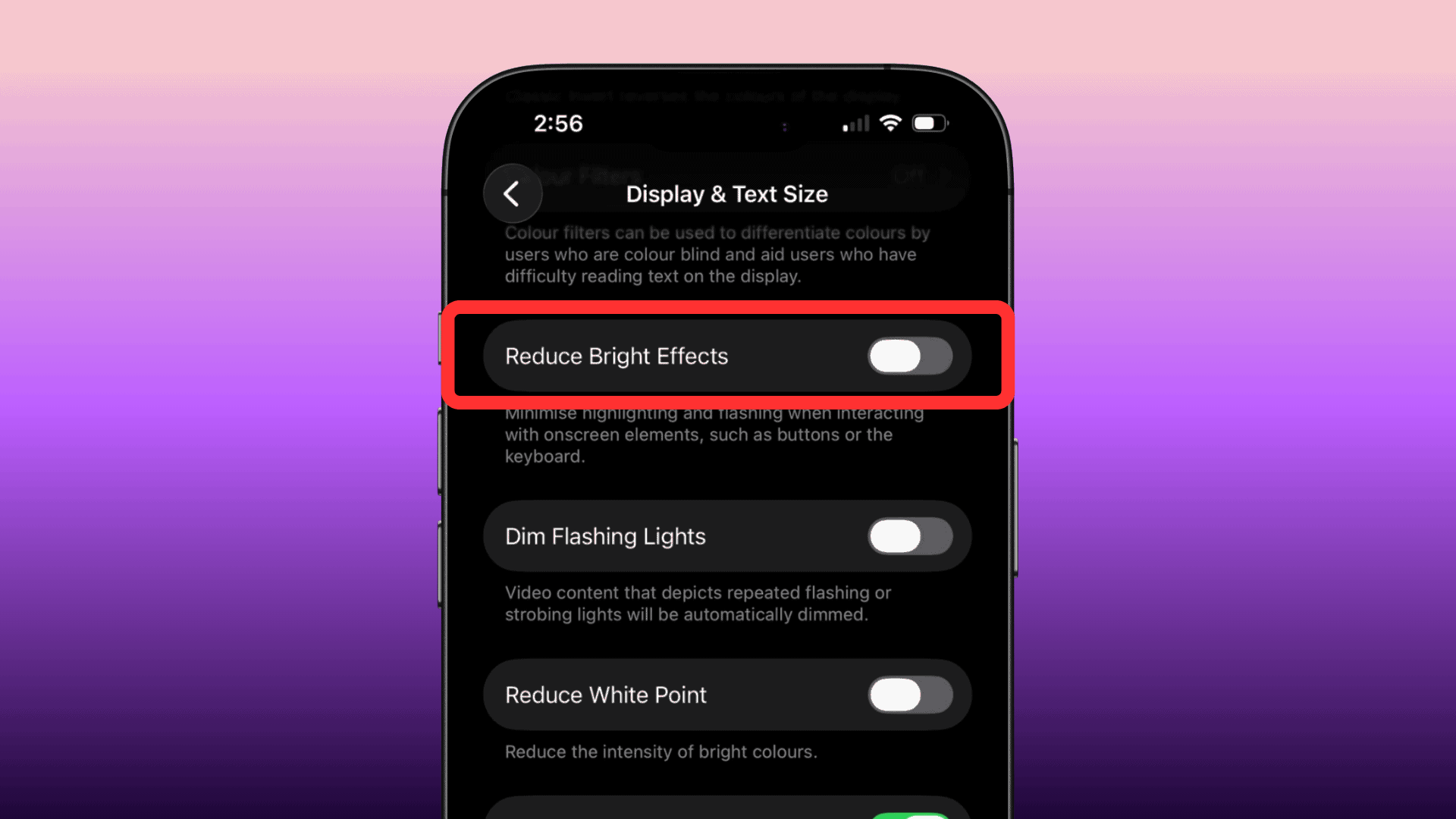
- Turn on Reduce Bright Effects

2. Reduce Motion
Reduce Motion is not new, but Apple has updated it in iOS 26.4 to better handle Liquid Glass animations. That matters for users who felt iOS 26 still looked too active even with the option enabled.
- Open Settings
- Tap Accessibility
- Tap Motion
- Turn on Reduce Motion
For now, these are the two main customization updates Apple offers for Liquid Glass in iOS 26.4. If you want a less flashy iPhone interface without waiting for bigger design controls in a future release, these settings are the first place to start.



Discussion