

Backing up your iPhone should be second nature, but not everyone knows how to do it right. There are actually several ways: you can automate it with iCloud, plug into a Mac, or use iTunes on a Windows PC. Each method has its pros and cons depending on your storage, habits, and how hands-on you want to be. How do you decide on one?
Let’s take a look at how each process works and which option that fits you best.
How to Backup iPhone to iCloud
iCloud is Apple’s built-in, automatic backup option. However, the free plan only gives you 5GB, which likely isn’t enough for all your data. If you choose this method, you’ll probably need to upgrade to a paid storage plan to back up everything.
To manage within the free tier, you can selectively back up what matters most, like Messages, app data, and settings, and skip things like full photo libraries. That said, upgrading your iCloud storage gives you the full convenience of automatic, wireless backups every time your iPhone is plugged in and on Wi-Fi.
Time needed: 1 minute
Here’s how to enable iCloud Backup automatically:
- Connect your iPhone to your Wi-Fi network. Wi-Fi connections should be stable while the backup process is going on.
- Go to Settings, then tap your Apple ID > iCloud.
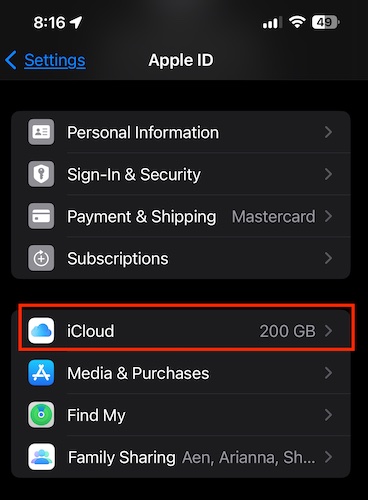
- Next, toggle the iCloud Backup switch.

- Tap Back Up Now to start the process of backing up your iPhone to iCloud.
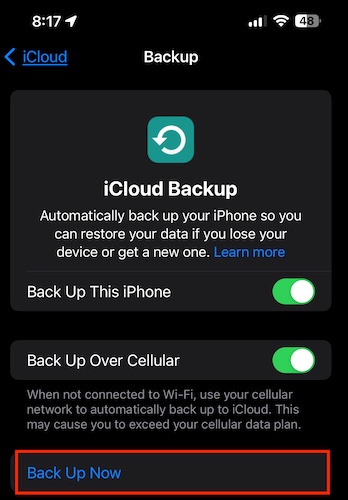


If you don’t want to manually back up your iPhone to iCloud, you can toggle the iCloud selection at the top of the iCloud Backup page. Make sure that your iPhone is charging, connected to a Wi-Fi network, and has enough storage space.
How to Back Up iPhone to Mac
Another way of backing up your iPhone is through the Finder app on your Mac. It’s a solid alternative if you have a physical hard drive and don’t want to pay for extra iCloud storage.
1. Connect your iPhone to your Mac using the USB cable.
2. Launch the Finder app and locate your iPhone.
3. Check the Encrypt local backup checkbox. This will require you to provide an encryption password.
4. Click the Back Up Now button.
5. Wait for the backup process to finish, and then you’re done.
How to Back Up iPhone with iTunes on a Windows PC
For those who are still using a Windows PC, another backup option is to use iTunes. Follow the steps below to backup your iPhone with iTunes on your Windows PC.
- Install the latest version of iTunes on your PC.
- Connect your iPhone to your computer and wait for iTunes to open automatically.
- If prompted, tap Trust to connect your iPhone to your PC.
- Select your iPhone in iTunes, and the Summary page will show up.

- Click either iCloud or Trust this computer under Backups.
- Click Back Up Now to start the backup process.

What if you don’t have iTunes on your Windows PC? Can you still back up your iPhone? Yes! You can back up your iPhone on your Windows PC using third-party software, such as iMazing, Acronis Backup, or FoneTool. Note that using software is the only iTunes alternative.
How Long Does It Take to Backup an iPhone?
There is no exact time to back up an iPhone. The duration of the backup process depends on three things:
1. How full your iPhone storage space is. As much as possible, delete or don’t back up video content.
2. The model of your iPhone, including its storage capacity.
3. The iOS version that is currently running on your iPhone.
Backing up your iPhone is usually straightforward, whether you’re using iCloud, a Mac, or a Windows PC. If something goes wrong, i.e., your device not connecting to iCloud, you can always reach out to Apple Support. However, that might take a while. If you’d rather troubleshoot it yourself, check out our guide on what to do if your iPhone can’t connect to iCloud.


The funny thing us, that I might consider doing almost the opposite: backing up iCloud to something local.
For those interested:
I’m currently using some 40 out of 200 GB of iCloud. Some 20 GB of that consists of back-ups of 6 iOS devices in use (and probably some obsolete ones), The rest is used by data: some 10 GB by photos, the rest by documents and other data. I have set my macOS devices to offload to iCloud. (Small numbers, but my primary storage is in cross-platform clouds.)
“The iPhone is so well-made, stable and reliable that it almost seems like it doesn’t need to be backed up”.
Well, there is an exception to that, and it is when the iPhone internal storage is almost full. Then, catastrophic events may happen, losing precious data, since there is not a product like DiskWarrior for iOS to repair and prevent that.