

macOS Tahoe 26 launched with Apple’s new “Liquid Glass” design, but some reports reveal a striking flaw: some interface elements render upside down while others display normally. Screenshots show alternating rows in Finder-like dialogs and icons in menu bar utilities flipped vertically. The issue points to a system-level rendering error rather than a problem limited to individual apps.
What Users Reported
The bug appears when navigating bottom items in file choosers or menus. In some cases, only half the items are affected, while the rest remain untouched. Users describe the inconsistency as disruptive and confusing, particularly because it surfaces in core system dialogs. The thread highlights performance drops after upgrading, suggesting the glitch ties into broader rendering inefficiencies in Tahoe 26.
Similar Bugs in Previous macOS Versions
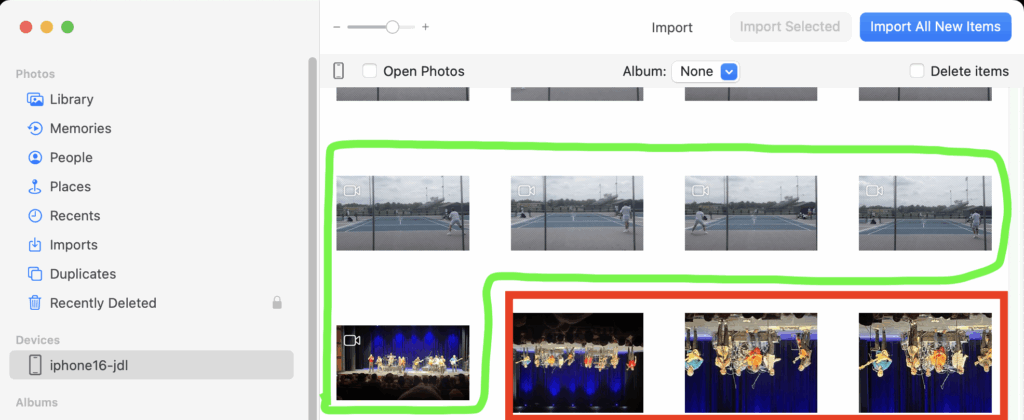
This is not the first time Apple users have encountered inverted or broken visuals:
Don’t miss the best of The Mac Observer
Set us as a preferred source and our Apple reporting ranks higher in your Google Search results and Discover feed — one tap, no account changes.
- Photos App Previews Flipped: In Apple’s own support forums, users reported that imported photos sometimes appeared upside down in the Photos app, even though videos displayed correctly (Apple Discussions).
- NSImageView Orientation Errors: Developers on Stack Overflow described images in Cocoa NSImageViews suddenly rendering upside down, a problem tied to inconsistent view transforms (Stack Overflow).
- Eclipse Splash Screen Inversion: After macOS updates, Eclipse IDE users documented inverted startup screens and erratic tab headers, another sign of rendering regressions creeping into macOS graphics layers (GitHub Issue).
- UI Fails to Refresh on Sonoma: On GitHub, Sequel Ace users flagged that macOS 14 Sonoma occasionally failed to refresh UI elements until windows were resized or hidden, pointing to incomplete screen redraws (GitHub).
- External Display Distortions on Ventura: macOS Ventura users connecting MacBook Pros to external monitors reported horizontal artifacts and screen tearing, another example of Apple’s display rendering pipeline producing visual faults (Apple Discussions).
Why Tahoe’s Bug Fits a Pattern
Looking across these examples, a pattern is followed: Apple’s rendering stack sometimes mishandles orientation, redraws, or transforms. Whether it is upside-down icons, splash screens, or inverted photos, the underlying failures often relate to how macOS applies and resets transforms during view reuse. Tahoe’s upside-down rendering bug fits neatly into this pattern.
For users, the impact is more than cosmetic. Inverted UI elements disrupt daily workflows, undermine accessibility, and reduce confidence in the stability of new macOS releases. This new bug echoes a growing concern. Apple’s first-release macOS builds are increasingly prone to visible UI regressions.
Waiting for a Fix
Community veterans recommend holding off on upgrading production systems to Tahoe 26 until point releases like 26.1 arrive. Apple has not yet commented on the upside-down rendering issue, but history suggests a patch will follow as reports accumulate. Until then, the bug joins a long list of UI glitches Apple users have encountered in recent macOS updates.



Discussion