
Google is quietly testing a new “AI Mode” in Chrome for iOS, featuring a dedicated AI Mode button in the search bar, which is already visible in internal screenshots and video shared below. This is the most user-facing update coming to Chrome on iPhone and iPad.
Recent code changes show Google is also working on Smart Tab Grouping for Chrome on iOS, along with two Gemini-related features. The first, “Ask Gemini Chip,” appears to test bringing Gemini’s assistant directly into the browser. The second, “Gemini Cross Tab,” lets the Gemini conversation window follow you as you move between tabs, so you can keep a chat going across different pages.
Native AI Mode Moves Closer for Chrome on iOS
I discovered that Google is now testing a deeply integrated “AI Mode” in Chrome for iPhone and iPad. Screenshots and internal video footage confirm this upgrade: a new AI Mode button with a colored ring appears in the omnibox. When users tap the search bar, the familiar Chrome interface appears, but with “AI Mode” labeled below their query, indicating smart suggestions are available.
Don’t miss the best of The Mac Observer
Set us as a preferred source and our Apple reporting ranks higher in your Google Search results and Discover feed — one tap, no account changes.
For a video demo of Chrome’s new AI Mode, watch it on YouTube here.
Ask Gemini Chip
Following AI Mode, the code also adds an experimental flag for a feature called “Ask Gemini Chip.” This flag is for early testing; there are no details yet about where or how the feature will appear, except that it’s a first step toward bringing Gemini features to Chrome on iOS.
- Flag name: Ask Gemini Chip
- Description: “Enables the Ask Gemini Chip feature.”
- Status: No information yet on how users will see or use this.

Gemini Cross Tab
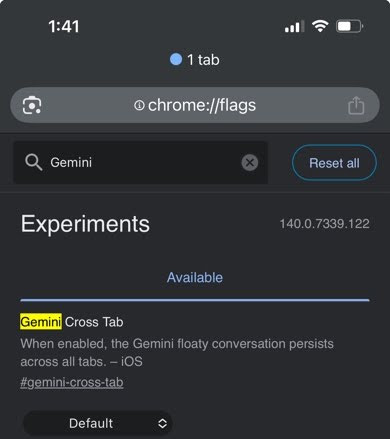
The flag titled “Gemini cross tab” allows the Gemini floaty conversation to persist across all open tabs, giving users a more consistent multi-tab experience on iOS.
- Flag description: “When enabled, the Gemini floaty conversation persists across all tabs.”
Smart Tab Grouping
There’s a new experimental flag called ‘Enable Smart Tab Grouping.’ When enabled, Chrome uses on-device AI to automatically organize your open tabs into smart groups based on type or topic, making the tab grid much easier to navigate for anyone with lots of tabs. For now, you’d have to enable this flag to try it.
- Flag name: Smart Tab Grouping
- Description: “When enabled, users can use the smart tab grouping feature in the tab grid.”

Google has recently confirmed that Gemini integration is coming soon to Chrome for iOS: “starting soon, on iOS Gemini in Chrome will be built into the app.”
While Google says multi-tab Gemini support is coming across all platforms, finding the new “Gemini cross tab” flag live on iOS is the first real sign of this integration in action.
These features are still hidden and not available to most users yet. They may appear in test or beta builds before being rolled out more widely. Everything here is still under development and may change before launch.



Discussion