Apple’s M5 iPad Pro lands in stores tomorrow. Review units hit desks this morning, and the verdict is clear. Apple kept the design and display, turned up speed, and leaned on iPadOS 26 to make the hardware feel useful more often.
What reviewers say about power vs software
The Verge’s David Pierce frames the headline tension right away. Hardware races ahead. Software tries to keep up. iPadOS 26 narrows the gap, but it does not close it.
Don’t miss the best of The Mac Observer
Set us as a preferred source and our Apple reporting ranks higher in your Google Search results and Discover feed — one tap, no account changes.
“Those shackles aren’t all the way off with iPadOS 26, but they’re getting there.”
MacStories editor-in-chief Federico Viticci pushes on the same point from the M5 angle. He praises the new Neural Accelerator and memory bandwidth, then flags the missing app ecosystem for local AI work on iPad.
“All these improvements amount to very little on iPadOS today because there is no serious app ecosystem for local AI.”
Bottom line for you: the tablet feels faster and more capable, especially for multitasking and creative work, but the Mac still owns developer-grade AI tools and terminal workflows.
Small upgrades that matter daily
Reviewers call this model an M4-class iPad Pro with targeted gains. Fast charging is the crowd-pleaser. Viticci confirmed 50 percent in about 30 minutes with a high-watt USB-C adapter and proper cable.
“I could indeed charge up to 50% in 30 minutes.”
PCMag’s Eric Zeman measured a 50 percent charge in 35 minutes using Apple’s new 40W Dynamic Power Adapter, which can deliver up to 60W.
“The iPad hit 50% in 35 minutes… A full recharge required 1 hour and 19 minutes.”
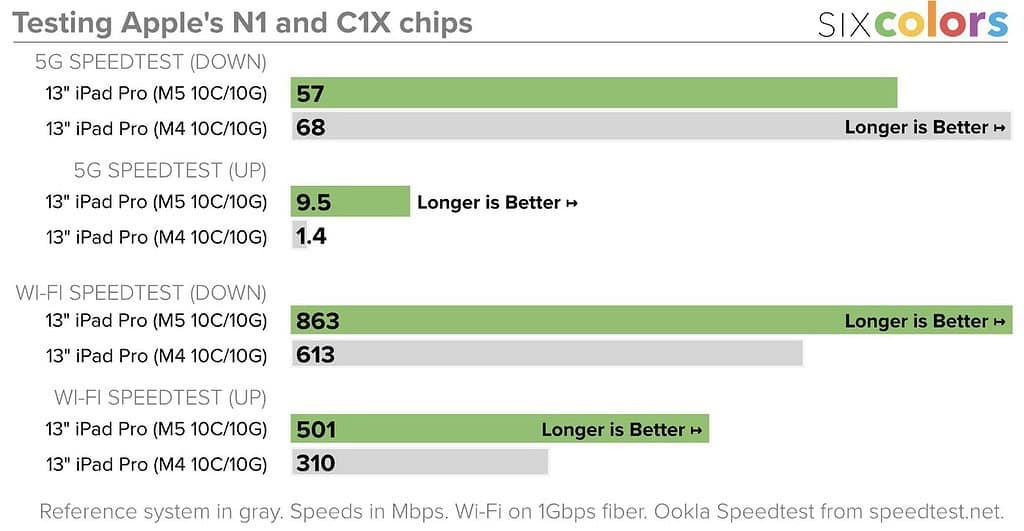
Credit: Six Colors
You also get the N1 and C1X wireless chips. Jason Snell at Six Colors tested Wi-Fi 7 on the N1 and saw clear gains over the prior Wi-Fi 6E model on his network.
“The M4… lagged behind the M5 with its pure Wi-Fi 7 power.”
Real-world wireless and 5G results
Gizmodo’s Kyle Barr stress-tested the C1X modem by hot-spotting a Vision Pro FaceTime with Spatial Personas during a road trip and saw only one drop in 30 minutes, with light battery impact.
“I only experienced a single moment where the FaceTime dropped during 30 minutes of use.”
Snell’s own 5G checks on AT&T showed mixed downloads but striking upload gains, which lines up with Apple’s efficiency pitch.
“A little slower at download and a whole lot faster at upload… that 6.8× improvement… was especially surprising.”
If you use your iPad as a hotspot or push large files upstream, you will feel this change.
External displays finally feel “Pro”
Viticci also verified 120 Hz output to a 4K external display with Adaptive Sync. No special cables needed beyond a solid USB4 lead. Animations stayed smooth, and resolution held at 4K.
“The refresh rate was immediately bumped to 120Hz… faster and smoother animations out of the box.”
That shift removes a common desktop compromise. If you work plugged into a monitor, you now get fluid UI both on the iPad and the external panel.
Performance perspective and who should upgrade
Pierce says you will notice the leap from M1. You will barely notice it from M4 unless you push heavy video or 3D assets. That tracks with Apple’s modest CPU and GPU deltas and the focus on AI throughput.
“For all but the most aggressive, creative-professional workflows, the M4 was and is more than enough.”
The Verge consider this update as an internal refresh that rides on iPadOS 26’s improved multitasking and navigation. If you skipped M4 or rely on Wi-Fi 7, 5G tethering, and faster top-ups, this model makes sense. Otherwise, wait for software to widen the runway. Check the M4 vs M5 comparison here.
The takeaways
You get faster charging, meaningfully better wireless, and a cleaner external-display story. You also get the same excellent OLED panels and thin chassis. iPadOS 26 lifts the ceiling for what you can do, but pro-grade AI and dev workflows still live on the Mac today. If your work hits those new lanes, upgrade. If not, you can keep your M4 and not miss much right now.
Review Roundup on M5 iPad Pro says, try it on your workflow and it helps, upgrade. If it is small change in workflow speed, stick with M4. M5 iPadOS 26 may take some time to mature so maybe you should wait for iPadOS 26.1 or iPadOS 26,2 to arrive before making a decision.




Review Roundup on M5 iPad Pro says, try it on your workflow and it helps, upgrade. If it is small change in workflow speed, stick with M4. M5 iPadOS 26 may take some time to mature so maybe you should wait for iPadOS 26.1 or iPadOS 26,2 to arrive before making a decision.