

Finding Mobile Device Management (MDM) processes on your iPhone is alarming. Users suspect unauthorized surveillance or corporate control immediately. Organizations use MDM to configure and secure devices legitimately. If you bought a used device, your privacy concerns are valid. You need to distinguish normal iOS actions from active remote control. Securing your device starts with this crucial understanding.
Table of contents
Diagnosing and Removing Unwanted Mobile Device Management Profiles
You may see processes like dmd or managedappdistributiond in system logs. Do not panic immediately, however. These frameworks allow Mobile Device Management to function. Their presence does not confirm active enrollment. True MDM enrollment creates a visible profile. The solutions below verify true enrollment status. They also resolve common confusion points.
1. Manually Confirm the Presence of a Configuration Profile
First, verify control before assuming an attack. The quickest check is in your device settings. An active MDM solution must show a profile here. If the profile list is empty, the device is not managed.
Don’t miss the best of The Mac Observer
Set us as a preferred source and our Apple reporting ranks higher in your Google Search results and Discover feed — one tap, no account changes.
Follow these steps to check for an active profile:
- Open Settings on your iPhone.
- Tap on General.
- Look for VPN & Device Management.
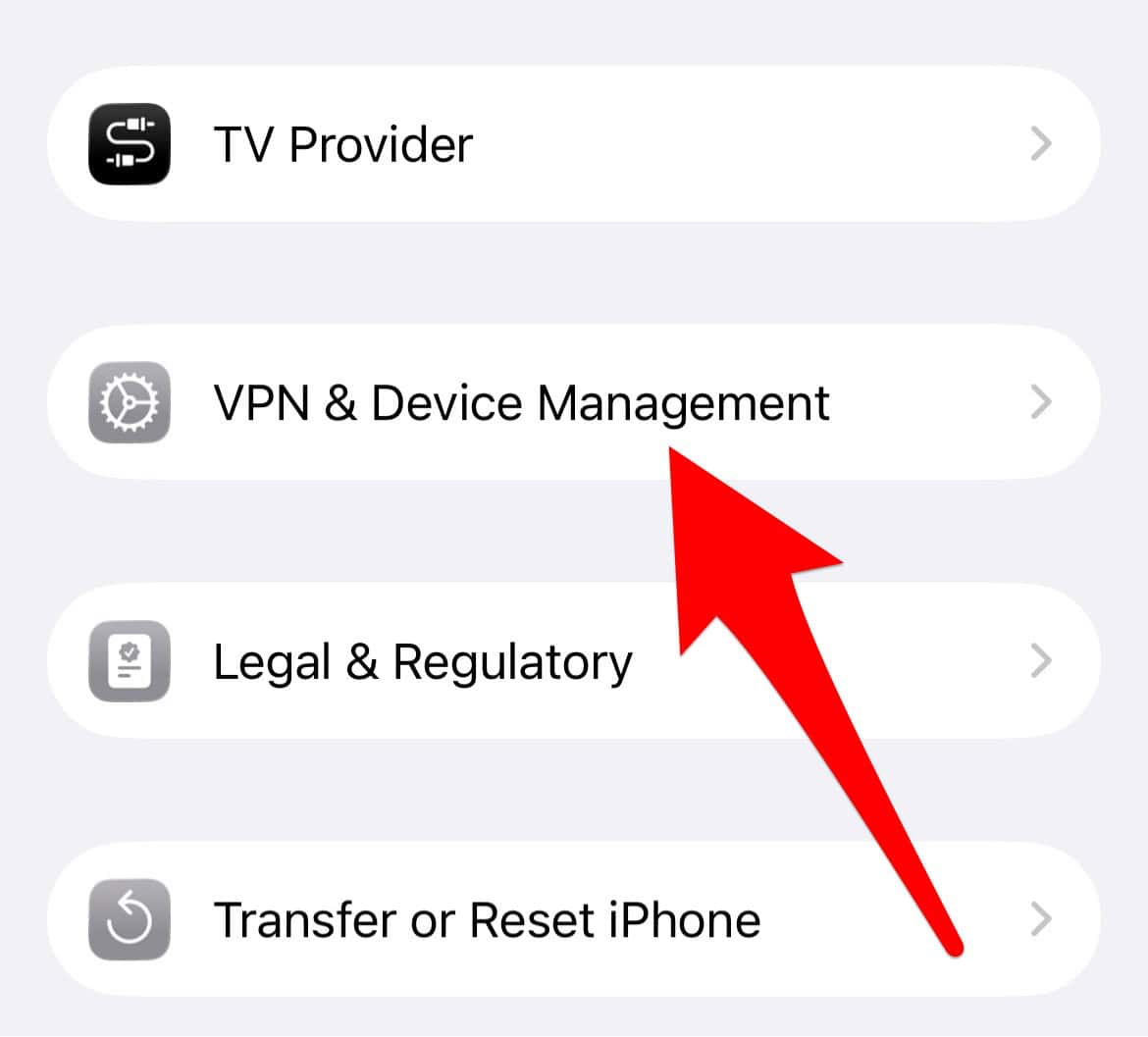
- No configuration profiles mean no active MDM enrollment.
- If a profile exists, select it.
- Look for a Remove Management button.
- The MDM administrator’s password might be required.

2. Understand the Function of iOS Management Processes
MDM-related processes appear in diagnostic logs. For instance, they show up in sysdiagnose files. This is normal system function, nevertheless. Apple includes the remote management framework in iOS. Therefore, the hooks for MDM are always present. This occurs even on unmanaged consumer devices.
To avoid misinterpreting system logs:
- Native iOS components include processes like
dmd. - These components facilitate management when necessary.
- They run in the background constantly.
- The processes wait for configuration requests to arrive.
- Process names show the MDM capability exists.
- They do not confirm active management or installation.
- Check settings, not logs, for actual enrollment.
3. Determine if the iPhone is in the Device Enrollment Program (DEP)
One of the most common causes of persistent issues involves the Device Enrollment Program (DEP). The device was likely purchased by a company or school. It was enrolled in Apple Business Manager (ABM). This links the serial number to the organization directly. Enrollment is forced even after erasing the device.
If your device is DEP-enrolled:
- Contact the seller or original owning organization.
- Request the removal of the iPhone’s serial number.
- The serial must be taken out of their ABM or ASM account.
- Otherwise, the device will prompt for MDM setup repeatedly.
4. Distinguish Carrier-Managed Wi-Fi from Corporate Control
Sometimes a profile looks like corporate management. Instead, it is a configuration installed by a cellular carrier. These facilitate access to secure Wi-Fi networks. They are often called “cellular offload networks.” Consequently, these are usually harmless. They do not equate to full corporate control.

Steps to check for carrier management:
- Check the configuration details specifically.
- Carrier profiles affect Wi-Fi or APN settings mainly.
- True MDM profiles grant broad administrative permissions.
- Permissions include remote lock and data erasure.
- You can compare your profile to the features of the 5 best MDM solutions for clarity.
5. Wipe and Restore the Device as a Last Resort
Remove a visible profile, then check for residual issues. You might encounter errors like fix the configuration for your iPad could not be downloaded.” A full wipe and restore is the most comprehensive step. This ensures a clean slate completely. Ensure the device is not DEP-enrolled beforehand.
To perform a clean restore:
- Back up your data to iCloud or your computer.
- Go to Settings > General > Transfer or Reset iPhone.

- Select Erase All Content and Settings next.
- Set up the iPhone again.
- Do not restore from a backup immediately.
- You can also use Finder/iTunes to restore the device.
- Verify the Device Management section remains empty.

FAQ
A user must physically approve the installation. This installation involves a configuration profile in Settings. Covert MDM installations are very rare. They require sophisticated, targeted zero-day exploits typically.
A Configuration Profile is simply a settings file. It contains settings like passwords or restrictions. MDM Enrollment is a specific profile type. It creates ongoing, two-way server communication. This allows remote administration to enforce policies dynamically.
Securing Your iOS Device Against Unwanted Management
Maintain device security through vigilance always. The native architecture of iOS resists unauthorized control strongly. Never approve unknown configuration profiles you see. Confirm the device is de-enrolled from previous programs completely. This minimizes the risk of unwanted MDM effectively. For full control, learn how to remove remote management on your iPhone.



My device as I found out through getting my data from Apple is under a google mdm an Apple business and Apple user education all unauthorized and I know by who also . He did have access to my iPhone once when I left it at home . He breaks into my home all the time is able to shut my adt alarm system off when I leave . I do not have wifi in my home but it says on panel he remotely turns it off. He’s in my TVs how do I know? He set up account s with my cox cable and I keep having them delete it but another one comes back up . He stolen my and my family’s ss# s and copy of birth certificates from my home . Long time ago and has used these to setup accounts under our names . I have to change credit cards constantly he charges items with them. Will go to same store I just went to and buy things so it looks like me . Uses that apple wallet I do not . Hired 3 private detectives . Police fbi been called . Killed my 3 dogs by poison in 2016 and he still doing this . I’m a prisoner in my own home . Watches me at all times . I need help oh but the thing with the profile not true. There was one time Apple found one under the vpn erased the phone it’s now hidden but if I try to go get into the account under user education it says I’m already have an account and don’t have permission to use it contact my manager or something similar to that . And he also has me at a developer at got hub. He stole my computers from my business in 2006 all have my name on them. Police never found them .. he went to prison once from me and been in prison 5 other times and arrested 87 times in my state alone . He was an employee of mine for 3 months and stole my server dialer and computers I lost my whole business 6 months later . FBI came in and helped get these losers but he was already in prison once another charge they never charged him with it . But they know he was involved to what extent they didn’t know. . Apple doesn’t help your data you get from them doesn’t give you names of the businesses on the data only numbers and nobody will tell me who or what the names of businesses are . So he’s basically stealing my money life everything from me daily . Imy question is he may have a hub or something hidden in my home and I can’t find it is this how he is getting in remotely or is it through my cox cable I use the boxes also I’ve bought 5 new phones in one year with nothing brought over from old iPhone bew Apple ID everything not even my emails I get new ones didn’t matter though within days my pictures from other phone showed up two days or day later when I didn’t do it. I did use same phone number because they at t mobile said it didn’t matter if I changed it or not . It was new phone new Apple ID . New email etc.. my phone get so hot all day it has to be charged all the time . My screens have swollen up on this iPhone 4 times on others same thing . I bought a flip phone that was good for about two weeks before I noticed stuff happening to it with different number . Can you give me any suggestions . I’m buying new iPhone or new black phone they say most private one . What do you recommend? Changing number etc.. he’s also in my husbands and two adult sons as well . Thank you