

WhatsApp is preparing a new formatting option that lets you hide parts of your messages as spoilers so recipients will not see the content right away. Instead of reading the full message instantly, people will need to tap the text to reveal it, which gives you more control when sharing sensitive details or plot points in group chats.
The feature appears in the latest WhatsApp beta for iOS 26.6.10.71 available on TestFlight, and it focuses on text messages only. Once released, you will find the Spoiler option next to existing tools such as Bold, Italic, and Strikethrough, and when you select it, WhatsApp will cover the chosen words with a gray overlay that hides the content until someone taps it.
WABetaInfo spotted references to the feature in the beta build and shared early details about how it works.
Don’t miss the best of The Mac Observer
Set us as a preferred source and our Apple reporting ranks higher in your Google Search results and Discover feed — one tap, no account changes.
“This feature is currently in development and not yet available for beta testing.”
The report explains that WhatsApp plans to add spoiler formatting directly inside the text editing menu, and it will also support a simple manual method using syntax. You can type double pipes before and after the text you want to hide, like this: ||hidden text||, and the app will automatically format it as a spoiler without opening the formatting pop-up.
How the Spoiler Feature Works
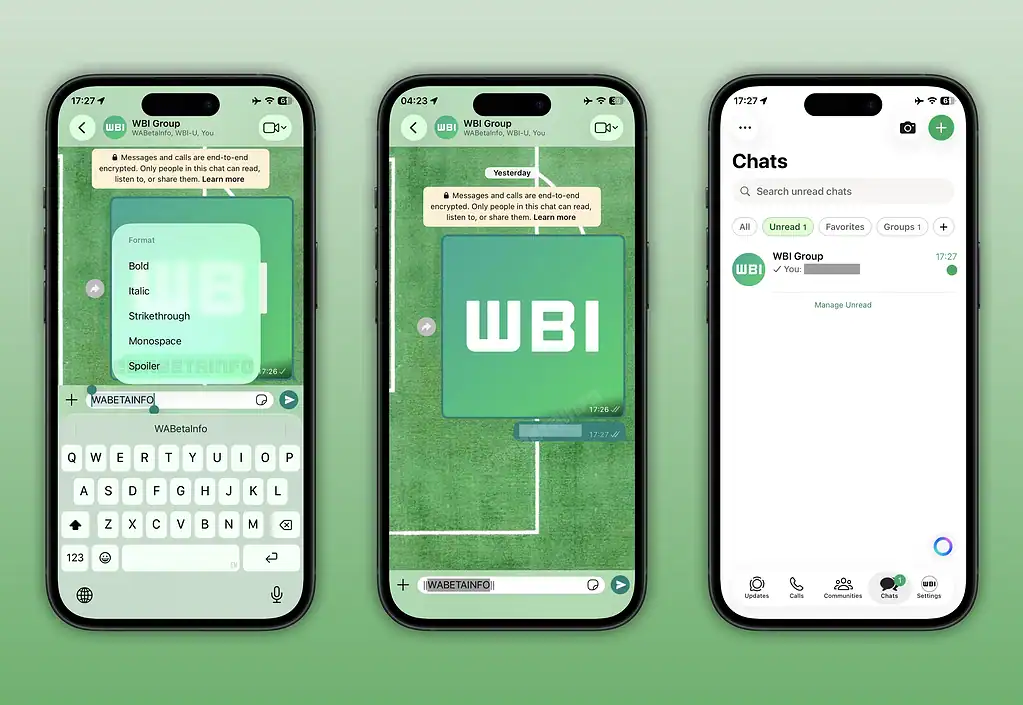
When you mark a message as a spoiler, WhatsApp hides it by default inside the chat. The recipient must tap the message bubble to reveal the text. Even after viewing it, the spoiler remains active, so if someone closes and reopens the app, they must tap again to see the content. This keeps the message concealed unless someone chooses to interact with it.
At the moment, WhatsApp is building the feature for text messages only, and there is no confirmed support for images or videos. The company is testing it on both Android and iOS to maintain a consistent experience across platforms. Beta testers may already see the option in the menu, but it does not work yet because the feature is still under development. Once testing finishes, WhatsApp will roll it out in a future update.


Discussion