

Apple used WWDC 2026 to introduce its next major software updates, led by iOS 27, macOS 27 Golden Gate, a redesigned Siri AI, and new Apple Intelligence features across its ecosystem.
The keynote focused on practical software upgrades rather than hardware. Apple announced updates for iPhone, iPad, Mac, Apple Watch, Apple Vision Pro, Apple TV, AirPods, developer tools, and several built-in apps.
The biggest story was Siri. Apple has finally given its voice assistant a much deeper AI upgrade, along with a new app, stronger context awareness, and tighter links with Spotlight, Shortcuts, Safari, Photos, Messages, and other system apps.
Don’t miss the best of The Mac Observer
Set us as a preferred source and our Apple reporting ranks higher in your Google Search results and Discover feed — one tap, no account changes.
Apple also refined the Liquid Glass design, added new privacy and parental controls, improved performance across devices, and released the first developer betas for iOS 27, iPadOS 27, and macOS 27 after the keynote.
Here is everything Apple announced at WWDC 2026.
WWDC 2026 announcements at a glance
| Category | Main announcement |
|---|---|
| iPhone | iOS 27 with Siri AI, Liquid Glass improvements, smarter apps, and performance upgrades |
| iPad | iPadOS 27 with desktop-style changes, better multitasking, Siri AI, and faster app launches |
| Mac | macOS 27 Golden Gate with Siri in Spotlight, improved search, and Apple Intelligence features |
| Apple Watch | watchOS 27 with new workout, sleep, gesture, and app grid changes |
| Vision Pro | visionOS 27 with more Apple Intelligence and visual features |
| Apple TV | tvOS 27 with smaller feature updates and compatibility changes |
| AirPods | Custom EQ and more personal audio controls |
| Developers | New Xcode and Foundation Models framework improvements |
| Apple Intelligence | Wider app integration, better writing tools, visual intelligence, and AI-powered automation |
Siri AI was the biggest WWDC 2026 announcement

Apple’s biggest WWDC 2026 announcement was Siri AI, a major rebuild of Siri for the modern AI era.
The new Siri can understand more natural requests, keep better context, and work across apps in a more useful way. Apple also introduced a standalone Siri app, which gives users a place to continue longer conversations and revisit past interactions.
This is a major shift from the old Siri experience, which often worked best for simple commands like setting timers, starting calls, or checking the weather. With Siri AI, Apple wants the assistant to handle more detailed tasks.
For example, Siri can help compare files, create shortcuts from natural language, summarize content, and respond based on what is visible on screen.
Siri gets a dedicated app

One of the more surprising changes is the new Siri app.
Instead of keeping Siri only as a voice assistant that appears briefly on top of the screen, Apple now gives it a full app experience. This makes Siri feel closer to a proper AI assistant, especially for longer conversations.
The app can show previous chats, continue tasks, and help users manage more complex requests. It also works with text and voice, which makes it more flexible for users who do not always want to speak to their device.
On iPhone and iPad, this gives Siri a clearer role inside iOS 27 and iPadOS 27. On Mac, it connects more closely with Spotlight.
Siri AI comes to Spotlight on Mac

macOS 27 Golden Gate brings Siri AI directly into Spotlight.
This means Mac users can start rich Siri conversations from the same place they already use to search for apps, documents, settings, and web results. Apple has also rebuilt parts of its search infrastructure across platforms, which should make search feel faster and more useful.
For Mac users, this is one of the most important changes in macOS 27. Spotlight has always been a fast launcher and search tool, but Siri AI turns it into a more powerful command center.
Users can ask questions, search files, create actions, and get help without opening several different apps.
Apple Intelligence expands across apps
Apple also announced new Apple Intelligence features across many built-in apps.
The company is bringing smarter tools to Photos, Safari, Shortcuts, Messages, Calls, Calendar, Reminders, Wallet, Passwords, Home, and more.
Apple wants AI features to feel built into the device rather than added as a separate layer.
Some of the biggest Apple Intelligence updates include:
- Smarter Writing Tools in iOS 27
- AI-powered tab organization in Safari
- Natural language creation in Shortcuts
- AI reframing and editing tools in Photos
- Context-aware features in Calls and Messages
- AI-generated video descriptions in the Home app
- Smart Calendar and Reminders suggestions
- Passwords app fixes for weak and compromised passwords
These updates make Apple Intelligence a much larger part of the Apple ecosystem.
iOS 27 brings a long list of iPhone upgrades

iOS 27 is the biggest update for iPhone users this year.
Apple has focused on AI, performance, design, and practical app improvements. The update does not appear to be built around one single visual change. Instead, it improves many parts of the system.
The main iOS 27 highlights include:
- Siri AI and the new Siri app
- Liquid Glass transparency controls
- Smarter Safari features
- Better Shortcuts creation
- Photos editing and slideshow tools
- New parental controls
- Apple Intelligence in Calls and Messages
- Wallet pass creation
- Better Genmoji tools
- Independent alarm volume
- Faster AirPlay
- Updated Camera app
- New Health tracking features
- Improved CarPlay features
Apple also confirmed that iOS 27 supports iPhone 11 and newer, which is good news for users who are still using older models.
Liquid Glass gets more control

Apple introduced Liquid Glass last year, but the design received mixed feedback from users who wanted better readability and more control.
At WWDC 2026, Apple responded with new Liquid Glass improvements in iOS 27 and macOS 27.
The biggest change is a new transparency slider. This lets users adjust how clear or solid the interface looks.
That matters because some users like the modern glass-style look, while others prefer a cleaner and more readable interface. The new slider gives both groups more control.
Apple also refined icons, window corners, sidebars, and system visuals across its platforms.
Safari gets smarter in iOS 27

Safari is getting several AI-powered changes in iOS 27.
One useful new feature lets Safari monitor a webpage and notify users when it changes. This can help with pages that update prices, availability, results, articles, or other live information.
Safari also gets AI tab organization. This should make it easier to manage large numbers of open tabs without sorting everything manually.
Apple is also adding AI-generated extensions, which could make Safari more useful for custom workflows. This looks especially helpful for users who rely on Safari for research, shopping, reading, and work.
Shortcuts gets natural language creation
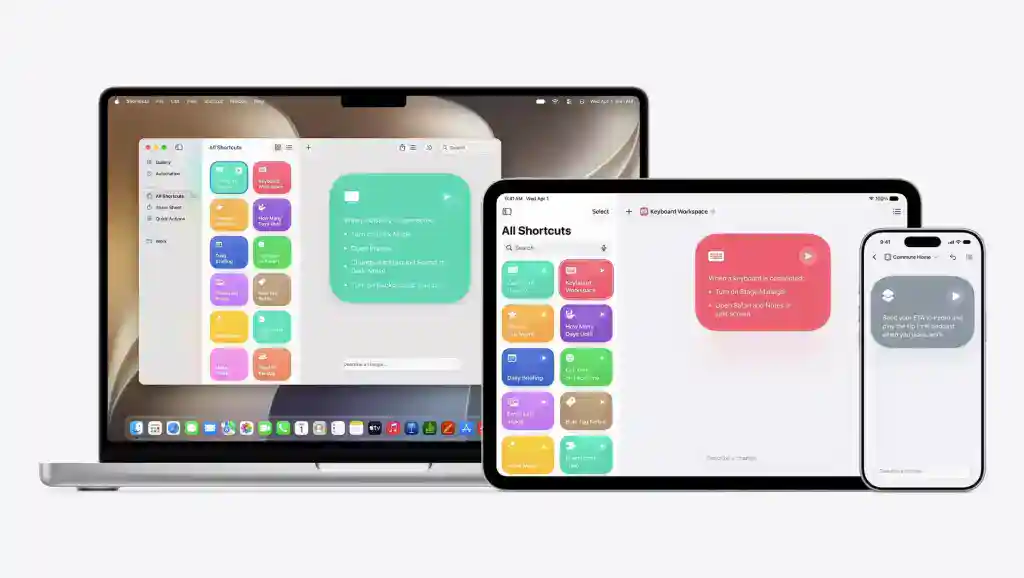
Apple is making Shortcuts easier to use in iOS 27.
Users can now create shortcuts with natural language. Instead of manually building every step, they can describe what they want the shortcut to do.
This is one of the most practical Apple Intelligence updates. Shortcuts has always been powerful, but many users avoid it because it can feel complicated.
With natural language support, more people can build automations for daily tasks, work routines, smart home actions, file management, and app workflows.
Photos gets AI editing and slideshow tools

The Photos app is also getting major Apple Intelligence upgrades.
Apple is adding AI reframing and editing tools, which can help improve photos without needing a separate editing app. The company also updated Image Playground with photorealistic generation and new editing options.
Another useful change is the new slideshow maker in Photos. Users can finally create better slideshows from their photo library and turn memories into more polished videos.
These changes make Photos more useful for casual users, creators, and families who want simple editing tools inside the default app.
Visual Intelligence expands in iOS 27
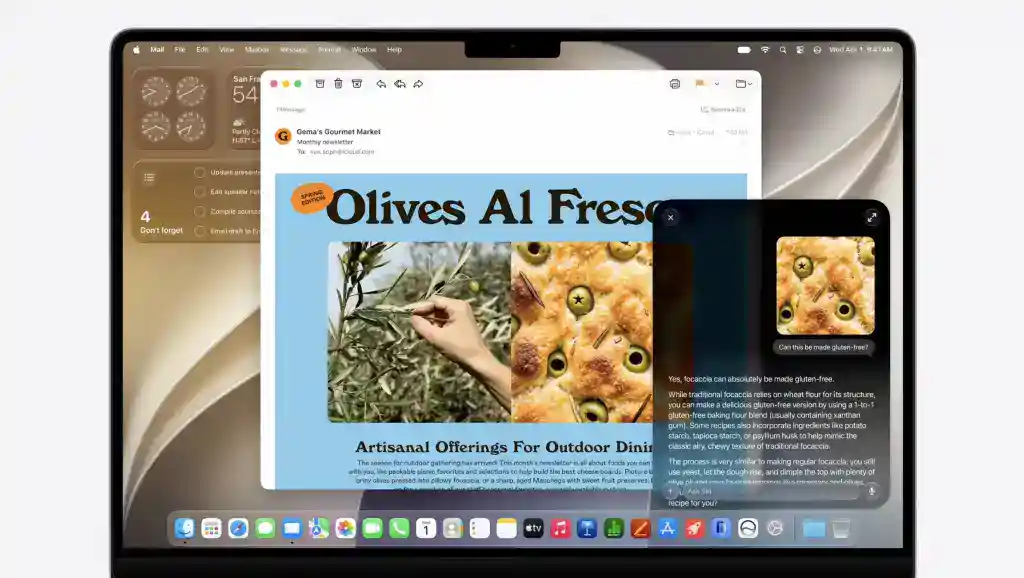
Apple is expanding Visual Intelligence with new features like bill splitting, nutrition insights, and support for visionOS.
This means users can point their device at real-world objects, text, food, receipts, or other visual information and get more useful actions.
For example, Visual Intelligence can help understand a restaurant bill, identify food details, or give more information about something shown on screen.
This feature fits Apple’s broader AI direction. The company wants devices to understand more context from the screen, camera, and apps while keeping the experience private.
Messages and Calls get contextual AI features

Apple Intelligence is also coming to Calls and Messages in smarter ways.
iOS 27 adds contextual features that can understand conversation details and suggest useful actions. This could include reminders, replies, follow-ups, or other helpful prompts based on what someone said.
Apple has been careful with communication features, so these tools are expected to focus on convenience rather than replacing personal conversations.
The goal is to save time and reduce missed details during calls and chats.
Calendar and Reminders get smarter
Calendar and Reminders are also getting new AI features in iOS 27.
Apple is adding natural language support, which should make it easier to create events, reminders, and task lists.
Users can type or speak a request in a normal sentence, and the system can turn it into the right entry.
For example, users should be able to ask for a reminder based on a message, an email, a date, or a plan without manually filling every field.
Passwords app can fix weak passwords
Apple’s Passwords app is getting a more active security role in iOS 27.
The app can now automatically fix weak and compromised passwords with agentic AI. This means it can help users move from unsafe passwords to stronger ones with less manual work.
This is a useful update because many people ignore password warnings when the fix takes too much effort.
Apple is making password security more automatic while keeping it inside its own system.
iOS 27 adds new parental controls

Apple also announced stronger parental controls in iOS 27.
The new tools include:
- Ask to Browse
- Time Allowances
- A redesigned Screen Time experience
- Better controls for child accounts
- Safer browsing and app access tools
These changes give parents more control without forcing them to manage every setting manually.
The redesigned Screen Time experience should also make it easier to understand how children use their devices.
Camera app gets Siri Mode and a new UI
The iOS 27 Camera app gets an updated interface and a new Siri Mode.
Apple has not turned the Camera app into a complicated editing tool, but it is adding smarter assistance inside the shooting experience.
Siri Mode could help users adjust settings, understand scenes, or trigger actions with voice commands.
The updated UI should also make the Camera app feel cleaner and more consistent with Apple’s wider design changes.
Wallet gets Create a Pass
The Wallet app is getting a new Create a Pass feature in iOS 27.
This should let users create digital passes more easily, which can be useful for tickets, memberships, events, and other items that belong in Wallet.
Apple has been making Wallet more useful each year, and this feature continues that pattern.
It also reduces the need for third-party apps that only exist to store simple passes.
Genmoji gets a major update
Apple is also improving Genmoji in iOS 27.
The new version gives users more control over how they create and edit custom emoji-style images. Apple has also updated Image Playground, so creative tools across iOS feel more connected.
Genmoji started as a fun Apple Intelligence feature, but with iOS 27, it looks more flexible and useful for messaging.
Health adds menopause tracking
The Health app is adding perimenopause and menopause tracking in iOS 27.
This gives users more ways to track health changes over time inside Apple’s default Health app.
Apple has steadily expanded Health beyond basic fitness and heart data, and this update adds another important area of personal health tracking.
CarPlay gets new iOS 27 features
Apple also announced new CarPlay features tied to iOS 27.
One of the notable additions is support for video apps. This will likely depend on safety rules and whether the car is parked, but it gives CarPlay a broader entertainment role.
Apple is also improving the overall CarPlay experience as it continues preparing for next-generation CarPlay adoption across more vehicles.
iPadOS 27 makes the iPad more desktop-like
Apple announced iPadOS 27 with performance upgrades, Siri AI, Liquid Glass refinements, and more desktop-style features.
The iPad already gained a more flexible windowing system in recent updates. With iPadOS 27, Apple is adding a persistent menu bar, which makes the iPad feel closer to a Mac for productivity work.
The update also improves app launch speeds, file transfers, AirDrop performance, Safari, Shortcuts, Photos, accessibility, and parental controls.
For iPad users, the main focus is clear. Apple wants the iPad to feel faster, smarter, and more useful for work.
iPadOS 27 compatibility changes
iPadOS 27 drops support for several older iPads.
This is not unusual for a major iPadOS update, especially as Apple adds more AI and performance-heavy features.
Users with newer iPad models will get the full iPadOS 27 experience, while some older devices will stay on earlier software.
macOS 27 Golden Gate announced
Apple officially announced macOS 27 Golden Gate at WWDC 2026.
The update focuses on Siri AI, Spotlight, faster search, Liquid Glass refinements, Visual Intelligence, parental controls, and Apple Intelligence features across the Mac.
The name Golden Gate continues Apple’s California-themed macOS naming style.
This update looks especially important for users who rely on Spotlight, automation, and AI tools for daily work.
macOS 27 drops Intel Mac support
One of the biggest macOS 27 changes is compatibility.
macOS 27 Golden Gate drops support for Intel-based Macs and focuses on Apple silicon. This is a major step in Apple’s transition away from Intel Macs.
The move allows Apple to build more features around its own chips, especially AI features that need newer Apple silicon hardware.
However, it also means some older Mac users will need to stay on macOS 26 or upgrade their hardware.
watchOS 27 adds new Apple Watch features
Apple announced watchOS 27 with several updates for Apple Watch users.
The update includes:
- Dynamic app grid
- New gesture control
- Workout Buddy upgrades
- Better sleep tracking
- More health and fitness improvements
- Compatibility changes
The Dynamic App Grid should make navigation feel more flexible. New gesture controls could make the watch easier to use when users cannot tap the screen.
Workout Buddy upgrades and sleep tracking improvements continue Apple’s focus on health and fitness.
watchOS 27 compatibility changes
watchOS 27 drops support for Apple Watch Series 8, Apple Watch Ultra 1, Apple Watch SE 2, and older models.
This is a major compatibility change, especially because many users still own those watches.
There was also confusion around Apple Watch Series 9 after it was reportedly left off a compatibility list by mistake. Apple is expected to clarify final compatibility details before the public release.
visionOS 27 improves Apple Vision Pro
Apple also announced visionOS 27 for Apple Vision Pro.
The update brings more Apple Intelligence features, expanded Visual Intelligence support, and improvements designed around spatial computing.
Vision Pro remains a smaller platform compared with iPhone, iPad, and Mac, but Apple continues to build it into the wider ecosystem.
The important part is that visionOS is no longer separate from Apple’s AI strategy. Visual Intelligence and Siri AI are now part of the Vision Pro story too.
tvOS 27 gets smaller updates
Apple also introduced tvOS 27, although it did not receive the same stage time as iOS 27, macOS 27, or Siri AI.
The update includes new features for Apple TV, along with compatibility changes that drop support for two older Apple TV models.
Apple TV updates are usually smaller than iPhone and Mac updates, but tvOS remains important for Apple’s living room strategy, gaming, streaming, and smart home experience.
AirPods get Custom EQ
Apple announced Custom EQ for AirPods.
This gives users more control over how their AirPods sound. Instead of relying only on Apple’s default tuning, users can adjust audio based on their preference.
This is a useful feature for people who want stronger bass, clearer vocals, or a more balanced sound.
Apple has already added several accessibility and hearing-related features to AirPods in recent years, and Custom EQ gives users another way to personalize the experience.
Developers get Xcode and Foundation Models updates
WWDC is mainly a developer event, so Apple also announced updates for Xcode and its developer frameworks.
The biggest developer story is the improved Foundation Models framework. This helps developers build apps that use Apple Intelligence and on-device AI features.
Apple is also improving Xcode, which should help developers build, test, and ship apps for iOS 27, iPadOS 27, macOS 27, watchOS 27, tvOS 27, and visionOS 27.
These tools matter because many of the features Apple announced will become more useful when third-party apps support them.
Apple Intelligence has new hardware limits
Apple also confirmed that its most powerful on-device AI features require newer hardware.
Some advanced Apple Intelligence features need the latest iPhone and Mac hardware, including models with stronger chips and more memory.
This is expected because AI features need more processing power, but it also means not every device that gets iOS 27 or macOS 27 will get every AI feature.
Users should check feature compatibility before expecting the full Siri AI and Apple Intelligence experience.
iCloud Shared Albums expand beyond Apple devices
Apple also announced that full-resolution iCloud Shared Albums are coming to Android and Windows.
This is a notable change because Shared Albums have always worked best inside Apple’s ecosystem.
With this update, users can share high-quality albums with friends and family even if they do not use iPhone, iPad, or Mac.
It also makes iCloud Photos more useful for mixed-device households.
iOS 27 hints at foldable iPhone preparation
iOS 27 also includes signs that Apple is preparing for a foldable iPhone.
References to app resizability and new framework strings suggest Apple is building software support for more flexible screen sizes.
Apple did not announce a foldable iPhone at WWDC 2026, but software support usually appears before new hardware.
This makes iOS 27 an important update for Apple’s future device plans.
Developer betas are available now
Apple released the first developer betas of iOS 27, iPadOS 27, and macOS 27 after the keynote.
These betas are meant for developers who need to test apps before the public release.
Regular users should avoid installing early developer betas on their main devices because bugs, battery drain, app crashes, and missing features are common in early software.
Apple is expected to release public betas later, followed by final versions in the fall.
WWDC 2026 was also Tim Cook’s final keynote as CEO
WWDC 2026 also had a major leadership moment.
Tim Cook delivered farewell remarks at the end of his final Apple keynote as CEO. Apple’s leadership transition adds extra weight to this year’s event.
Cook’s final keynote focused on Apple’s software future, especially AI, platform integration, privacy, and Apple silicon.
That makes WWDC 2026 one of the most important Apple events in recent years.
What WWDC 2026 means for Apple users
WWDC 2026 shows where Apple is heading next.
The company is putting AI inside its core apps, rebuilding Siri, improving performance, and giving users more control over design and privacy.
For iPhone users, iOS 27 brings the most visible changes. For Mac users, macOS 27 Golden Gate makes Spotlight and Siri more powerful. For iPad users, iPadOS 27 continues the move toward a more desktop-like experience.
Apple Watch, Vision Pro, Apple TV, and AirPods also get useful updates, though they play smaller roles in this year’s keynote.
Wrap Up
WWDC 2026 was one of Apple’s most AI-focused events yet.
The biggest announcement was clearly Siri AI, but the keynote also brought important updates to iOS 27, iPadOS 27, macOS 27 Golden Gate, watchOS 27, visionOS 27, tvOS 27, AirPods, iCloud, and developer tools.
Apple is not just adding AI as a separate feature. It is building it into everyday apps and system tools.
For users, the most important changes are smarter Siri, better Safari, easier Shortcuts, stronger parental controls, improved Photos tools, more flexible Liquid Glass settings, and better performance across devices.
The developer betas are already available, while public betas and final releases will arrive later. If you plan to install iOS 27 or macOS 27 early, use a secondary device and back up your data first.


Discussion