
The glowing Apple logo on the new touchscreen MacBook Pro runs on a strip of just four LEDs, and iFixit had to destroy a display to see them. In its teardown of the 14-inch MacBook Pro with PROLED XDR Display, iFixit says the glass separated from the layers underneath during removal, and the OLED and touch layers cracked.
The $2,899 laptop still earned a 5 out of 10 repairability score, one point better than the M5 MacBook Pro iFixit opened last year.
Four LEDs, a reflective layer and a diffuser light the MacBook Pro’s Apple logo
OLED pixels make their own light, so the PROLED panel has no backlight for the logo to borrow. iFixit found an LED strip with four LEDs along one edge of the logo. Their light passes through a reflective layer and then a diffuser, which turns four bright points into one even glow. A mirror-like coating gives the logo its shiny look when the LEDs are off. Two rigid foam pads sit on either side, likely to back the OLED when you press the glass.
Don’t miss the best of The Mac Observer
Set us as a preferred source and our Apple reporting ranks higher in your Google Search results and Discover feed — one tap, no account changes.
iFixit calls the logo “the most useless feature” of the display and says reaching it takes an “insane repair path.” The LEDs sit behind the panel under a taped patch in the middle, so you can’t get to them without taking the screen out. If the logo ever goes dark, iFixit’s advice is simple. Live without it.
So software is the only practical way to manage that glow. You can turn the glowing logo off with one Terminal command or dim it with the Backglow app.
Pulling the PROLED panel out in one piece cracked the OLED and the touch layer
iFixit warmed the display and pried at it, hoping to free the panel on its own. The rubber trim lifted, the glass delaminated, and both the OLED and the capacitive touch layer cracked. In practice, a display repair on this Mac means replacing the whole lid.
The good news is that iFixit calls the lid “just as easy to replace as last year.” It comes off as one assembly, and there’s no separate lid angle sensor. iFixit notes Apple hasn’t listed PROLED parts on its Self Service Repair site yet, and it expects a touch lid to cost more than a non-touch one.
Apple says a newly designed hinge gives the screen more stability when you touch it. iFixit found the PROLED model and the M6 MacBook Pro use nearly identical three-screw hinges. The PROLED version wobbles a bit less, which iFixit puts down to minor spring tuning. It found no link to the iPhone Duo hinge.
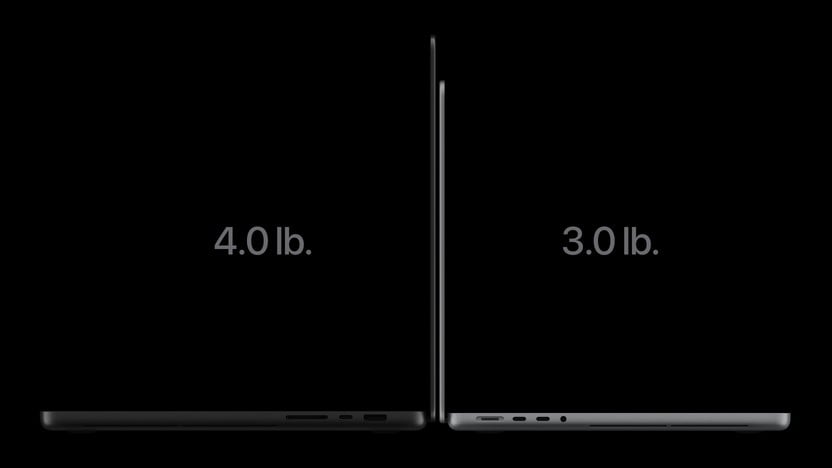
iFixit’s scale shows where Apple cut weight from the 3-pound touchscreen model
Apple lists the 14-inch PROLED model at 3 pounds. iFixit puts it at 1.38 kg, 170 grams lighter than the 14-inch M6 MacBook Pro.
| Part | 14-inch M6 MacBook Pro | 14-inch PROLED MacBook Pro |
|---|---|---|
| Lower chassis with bottom cover | 456 g | 364 g |
| Display assembly | 485 g | 384 g |
| Speakers | 29 g | 39 g |
The display lost 101 grams despite the added touch layer and logo LEDs. The bottom covers account for 44 of the 92 grams saved in the chassis, and the smaller trackpad saves 8 grams. The speakers got heavier, which fits Apple’s claim of 50 percent deeper bass.
The 72.6Wh battery weighs 276 grams, just 2 grams less than the M6 battery. It still uses pull tabs, which iFixit struggled to remove intact. It wants a screwed-down battery like the MacBook Neo has, or the electrically debondable adhesive Apple uses in the iPhone.
Touch ID and the touchscreen kept working after a logic board swap, unlike on the M5
iFixit moved a donor logic board into the laptop, and Apple’s Repair Assistant recognized the battery, display and Touch ID sensor on first boot. After a few key presses and a reboot, True Tone, brightness control and the touchscreen all worked. The touchscreen didn’t need calibration. Last year’s M5 MacBook Pro failed Touch ID calibration in the same kind of test.
Four pentalobe screws hold the bottom cover. But the fans and USB-C ports still sit under the logic board, so replacing either one means pulling the board first. The HDMI port and SDXC card reader are soldered to the board, and so are the storage and unified memory.
Why iFixit’s 5 out of 10 score would drop to 4 under its 2027 rules
iFixit docked points because the modular USB-C ports still need the logic board out and a fan swap still eats a full afternoon. Starting in 2027, its scorecard will penalize soldered memory more heavily, and under that rule this Mac would score a 4. The keyboard is also part of the aluminum top case, so replacing it means removing the battery. The MacBook Neo lets you swap the keyboard on its own.
For buyers, the takeaway is practical. You can’t add memory or storage later, so pick the configuration you’ll need for years. Treat the display, touch layer and logo as one expensive part, because a cracked screen or a dead logo means a new lid. And if a repair shop ever swaps your logic board, iFixit’s test suggests Touch ID and touch input should come back after Repair Assistant runs, which wasn’t a given on last year’s model.


Discussion