
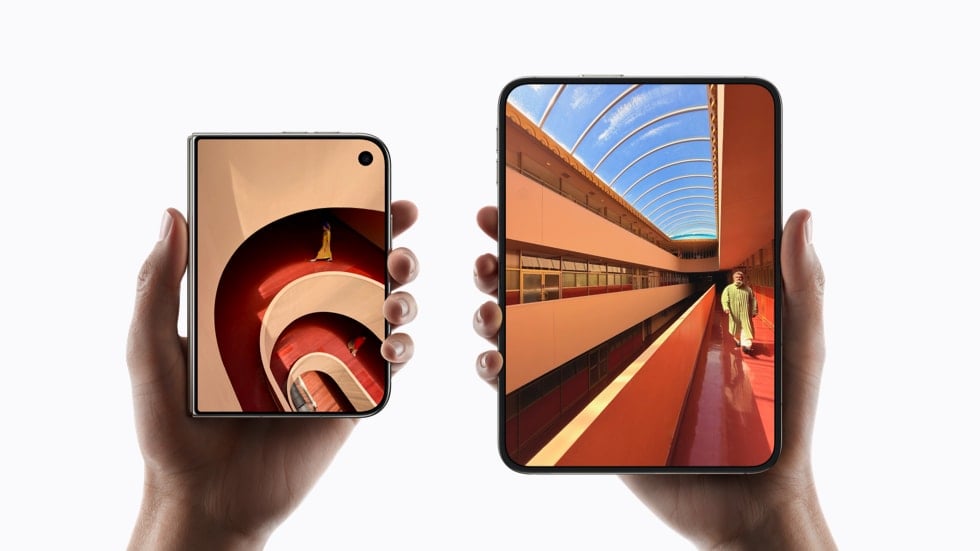
Apple’s support guide for cleaning nano-texture displays now includes the iPhone Duo. The updated document, which carries a November 5, 2026 publish date, says “iPhone Duo comes with a nano-texture cover layer on the inner display,” and tells you to wipe it with an Apple Polishing Cloth or another microfiber cloth made for displays.
That’s the same advice Apple gives for a nano-texture Studio Display or MacBook Pro. The difference is that you press your thumbs into the iPhone Duo’s inner screen all day, and Apple doesn’t put a cloth in the box.
What Apple says you can use to clean the iPhone Duo’s nano-texture inner screen
Apple’s guide keeps it short. It says the cleaning method is the same across its nano-texture products, and lists three things you can use to remove dust and smudges:
Don’t miss the best of The Mac Observer
Set us as a preferred source and our Apple reporting ranks higher in your Google Search results and Discover feed — one tap, no account changes.
- A clean Apple Polishing Cloth
- Another microfiber cloth made for electronic displays
- A fabric blended from cotton and elastane or spandex
For smudges that won’t come off, Apple allows you to dampen the cloth with a 70 percent isopropyl alcohol solution, but only “infrequently.” Read that as an occasional fix for an oily mark, not a daily wipe down. Apple also says to keep the cloth itself clean: hand wash it with dish soap and water, rinse it well, and let it air dry for at least 24 hours.
Apple’s iPhone Duo tech specs describe the inner display as having a nano-texture finish with a fingerprint-resistant oleophobic coating and an anti-reflective coating. The front, which holds the outer display, gets Ceramic Shield 2 instead, so the special care applies to the folding screen inside. When Apple unveiled the iPhone Duo, it said a scratch-resistant coating and a nano-textured cover layer protect that 7.6-inch inner display.
iPhone Duo ships without a Polishing Cloth, unlike a nano-texture MacBook Pro
Open an iPhone Duo box and you’ll find the phone and a 1 meter USB-C charge cable. That’s it, according to Apple’s spec page.
Compare that with the MacBook Pro with PROLED XDR Display. Apple’s spec page lists a “Polishing cloth (only with nano-texture glass option)” in the box for every 14-inch and 16-inch configuration. So if you order a touchscreen MacBook Pro with nano-texture glass, Apple hands you the cloth it recommends. Buy an iPhone Duo, which has nano-texture on every unit, and you’re on your own.
It’s an easy thing to miss. Apple’s list is short on purpose. A paper towel, a kitchen sponge or the hem of your shirt isn’t on it, and neither is a household glass cleaner.
Why Apple wants a gentle touch on the iPhone Duo’s replaceable cover layer
The inner screen has had a rough start. Apple confirmed a replaceable cover layer sits over the folding panel, and a video has since shown ripples where that matte layer was peeled back.
Apple’s own repair procedure for the iPhone Duo cover layer shows how careful it is with that panel. The guide is written for technicians, not owners. It tells them to peel the old layer at a 45 degree angle to limit adhesive residue, not to use hard or sharp tools to lift it, and to clean leftover adhesive from the display with an ethanol wipe. It says plainly, “Don’t use IPA wipes.”
That rule covers the bare panel under the cover layer during a repair. It doesn’t contradict the consumer guide, which allows a little 70 percent isopropyl alcohol on a cloth for the cover layer you actually touch. But it’s a good hint about where the line sits. The fewer chemicals and the less pressure you use on that screen, the better.
A simple cleaning routine for iPhone Duo and touchscreen MacBook Pro owners
Based on Apple’s guidance, here’s a routine that stays inside the rules for both devices:
- Wipe with a dry Polishing Cloth or display microfiber cloth first. Save the alcohol for later.
- Only for stubborn marks, lightly dampen the cloth with 70 percent isopropyl alcohol. Put the alcohol on the cloth, not on the screen.
- Wash the cloth by hand with dish soap and water when it gets dirty, and give it 24 hours to dry.
- Keep a dedicated cloth for the matte screens. Don’t reuse one that has picked up dust from a desk or a bag.
Apple’s general cleaning guide for its products doesn’t mention the iPhone Duo or the PROLED MacBook Pro yet, so the nano-texture document is the one to follow for both.


Discussion