
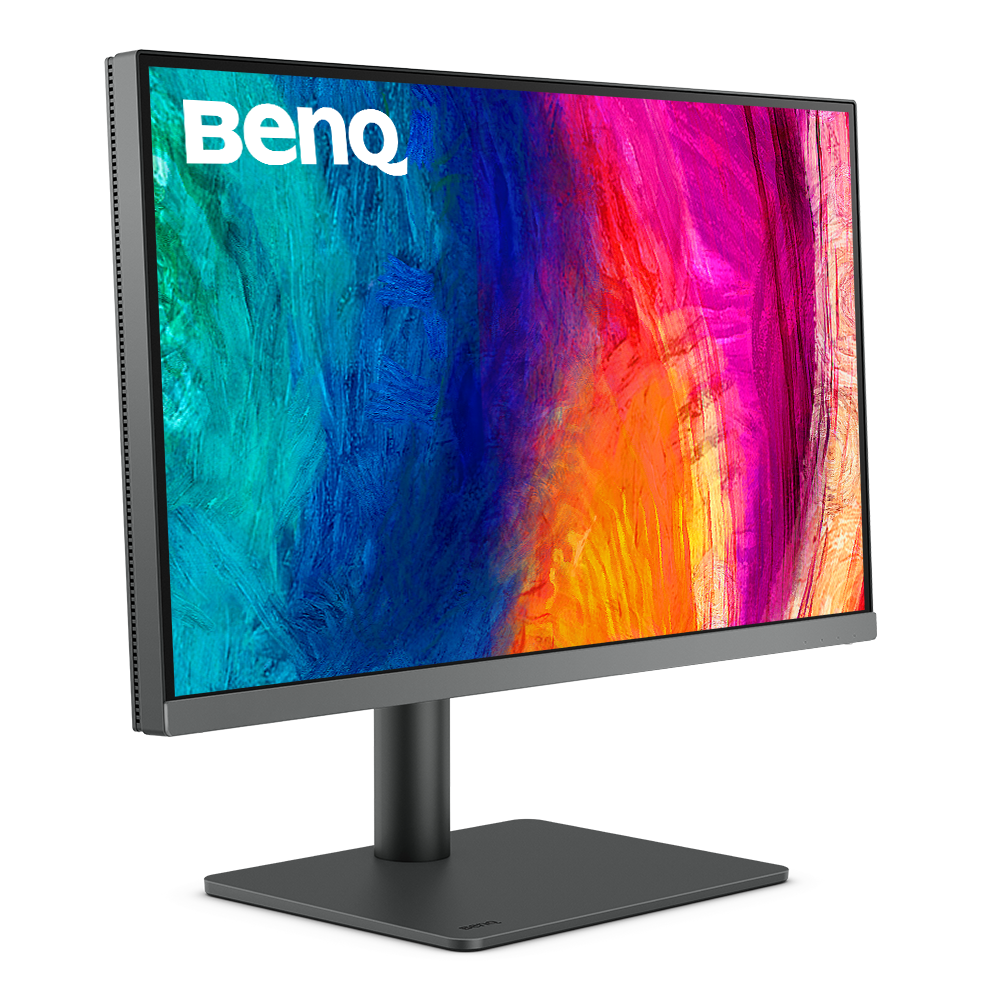
BenQ’s 27-inch PD2706U 4K monitor is $399.99 on Amazon, down from $649, a $249.01 saving. Its 27-inch QHD sibling, the PD2706QN, is $299.99, down from $399.99. Both run a MacBook and charge it over one USB-C cable at up to 90W, which is the reason to pick them over a cheaper monitor that needs a second cable and a power brick.
We checked the price, seller and stock on Amazon on November 14, 2026. Both monitors are sold by BenQ’s own Amazon store, BenQ INFTY Lab, rather than a third-party reseller.
One USB-C cable charges your MacBook and drives the BenQ screen at the same time
BenQ’s spec sheets for the PD2706U and the PD2706QN list a USB-C port with 90W Power Delivery, DisplayPort Alt Mode and data. Plug that one cable into your Mac and you get the picture, the monitor’s USB ports and charging together. BenQ also says Thunderbolt 3 and 4 devices work with the PD2706U’s USB-C port.
Don’t miss the best of The Mac Observer
Set us as a preferred source and our Apple reporting ranks higher in your Google Search results and Discover feed — one tap, no account changes.
Ninety watts covers every current MacBook Air comfortably. Apple’s MacBook Air specs say the M5 model ships with a 40W adapter and needs a 70W or higher USB-C source for fast charging. The MacBook Neo ships with a 20W adapter, and Apple says only its left USB 3 port carries a display signal, so that’s the one to plug the BenQ into.
The monitor also fixes the Neo’s port shortage. The Neo has two USB-C ports and a headphone jack. Both BenQs add three USB-A ports and one USB-C downstream port, and both have a KVM switch if you share the screen with a work PC.
| Spec | BenQ PD2706U | BenQ PD2706QN |
|---|---|---|
| Amazon price | $399.99 (list $649) | $299.99 (list $399.99) |
| Saving | $249.01 | $100 |
| Resolution | 3840 x 2160 (4K) | 2560 x 1440 (QHD) |
| Refresh rate | 60Hz | 100Hz |
| Brightness | 350 nits typical, 400 HDR peak | 350 nits typical, 400 HDR peak |
| Color | 95% P3, 100% sRGB | 95% P3, 100% sRGB |
| USB-C charging | 90W | 90W |
| Speakers | 2.5W x 2 | 3W x 2 |
BenQ’s M-book mode and Display Pilot 2 make the screens behave more like Apple’s
BenQ builds in a few things for Mac owners. Its PD2706U page says the monitor ships with default color settings meant to match Mac and MacBook Pro colors, and an M-book mode handles that color matching. BenQ’s Display Pilot 2 app adds ICCsync for color profiles and lets you change the monitor’s brightness from your Mac keyboard. BenQ says that keyboard control only works on Mac devices running Display Pilot 2.
One limit is spelled out on BenQ’s PD2706QN page: Mac devices do not support DisplayPort MST. So the PD2706QN’s daisy-chain output won’t let you hang a second screen off it from a Mac.
Which BenQ fits your Mac: the 4K PD2706U or the QHD PD2706QN
For a MacBook Neo, get the PD2706U. Apple says the Neo supports one external display at up to 4K at 60Hz, and that’s exactly what this BenQ runs. Apple’s Neo page lists nothing about QHD at 100Hz, so it doesn’t confirm the PD2706QN’s faster refresh on that laptop.
For an M5 MacBook Air or MacBook Pro, it comes down to sharpness against smoothness. The PD2706U packs about 163 pixels per inch at 27 inches, so text looks crisper. The PD2706QN sits around 109 pixels per inch but scrolls at 100Hz, and it costs $100 less.
Against Studio Display at $1,599, the PD2706U is $1,199.01 cheaper and gives up only 6W of charging, 96W against 90W. You do drop from 5K to 4K and lose the built-in camera. If you’re kitting out a new Neo, our look at Satechi color-matched MacBook Neo accessories covers the rest of the desk.
Pick the BenQ PD2706U at $399.99 if you want the sharper 4K screen and a one-cable MacBook desk. Pick the PD2706QN at $299.99 if you’d rather keep $100 and get a smoother 100Hz panel.
MacObserver may earn a commission when you buy through links on this page. It doesn’t change the price you pay.
Discussion