
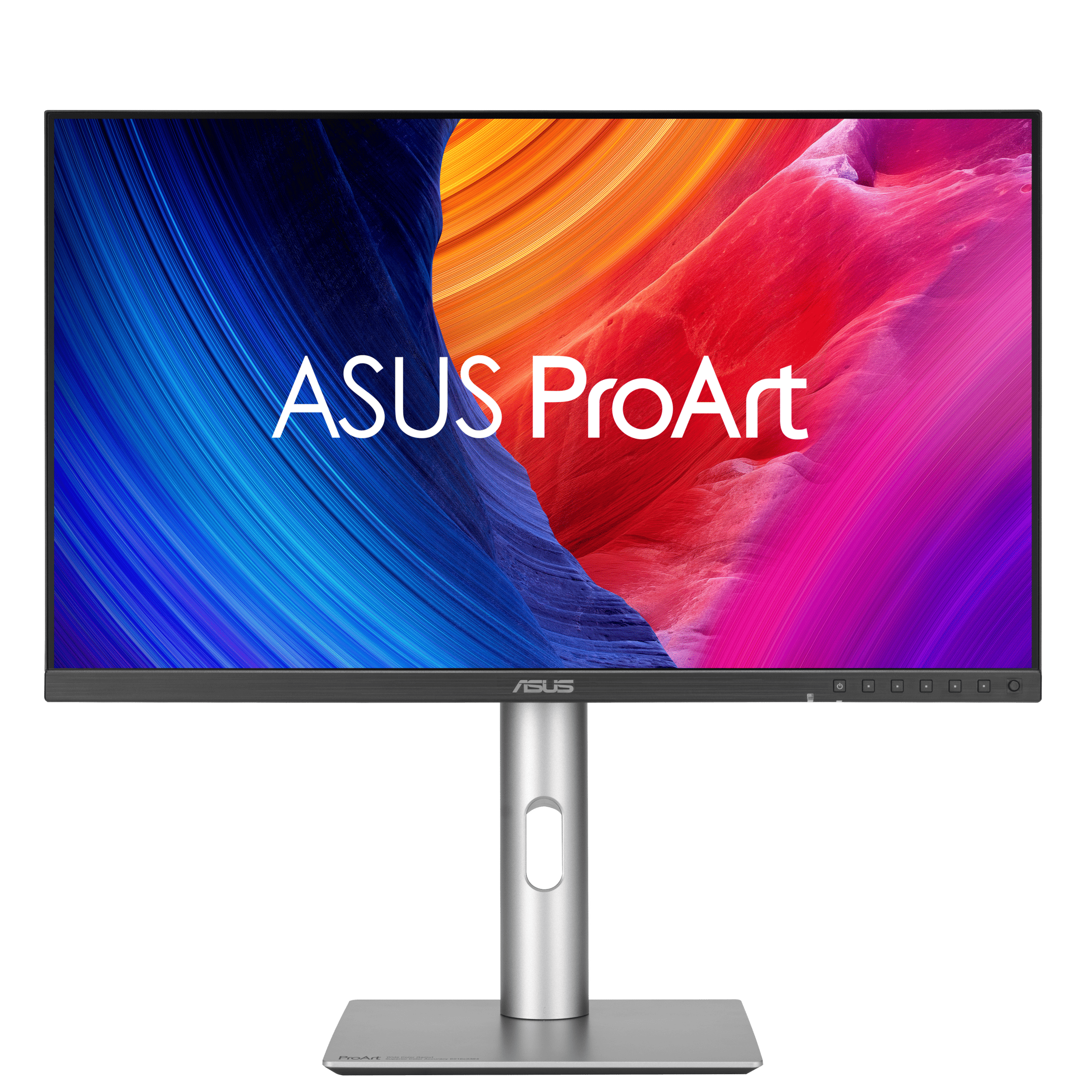
The ASUS ProArt PA32QCV 32-inch 6K monitor is $1,098.99 on Amazon, down from $1,299. That’s $200 off a 31.5-inch, 6016 x 3384 screen built for Mac users who edit photos and video and want more room than a 27-inch display gives you. You get it for $300 less than Apple’s Studio Display costs on Amazon right now.
We checked the price, seller and stock on Amazon on November 25, 2026. Amazon.com sells and ships it, and the listing warned that only 16 were left in stock. The $1,299 list price checks out, too. ASUS’s own store shows the same $1,299 regular price with a $1,099 sale, so Amazon is a penny under ASUS and the $200 saving is real.
Apple dropped the 6K Pro Display XDR, so the PA32QCV now goes up against Studio Display
This deal used to beg a comparison with Apple’s 32-inch 6K Pro Display XDR. But Apple doesn’t sell that one anymore. Its old product page now redirects to the 27-inch Studio Display XDR, which starts at $3,299. That leaves the regular Studio Display as Apple’s mainstream monitor, at $1,599 from Apple and $1,399 on Amazon. We covered that Studio Display deal when it dropped. Here’s how the two compare on paper.
Don’t miss the best of The Mac Observer
Set us as a preferred source and our Apple reporting ranks higher in your Google Search results and Discover feed — one tap, no account changes.
| ASUS ProArt PA32QCV | Apple Studio Display | |
|---|---|---|
| Amazon price | $1,098.99 | $1,399 |
| Regular price | $1,299 (ASUS) | $1,599 (Apple) |
| Screen size | 31.5 inches | 27 inches |
| Resolution | 6016 x 3384 | 5120 x 2880 |
| Pixel density | 218 ppi | 218 ppi |
| Brightness | 400 nits typical, 600 nits HDR peak | 600 nits |
| Color | 98% DCI-P3, 100% sRGB, Delta E under 2 | P3 wide color |
| Laptop charging | 96W over Thunderbolt 4 | 96W over Thunderbolt 5 |
| Ports | 2 Thunderbolt 4, DisplayPort 1.4, HDMI 2.1, USB-C, 2 USB-A | 2 Thunderbolt 5, 2 USB-C |
| Stand | Tilt, swivel, pivot, 130mm height | Tilt only (height costs extra) |
| Camera and mics | None listed | 12MP Center Stage camera, three mics |
Both screens hit the same 218 pixels per inch, according to ASUS and Apple. So the ASUS isn’t sharper. It’s bigger. At the same density, those extra 4.5 inches give you 896 more pixels across and 504 more down, which is a lot of extra timeline or a second document side by side.
What the PA32QCV gives a Mac user that Studio Display doesn’t
- A stand that tilts, swivels, pivots into portrait and rises 130mm, all in the box. Apple’s base Studio Display stand only tilts.
- More ports. Next to two Thunderbolt 4 ports with daisy-chaining, you get DisplayPort 1.4 and HDMI 2.1, so a second computer can plug in too, plus a USB-C and two USB-A hub ports.
- A built-in KVM switch, so one keyboard and mouse can control two connected computers.
- Factory calibration with a Calman Verified rating and a calibration report in the box, plus DCI-P3, Rec.709, Adobe RGB and DICOM presets.
- An M Model-P3 preset that ASUS says matches the color of a MacBook display.
- A 5-year warranty on Amazon’s listing, 3 years plus 2 more when you register it online.
ASUS lists the monitor as Mac Compliance certified and says you can use your MacBook’s brightness keys to control it once you install its DisplayWidget Center app. ASUS also warns that daisy-chaining on a MacBook can vary by model. On the Mac side, Apple says the M5 Pro Mac mini can run up to three 6K displays at 60Hz, so a desk Mac has no trouble with this panel.
Studio Display still wins on camera, speakers and Thunderbolt 5, so know what you give up
Apple’s monitor is the better all-in-one. It has a 12MP Center Stage camera, six speakers and a three-mic array, so it replaces your webcam and desk speakers. ASUS lists only two 2W speakers and no camera, so plan on a webcam if you take video calls. Studio Display also uses Thunderbolt 5 for its upstream port, while the ASUS tops out at Thunderbolt 4.
The ASUS is also big and heavy. With its stand it measures 28.12 inches wide and weighs 20.5 pounds, against 24.5 inches and 13.9 pounds for Studio Display with the tilt stand. And it runs at 60Hz, same as Studio Display, so don’t buy it for smooth gaming. If you want 120Hz and brighter HDR from Apple, the Studio Display XDR has a mini-LED backlight and 2000 nits peak HDR, but it costs three times as much.
If you grade photos or cut video and you care more about screen space and color presets than a built-in camera, the PA32QCV at $1,098.99 is the better deal. If your desk is small or your budget is, the 27-inch ProArt PA279CRV was $349 when we covered it.
MacObserver may earn a commission when you buy through links on this page. It doesn’t change the price you pay.

Discussion