
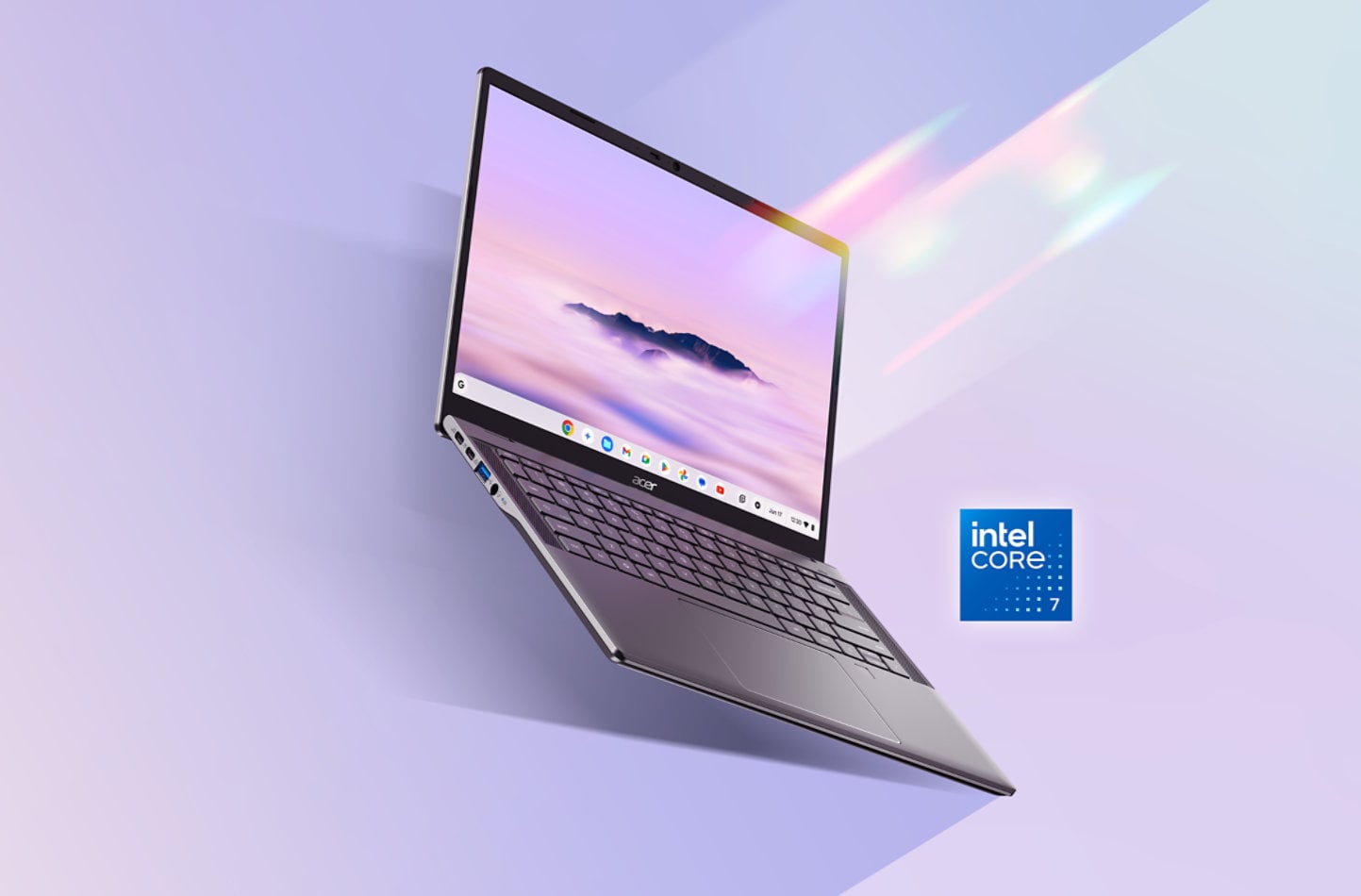
The Acer Chromebook Plus 514 (CB514-5HT-33RD) is $499.99 on Amazon, down from $599.99. That’s $100 off a 14-inch touchscreen Chromebook with an Intel Core i3-1315U, 8GB of memory and a 256GB SSD. It’s aimed at students and families who live in Google Docs, Gmail and the browser and want a bigger screen than a tablet for less than a MacBook.
We checked the price, seller and stock on Amazon on November 25, 2026. Amazon.com sells it, the listing showed it in stock, and Amazon tags it as a Black Friday Deal. The model on sale is the Gray one with the touch display.
Chromebook Plus 514 versus MacBook Neo and the A16 iPad for students
The obvious rival for a student budget is Apple’s MacBook Neo. It’s $649 on Amazon right now (we covered that price in our MacBook Neo deal) and $699 at Apple. The Acer costs $149 less than the Neo on Amazon. The other option is Apple’s 11-inch iPad with A16, which Amazon has at $379 against $449 at Apple. But you’ll need to add a keyboard before it works like a laptop.
Don’t miss the best of The Mac Observer
Set us as a preferred source and our Apple reporting ranks higher in your Google Search results and Discover feed — one tap, no account changes.
| Device | Amazon price | Regular price | Chip | Memory and storage | Screen |
|---|---|---|---|---|---|
| Acer Chromebook Plus 514 | $499.99 | $599.99 list | Intel Core i3-1315U | 8GB, 256GB | 14-inch 1920 by 1200 touch |
| MacBook Neo | $649 | $699 at Apple | Apple A18 Pro | 8GB, 256GB | 13-inch 2408 by 1506 |
| iPad (A16) 11-inch | $379 | $449 at Apple | Apple A16 | 128GB | 11-inch |
On paper the Neo and the Acer share 8GB of memory and 256GB of storage. Per Apple’s MacBook Neo specs, the Neo has a 6-core A18 Pro, a 500-nit screen at 219 pixels per inch and up to 11 hours of wireless web use, in a 2.7-pound body. The Acer screen is rated at 300 nits, so it’s dimmer, but it’s bigger, has a matte finish and takes touch input. Acer quotes up to 17 hours of battery life on the Amazon listing, from a 53-watt-hour battery.
What the Acer gives you that a MacBook Neo doesn’t
- Two USB-C ports at up to 10Gbps with DisplayPort and charging up to 65W
- Two USB-A ports and an HDMI 1.4 port, so no dongles for older flash drives or a classroom projector
- A 1080p webcam that shoots 60 fps video, with a physical privacy shutter
- Wi-Fi 7 and Bluetooth 5.3
- MIL-STD-810H durability testing and an aluminum top cover, per Acer
- A protective sleeve in the box
The Neo gives you two USB-C ports, and only one of them runs at USB 3 speeds. So if your kid’s school still runs on HDMI projectors and USB-A sticks, the Acer is simply easier to live with. Amazon’s listing also bundles 12 months of Google AI Pro at no cost. Acer’s product page says that plan costs $19.99 a month once the offer ends, so set a reminder if you don’t plan to keep it.
The catch for iPhone owners who want a Chromebook to work like a Mac
This is where the Acer falls short for an Apple household. ChromeOS has its own phone link, called Phone Hub, that shows your phone’s notifications and open Chrome tabs on the laptop. But Google’s Phone Hub help page lists an Android phone running Android 5.1 or later as a requirement. Neither Google nor Acer says Phone Hub works with an iPhone.
The 8GB of memory is soldered on, and Amazon’s spec table lists 8GB as the maximum, so you can’t upgrade it later. And the Core i3 is a 6-core, 8-thread chip that boosts to 4.5GHz. That’s fine for Docs, video calls and dozens of tabs. Don’t expect it to edit 4K video.
Who should grab the Chromebook Plus 514 at $499.99 and who should pay more
Buy the Chromebook Plus 514 at $499.99 if you or your student already uses Google’s apps, has an Android phone or doesn’t care about phone syncing, and wants a full-size keyboard, a touchscreen and plenty of ports for under $500. If the student carries an iPhone, the extra $149 for the MacBook Neo gets you a Mac instead of a laptop whose phone link is built around Android. If you’re happy with Windows and want a 16-inch screen, the HP OmniBook 3 16-inch we covered is another way to go.
MacObserver may earn a commission when you buy through links on this page. It doesn’t change the price you pay.

Discussion