

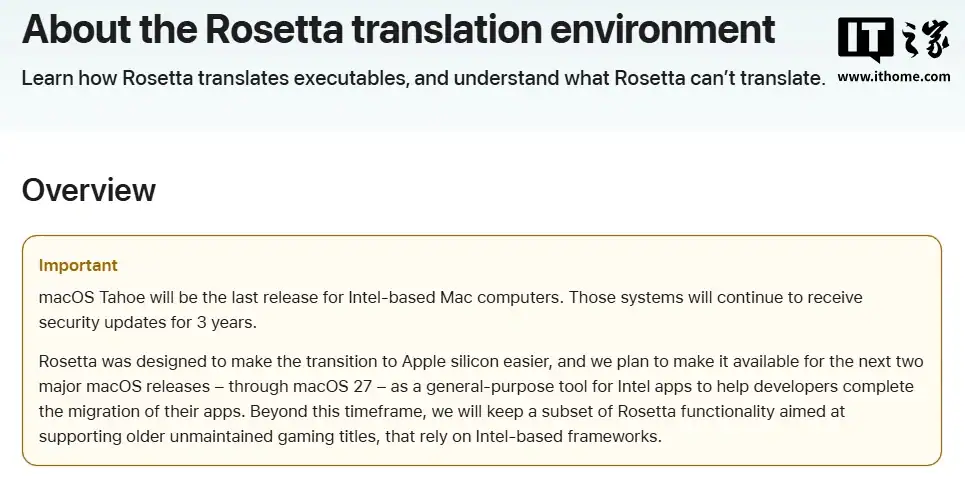
Apple confirmed that macOS 27 will mark the official end of Intel-based Mac support. The current version, macOS Tahoe, will be the last update made for Intel computers. After Tahoe, Apple will keep Rosetta active for two more macOS releases before removing it completely.
Rosetta has played a key role in Apple’s move from Intel to its own chips. It works as a translator, letting Apple Silicon Macs run older Intel apps. The process is automatic, and most users never notice it working. It helped developers and users continue using older software during the transition.
IT House reported on October 29 that Apple announced this change to developers, confirming that macOS Tahoe is the final version for Intel Macs. Rosetta will remain for a short time after that, mainly to support older Intel-only games that are no longer updated.
Don’t miss the best of The Mac Observer
Set us as a preferred source and our Apple reporting ranks higher in your Google Search results and Discover feed — one tap, no account changes.
After almost twenty years with Intel, this decision closes a long partnership. Apple is now fully focused on its own chip technology, which powers every new Mac.
What Developers Should Know
Rosetta can still translate most Intel apps, including those using Just-In-Time (JIT) compilers. However, there are some clear limits:
- It does not support kernel extensions.
- It does not support virtual machines that emulate Intel (x86_64) processors.
- It supports AVX and AVX2 instructions, but not AVX512.
Developers who rely on AVX512 should first check if their system supports it by using the command sysctlbyname with the flag hw.optional.avx512f.
Mixing Intel and ARM64 code in one process is also not allowed. Rosetta translates the entire process at once, including parts that load later at runtime. Developers can check if their app is running under Rosetta using the command sysctlbyname with the flag sysctl.proc_translated.
Apple recommends that developers start phasing out Intel dependencies and ensure their apps run natively on Apple Silicon before macOS 27 arrives.
What Users Can Do
Users who still depend on older Intel-based apps can continue using them for now. On Apple Silicon Macs, Rosetta allows these apps to run smoothly.
If an app doesn’t open, you can enable Rosetta manually:
- Right-click the app in Finder.
- Choose Get Info.
- Check the box that says Open using Rosetta.
You might notice a short delay when you launch the app for the first time, as Rosetta translates it for Apple Silicon.
Some older Intel-only games will continue working for a while, but support will fade after macOS 27.
The End of the Intel Era
macOS Tahoe marks the last stop for Intel Macs. With macOS 27, Apple will complete its transition to Apple Silicon.
For developers, this means adapting their apps fully to ARM64. For users, it means fewer compatibility layers and faster performance on newer Macs.
Rosetta helped bridge two generations of computing. Now, as Apple closes that bridge, its software future will run entirely on Apple’s own chips.




Discussion