

Finding the best Apple Music equalizer isn’t about downloading extra apps or tweaking dozens of sliders. Apple Music already includes built-in sound settings that can noticeably improve how your music sounds, depending on the genre you listen to and the headphones you use.
This guide explains how Apple Music’s equalizer works, which EQ presets are worth using, and how to get the best sound without overcomplicating things.
Table of contents
How the Apple Music Equalizer Works
Apple Music doesn’t use a manual, multi-band equalizer. Instead, it relies on preset EQ profiles designed to boost or reduce certain frequencies, such as bass, mids, or treble.
Don’t miss the best of The Mac Observer
Set us as a preferred source and our Apple reporting ranks higher in your Google Search results and Discover feed — one tap, no account changes.
These presets apply system-wide to Apple Music playback and are meant to be simple rather than technical. Once enabled, they affect how songs sound immediately, without any extra setup.
If you’re still getting familiar with Apple Music features and settings, MacObserver has already covered how to use Apple Music on iPhone, including where audio controls are located.
The Best Apple Music Equalizer Presets
There’s no single EQ preset that works best for everyone, but a few options consistently deliver better results depending on your listening habits.
Bass Booster
This is one of the most popular presets. It enhances low-end frequencies and works well for hip-hop, electronic music, and pop tracks. It’s especially useful if your headphones lack strong bass.
Late Night
Late Night compresses the audio range, making quieter sounds louder and louder sounds softer. This is a good option if you listen at low volumes or use speakers where dialogue and vocals get lost.
Rock
The Rock preset boosts both bass and treble slightly, giving songs more energy. It works well for guitar-heavy music and live recordings.
Acoustic
This preset emphasizes clarity and vocals, making it suitable for acoustic tracks, podcasts, and softer genres where detail matters more than bass.
In practice, these presets deliver more noticeable improvements than constantly switching between options.
How to Enable the Apple Music Equalizer
Apple’s EQ settings are found in the system sound controls rather than inside the Music app itself. Apple explains this process in its guide to sound settings on iPhone.
To enable EQ:
- Open Settings
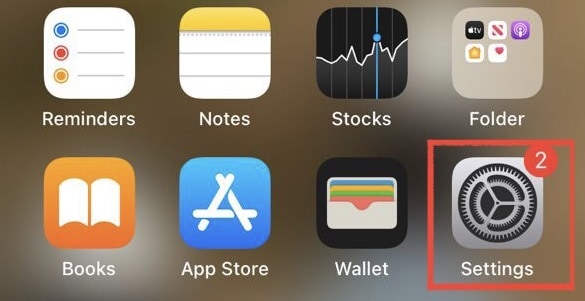
- Scroll to Music

- Tap EQ
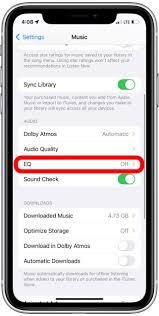
- Choose a preset
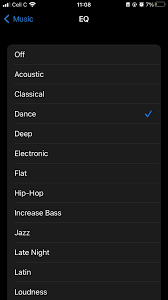


Changes apply immediately to Apple Music playback.
Does EQ Affect Audio Quality?
EQ presets can improve how music sounds, but they don’t add detail that isn’t already there. Boosting certain frequencies too aggressively may reduce clarity, especially when combined with other features like Spatial Audio.
Apple Music already supports advanced audio options such as Lossless and Dolby Atmos, which are part of the broader Apple Music features lineup. Using EQ works best as a subtle enhancement rather than a replacement for good audio quality.
Apple Music EQ vs Other Streaming Services
Compared to other platforms, Apple Music’s EQ approach is relatively simple. Some services offer in-app equalizers or more advanced controls, while Apple keeps things system-level and preset-based.
If you’ve compared Apple Music’s audio experience with competitors before, MacObserver has explored these differences in its Apple Music vs Spotify comparison, where sound quality and customization are common deciding factors.
When You Should Avoid Using EQ
In some cases, leaving EQ off is the better option:
- When using high-quality headphones already tuned for balance
- When listening to Lossless tracks where accuracy matters
- When Spatial Audio is enabled, as EQ can interfere with spatial effects
If music starts sounding distorted or overly boosted, switching EQ off often fixes the issue.
Final Takeaway
The best Apple Music equalizer depends on what you listen to and how you listen. For most users, presets like Bass Booster, Late Night, or Rock offer noticeable improvements without requiring technical adjustments.
Apple’s EQ system is designed to be simple, and when used sparingly, it can enhance your listening experience without sacrificing clarity. Trying a few presets and sticking with one that matches your headphones and music style is usually the most effective approach.


Discussion