

Apple has released iOS 27 in beta, and the update brings several useful upgrades to CarPlay. While this year’s changes are not massive, they improve how drivers interact with Siri, media apps, navigation, and in-car entertainment. Apple has also introduced a refreshed design that matches the new look of iOS 27.
Siri AI Comes to CarPlay

The biggest CarPlay upgrade in iOS 27 is the arrival of Siri AI. Apple’s new assistant now delivers more natural conversations, understands context better, and handles follow-up questions much more effectively than before. Apple introduced Siri AI across iPhone, and those same improvements carry over to CarPlay.
The new Siri interface appears as a glowing orb at the bottom of the display, replacing the older animation style. Siri also remembers the context of ongoing conversations, making it easier to ask multiple related questions without repeating yourself.
Don’t miss the best of The Mac Observer
Set us as a preferred source and our Apple reporting ranks higher in your Google Search results and Discover feed — one tap, no account changes.
Another welcome addition is conversation syncing. Any Siri interactions that happen through CarPlay automatically appear in the Siri app on your iPhone, complete with a car icon that identifies conversations started from your vehicle.
CarPlay Finally Gets Dedicated Video Apps
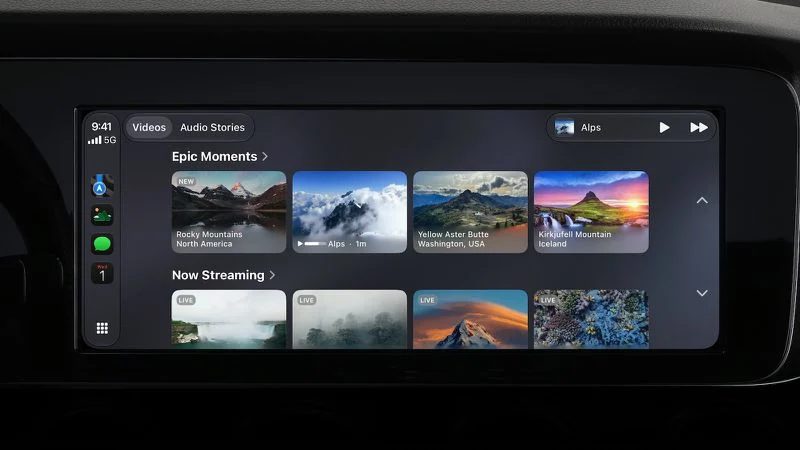
Apple is expanding video support in CarPlay with iOS 27.
Previously, video playback in supported vehicles relied on AirPlay streaming from an iPhone. Now, developers can build dedicated video apps for CarPlay, allowing users to browse and select content directly on the vehicle’s display.
As expected, video playback remains limited to situations when the vehicle is not moving. Support will also depend on automakers enabling the feature in compatible vehicles.
New Design and Wallpapers
iOS 27 introduces Apple’s updated Liquid Glass design language, and CarPlay benefits from it as well.
Drivers will notice refreshed app icons, cleaner visual elements, and a collection of new wallpapers that closely match the design found across iOS 27 and macOS Golden Gate.
The changes are subtle, but they help create a more modern and consistent look throughout Apple’s ecosystem.
MiniPlayer Makes Media Controls Easier
Apple has also upgraded media apps with a new MiniPlayer.
The MiniPlayer appears in the top-right corner of supported apps and provides quick access to album artwork and playback controls. This makes it easier to manage audio without constantly switching between screens.
Audio Scrubbing Arrives in CarPlay

One small but useful improvement is support for audio scrubbing.
Users can now drag the playback progress bar on the Now Playing screen to jump to a specific part of a song, podcast, or audiobook. Previously, CarPlay offered more limited playback controls.
Better GPS Accuracy and Wireless Reliability
Apple has quietly improved the overall CarPlay experience with better GPS accuracy, improved navigation heading information, and stronger wireless CarPlay reliability. While these changes may not be immediately visible, they should help provide a smoother day-to-day experience.
Wrap Up
iOS 27 focuses on refining CarPlay rather than reinventing it. Siri AI brings smarter voice interactions, dedicated video apps open new entertainment possibilities, and smaller upgrades such as the MiniPlayer, audio scrubbing, and navigation improvements make everyday use more convenient.
For many users, Siri AI and native video app support will likely be the standout additions when iOS 27 launches later this year.


Audio scrubbing, better GPS accuracy, and wireless reliability address pain points for me. This is good news.