

Apple released iOS 26.4 beta 4 with a small but useful change that gives users more control over the Liquid Glass interface. The update introduces a new accessibility setting called Reduce Bright Effects, which reduces the bright flashing highlights that appear when interacting with certain UI elements across the system. This change helps users who find the visual effects distracting or uncomfortable during regular use.
Liquid Glass remains a major part of iOS 26’s design language, and Apple continues to refine how it behaves. Earlier updates already introduced ways to soften the look, including a design switch that makes the interface appear closer to older iPhone styles.
According to Apple’s beta release, the new option focuses on limiting the bright highlight animations that appear when tapping or interacting with Liquid Glass components. The ‘Reduce Bright Effects‘ feature tones down highlights and flashes when you interact with Liquid Glass elements.
Don’t miss the best of The Mac Observer
Set us as a preferred source and our Apple reporting ranks higher in your Google Search results and Discover feed — one tap, no account changes.
How to Find the New Setting
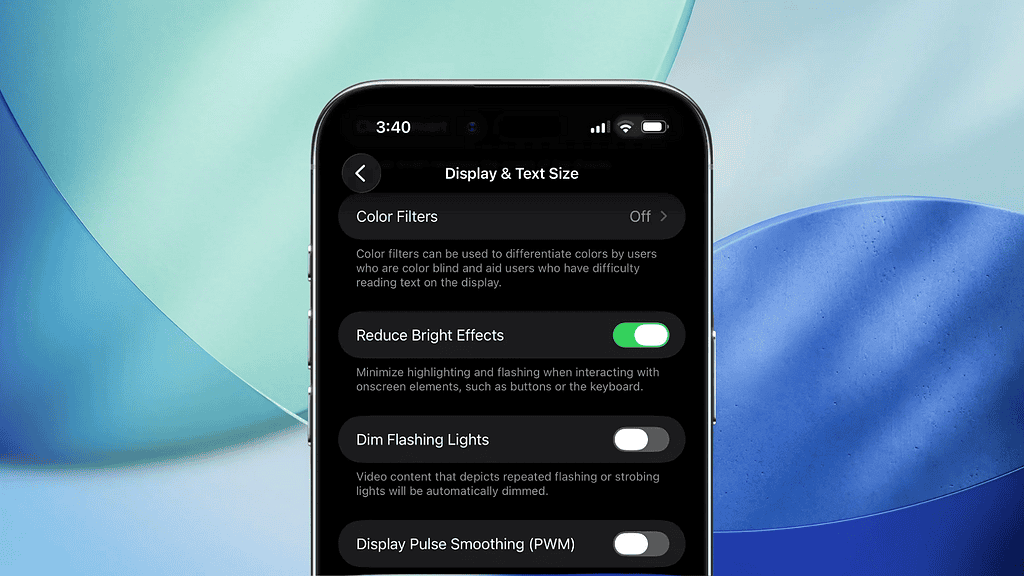
Apple placed the new toggle inside the Accessibility settings so users can quickly control the effect. You can enable the feature by following these steps:
- Open Settings
- Tap Accessibility
- Select Display & Text Size
- Turn on Reduce Bright Effects
The new setting adds another layer of control for people who prefer a calmer interface, while still keeping the Liquid Glass design intact.

Discussion