
For Mac users who rely on their iPhone’s cellular data, Apple is introducing a significant quality-of-life improvement in macOS Tahoe. The new operating system simplifies the process of connecting to a personal hotspot, making it more seamless than ever before. This update addresses a common point of friction for those who work on the go or in areas without reliable Wi-Fi.
Automatic Hotspot Connections
The personal hotspot feature, which allows a Mac to share an iPhone’s internet connection, has long been a part of the Apple ecosystem. While generally effective, the process often required manual confirmation from the user. With macOS Tahoe, Apple introduces an “Automatic” connection option, eliminating the need for user intervention.
When a Mac running macOS Tahoe is not connected to a known Wi-Fi network, it can now automatically detect and join the personal hotspot of a nearby iPhone or cellular-enabled iPad. This creates a more fluid and uninterrupted online experience, similar to what users might expect from a device with built-in cellular capabilities.
Don’t miss the best of The Mac Observer
Set us as a preferred source and our Apple reporting ranks higher in your Google Search results and Discover feed — one tap, no account changes.
How to Enable the Feature
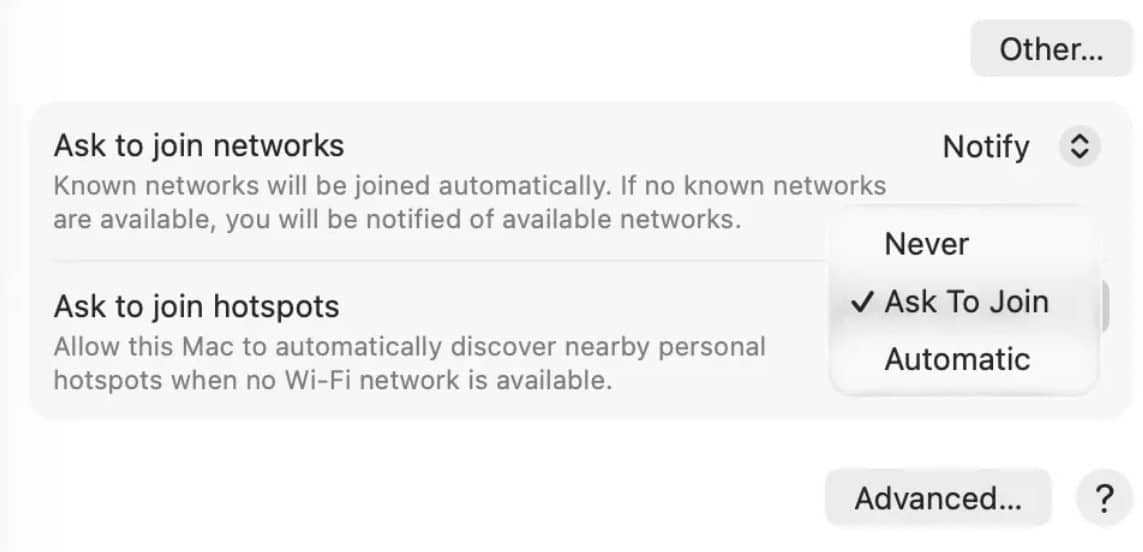
This new functionality is not enabled by default, which prevents unintentional mobile data usage. To activate it, users can navigate to the Wi-Fi settings on their Mac. This can be accessed through the System Settings application or by clicking the Wi-Fi icon in the menu bar.
Within the Wi-Fi settings, under the “Ask to join hotspots” section, users will find three choices: “Never,” “Ask to Join,” and the new “Automatic” option. Selecting “Automatic” instructs the Mac to connect to the user’s iPhone hotspot without requiring a prompt whenever other Wi-Fi networks are unavailable. The feature is built on Apple’s Continuity framework, using Bluetooth and Wi-Fi for secure discovery and connection.
Integration with Family Sharing
The convenience of this feature extends beyond a single user’s devices. The automatic hotspot connection is also integrated with Family Sharing. This allows a user to configure their Mac to automatically connect to a family member’s iPhone hotspot, and vice versa, creating a shared and easily accessible pool of connectivity for the entire family group. This enhancement further strengthens the integration within the Apple ecosystem, making it easier for users to stay connected across all their devices.


Discussion