
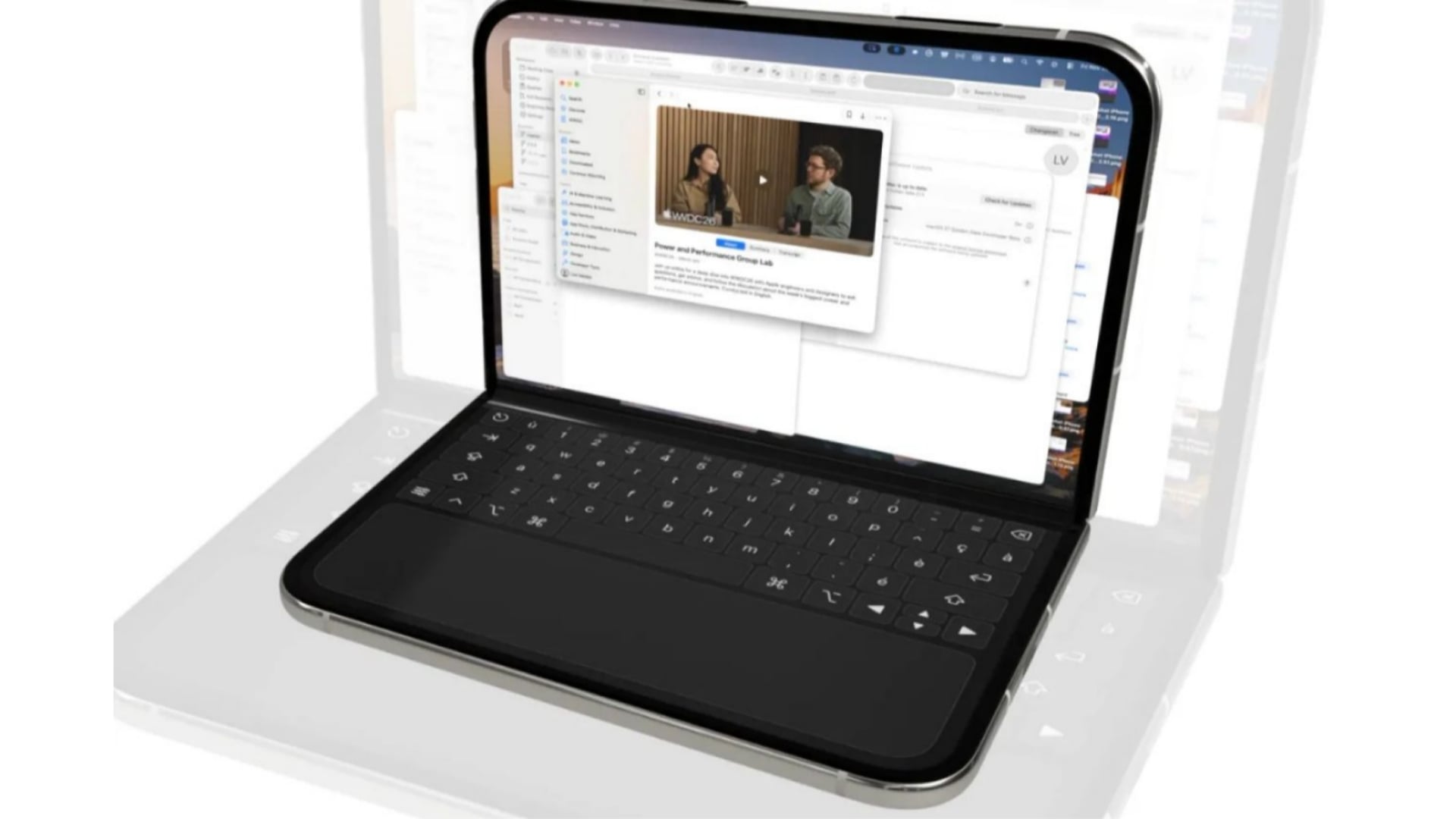
Apple’s iPhone Duo can now double as a miniature MacBook thanks to a new update for Screens, a popular remote desktop app developed by Edovia. The latest Screens 5.10.6 update introduces a dedicated Laptop Mode that transforms the foldable iPhone into a compact workstation with a virtual keyboard and trackpad.
Announced on November 25, the update takes advantage of the iPhone Duo’s folding design to bring a familiar laptop-style experience to Apple’s first foldable smartphone.
While Apple already offers Split View multitasking on iPhone Duo, Screens introduces another practical way to use its foldable display for productivity.
Don’t miss the best of The Mac Observer
Set us as a preferred source and our Apple reporting ranks higher in your Google Search results and Discover feed — one tap, no account changes.
How Screens turns iPhone Duo into a miniature MacBook
When you fold the iPhone Duo halfway during a remote desktop session, Screens divides the inner display into two functional sections. The upper half displays your connected computer’s desktop, while the lower half houses a custom virtual keyboard and trackpad.
The virtual trackpad supports familiar navigation gestures, while the keyboard supports multiple languages and automatically follows your preferred system keyboard language. You can also swipe down on individual keys to access secondary characters, similar to the virtual keyboard on an iPad.
Laptop Mode works particularly well with the High Performance Screen Sharing technology introduced in Screens 5.10, which brings several improvements to remote Mac connections.
These include:
- Automatic desktop resizing to fit the upper half of the iPhone Duo’s display.
- Remote audio streaming directly from your connected Mac.
- Smoother video streaming using HEVC encoding.
- Customizable virtual display resolutions.
- Built-in encryption for high-performance connections.
However, High Performance Screen Sharing requires an Apple silicon Mac running macOS 14 Sonoma or later, according to the developer’s official release notes.
The iPhone Duo still runs iOS, while the connected computer handles desktop applications and processing. Your remote computer must remain accessible through a network connection.
What else is new in Screens 5.10.6?
Beyond Laptop Mode, Edovia has improved dictation by allowing users to send spoken text directly through keyboard input or paste it using the clipboard, with an optional automatic Return command.
The update also introduces portrait desktop resolutions for high-performance connections on iPhone, additional Apple Pencil actions for controlling keyboard visibility, improved mouse and trackpad handling, and general stability improvements.
Screens 5.10.6 is available for iOS, iPadOS, and visionOS, while the macOS update was awaiting App Store approval at the time of the announcement.
You can download Screens from the App Store with a seven-day free trial, followed by monthly or annual subscription options or a one-time lifetime purchase, all supporting Family Sharing.



Discussion