

If you buy an Apple Watch (GPS + Cellular), you’ll pay two things: the price of the watch itself and a monthly carrier fee to light up cellular. Below is the current landscape across the big three (Verizon, AT&T, T-Mobile) and popular MVNOs like Xfinity Mobile, Spectrum Mobile, Visible, Cricket, UScellular, C Spire, Metro by T-Mobile, Boost Mobile, and more, updated for August 2025.
Table of contents
Before you start (read this in 30 seconds)
- Check compatibility: You need an Apple Watch (GPS + Cellular) and a compatible iPhone. Not all carriers support Apple Watch or Family Setup (watch without an iPhone). Apple lists supported U.S. carriers and which ones support Apple Watch For Your Kids (Family Setup).
- Your iPhone plan matters: Most carriers require an eligible phone line on the same account to add a paired watch line (names like NumberShare/NumberSync/DIGITS).
- Fees & taxes: Expect a monthly add-on (usually $10–$15) plus a one-time activation fee in many cases. Some prepaid brands include taxes in the sticker price.
- eSIM only: Apple Watch cellular uses eSIM, no physical SIM to move.
- Family Setup? Only some carriers support a standalone Apple Watch for a child or family member. Apple’s carrier list shows who does.
Quick guide: turn on cellular (works for most carriers)
- Open Watch app on your iPhone → My Watch › Cellular.
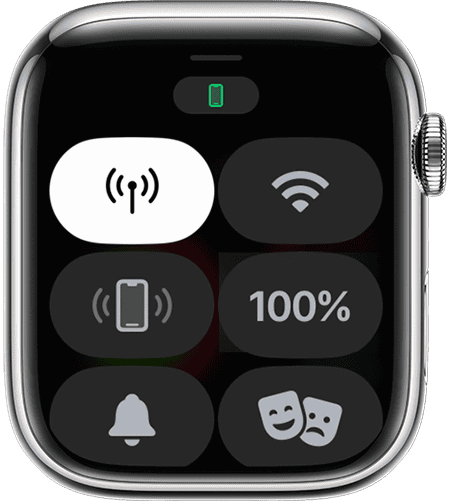
- Add a plan when prompted (you’ll be bounced to your carrier).
- Pick the watch plan (paired/NumberShare/NumberSync/DIGITS).
- Accept fees (monthly + any activation).
- Finish activation and reboot the watch if asked.
- Test: turn off iPhone or walk out with iPhone left behind; make a call from the Watch.

Carrier names vary (NumberShare on Verizon, NumberSync on AT&T, DIGITS on T-Mobile), but the on-device flow is nearly identical.
2025 Apple Watch Cellular Pricing (U.S.)
Key: “Monthly watch line” is the extra carrier charge to enable cellular on your Watch (with a paired iPhone line unless noted). “Family Setup?” shows whether the carrier supports a standalone child/relative watch without an iPhone.
- Verizon
- $10/mo (NumberShare)
- $40 activation fee (effective Sept 2025)
- Taxes/fees: not included
- Requires phone line: Yes
- Family Setup: Yes
- Notes: Verizon lists smartwatches as $10 connected devices; activation fees recently increased.
- AT&T
- $10.99/mo (wearable line, NumberSync)
- Activation fee: $35 (often waived with discounts)
- Taxes/fees: not included
- Requires phone line: Yes
- Family Setup: Yes
- Notes: Standard wearable plan; waivers possible with AT&T Signature or promos.
- T-Mobile
- $15/mo Watch Plan Plus (consumer)
- Activation fee: varies
- Taxes/fees: usually not included
- Requires phone line: Yes
- Family Setup: Yes
- Notes: Consumer plan is $15; business “Data with Paired DIGITS” is $10.
- Xfinity Mobile
- $10/mo smartwatch fee
- Activation fee: $0–varies
- Taxes/fees: varies by market
- Requires phone line: Yes (Xfinity Mobile line required)
- Family Setup: No
- Notes: Watch data counts toward your phone’s plan; billed separately as $10 line.
- Spectrum Mobile
- $10/mo (often with 3-month free promos)
- Activation fee: varies
- Taxes/fees: varies
- Requires phone line: Yes
- Family Setup: No
- Notes: Frequently runs promotions to offset or waive the smartwatch fee.
- UScellular
- $10/mo (paired or standalone)
- Activation: promo-dependent
- Taxes/fees: not included
- Requires phone line: Yes for paired, No for standalone
- Family Setup: Yes
- Notes: Supports both paired and standalone Apple Watch options.
- Visible (Verizon)
- $10/mo add-on (sometimes free with Plus/Pro promos)
- Activation: $0
- Taxes/fees: included in plan
- Requires phone line: Yes (Visible plan required)
- Family Setup: No
- Notes: Watch service bundled with certain Visible promos.
- Cricket (AT&T)
- $10/mo Unlimited Smartwatch plan
- Activation fee: up to $25
- Taxes/fees: not included
- Requires phone line: Yes
- Family Setup: Yes
- Notes: Fully supports Apple Watch with NumberSync.
- C Spire
- $10/mo watch plan
- Activation fee: varies
- Taxes/fees: not included
- Requires phone line: Yes
- Family Setup: Yes
- Notes: Listed across C Spire wearable plan pages.
- Metro by T-Mobile
- $10/mo watch line; $5/mo with $60 plan BYO deals
- Activation fee: $0–varies
- Taxes/fees: included (prepaid)
- Requires phone line: Yes
- Family Setup: No
- Notes: Publishes $10 smartwatch plan, sometimes $5 on promos.
- Boost Mobile
- $10/mo “Watch 2GB” plan (discounted when paired with phone line)
- Activation: promo-dependent
- Taxes/fees: included (prepaid)
- Requires phone line: Yes (for discount)
- Family Setup: Yes
- Notes: Added Apple Watch in 2025; offers bundle discounts.
- Consumer Cellular
- Pricing: not publicly listed
- Activation: varies
- Taxes/fees: varies
- Requires phone line: Yes
- Family Setup: No
- Notes: Compatible with Apple Watch (Series 4+). Must contact support for exact pricing.
- Google Fi Wireless
- Not supported for Apple Watch cellular
- Activation: N/A
- Taxes/fees: N/A
- Requires phone line: N/A
- Family Setup: N/A
- Notes: Fi supports Wear OS watches, but not Apple Watch as of 2025.
Why Family Setup matters: If you want to give a child or parent an Apple Watch that works without an iPhone, pick a carrier in the Family Setup column. Apple’s official list shows which U.S. carriers support it (AT&T, Verizon, T-Mobile, UScellular, Boost, Cricket, C Spire; MVNO cable brands like Spectrum/Xfinity and most “value” carriers typically don’t).
Tips to save (and avoid gotchas)
- Activation fees: Expect $35–$40 on some carriers—Verizon is raising device activation to $40 from Sept 2025. Watch for waiver promos when you start service or switch.
- Prepaid can be cheaper: Brands like Visible, Metro, and Boost often include taxes/fees in the plan price, and sometimes run $5/mo watch-line promos with certain phone plans.
- Data sharing rules differ: Xfinity counts watch data against your phone’s data bucket; others treat it as unlimited talk/text + low data usage for notifications/streaming.
- Family Setup vs paired: If you don’t need Family Setup, a paired line is the simplest/cheapest path. Check Apple’s list first if you do need standalone.
- Already on a carrier? Ask chat/retail if they’ll waive the activation and stack a bill credit—common with watch/tablet lines.
FAQs
No. A GPS-only Apple Watch (or a cellular model without an active plan) works fine over Bluetooth/Wi-Fi when your iPhone is nearby. Cellular simply lets the Watch work on its own (calls, texts, maps, streaming) when you leave the phone behind.
Branding. Verizon NumberShare, AT&T NumberSync, and T-Mobile DIGITS all let your Watch share your iPhone’s number for calls/texts on the carrier network. Pricing and perks vary.
No for Fi as of 2025. Apple Watch can still pair over Bluetooth/Wi-Fi with your iPhone, but Fi doesn’t provision Apple Watch cellular. Many discount carriers likewise don’t support Watch cellular.
No. Only certain carriers do; Apple maintains a live list. In the U.S., Family Setup appears on the big three plus a handful of regionals (e.g., UScellular, Boost, Cricket, C Spire).
Usually yes on postpaid (AT&T, Verizon, T-Mobile). Prepaid brands (Visible/Metro/Boost) often show taxes included in the monthly price. Check your plan’s details at signup.
Summary (skimmable)
- Pick carrier that supports Apple Watch (and Family Setup if needed).
- Expect $10–$15/mo for the watch line, plus $35–$40 activation in some cases.
- Turn it on via Watch app › Cellular and follow your carrier’s flow.
- Test standalone by leaving your iPhone behind and placing a call from the Watch.
- Save with prepaid brands (taxes included) or ask for activation-fee waivers.
Conclusion
For most people, the real-world price to make an Apple Watch cellular is about ten bucks a month—$10.99 at AT&T, $10 at Verizon (plus fees), $15 at T-Mobile consumer, and $10 at key MVNOs like Xfinity Mobile, Spectrum Mobile, Visible, Cricket, UScellular, C Spire, Metro, and Boost. Your out-the-door bill depends on activation fees, whether taxes are included, and if you need Family Setup. Use the table above to match your needs (and budget), then flip the switch in the Watch app.
Don’t miss the best of The Mac Observer
Set us as a preferred source and our Apple reporting ranks higher in your Google Search results and Discover feed — one tap, no account changes.



Discussion