
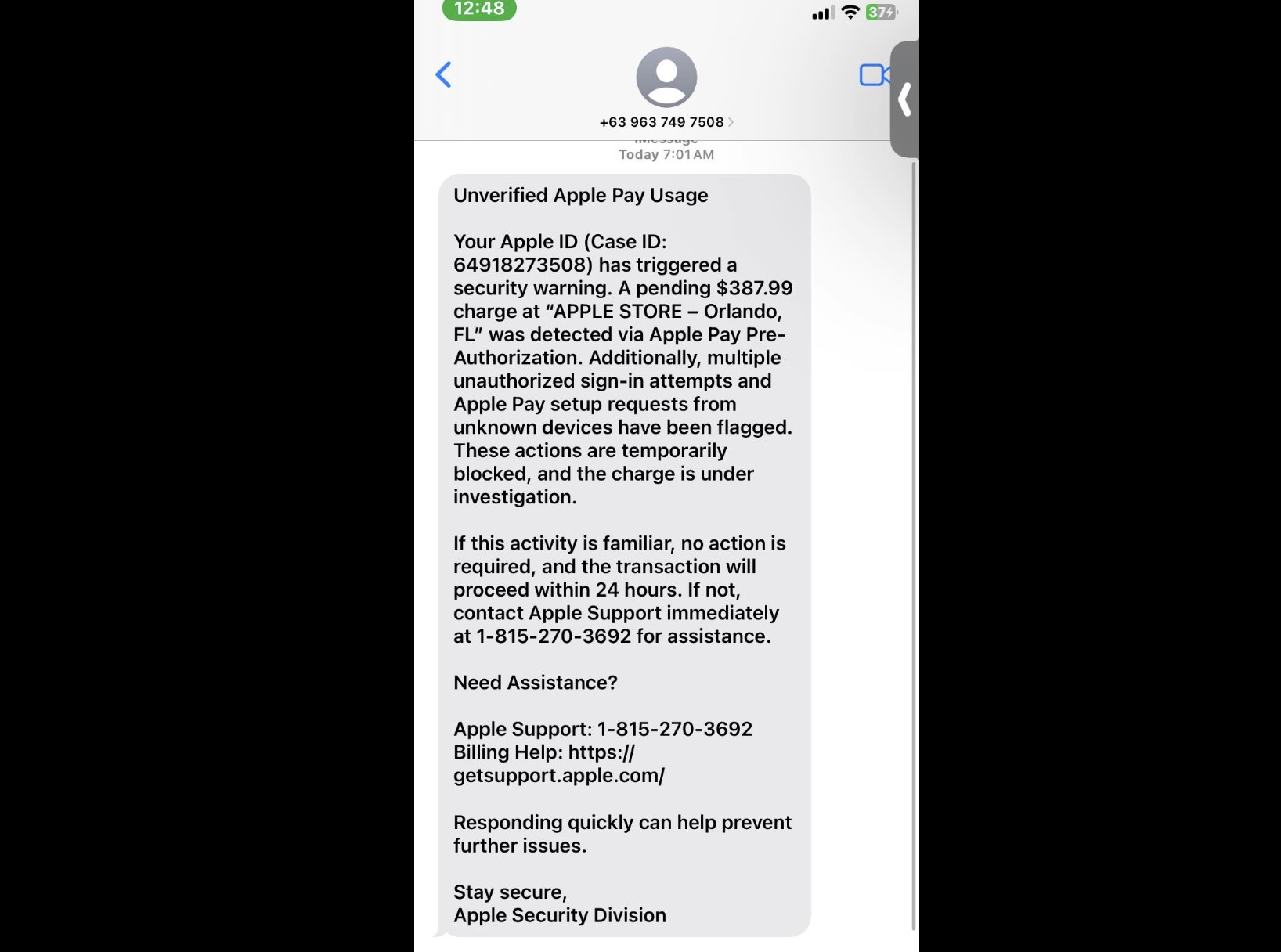
A deceptive text message is making the rounds, designed to panic you into giving up your most sensitive information. The message often claims your Apple Pay has been suspended or that a transaction is unverified, creating a false sense of urgency to trick you into reacting without thinking. This notification is a phishing scam, and interacting with it can compromise your financial and personal data.
These attacks, a form of “smishing” (SMS phishing), begin with an unsolicited text containing alarming language. It might say “Your Apple Pay has been suspended due to suspicious activity” or “We have detected an unverified transaction.” The goal is to make you believe there is a problem with your account that requires immediate attention.
The core of the scam is a malicious link included in the message. This link will direct you to a counterfeit website that looks nearly identical to an official Apple or bank login page. Scammers have meticulously copied the branding and design to lower your guard and make the page seem legitimate.
Don’t miss the best of The Mac Observer
Set us as a preferred source and our Apple reporting ranks higher in your Google Search results and Discover feed — one tap, no account changes.
Once on the fake page, you will be prompted to “verify” your identity by entering sensitive details. This can include your Apple ID and password, credit card number, expiration date, CVV code, and even personal information like your full name and address. This data is sent directly to the criminals for fraudulent purchases or identity theft.
It is crucial to recognize the warning signs. Legitimate companies rarely use high-pressure tactics or threatening language. You should also inspect any links before tapping them; a scam URL will not be a genuine apple.com address. Other red flags include generic greetings like “Dear Customer” and simple grammatical errors or typos.
If you receive one of these messages, the most important rule is to not interact with it. Never click on any links and do not reply to the sender. Replying confirms that your phone number is active, which could invite more scam attempts in the future.
Instead of engaging, you should report the fraudulent text directly within the Messages app by tapping “Report Junk” under the message. This sends the information to Apple and your carrier, helping to block the sender. After you have reported it, delete the message from your device.
If you already clicked the link and entered your information, you must act quickly to limit the damage. The first and most critical step is to immediately change your Apple ID password. If you use that same password for any other online accounts, change those as well, prioritizing financial and email services.
Next, if you entered any credit or debit card information, contact your bank or card issuer without delay. Explain that your card details have been compromised so they can cancel the card and issue a new one to prevent fraudulent charges. Continue to monitor your bank statements and Apple account for any unauthorized activity.
Ultimately, vigilance is the best defense. Apple will never send you a text message with a link asking you to enter your password or other sensitive information to resolve an account issue. By staying skeptical of unsolicited messages and knowing the red flags, you can keep your data safe and maintain your iOS security.


I received this today. I did not respond at all.
Unverified Apple Pay Usage
Your Apple ID (Case ID: 649182) has triggered a security warning. A pending $287.99 charge at “APPLE STORE – Orlando, FL” was detected via Apple Pay Pre-Authorization. Additionally, multiple unauthorized sign-in attempts and Apple Pay setup requests from unknown devices have been flagged. These actions are temporarily blocked, and the charge is under investigation.
If this activity is familiar, no action is required, and the transaction will proceed within 24 hours. If not, contact Apple Support immediately at +1-888-574-8466 for assistance.
Need Assistance?
Apple Support: +1-888-574-8466
Billing Help: https://getsupport.apple.com/
Responding quickly can help prevent further issues.
Stay secure,
Apple Security Division
i call the number and say “HI, YOU ARE A SCAMMER!” and hang up before reporting it.
I want to buy a car.and i will like apple to send the money to the persons account.
9/29/25 I received a text about an “unverified charge” on my Apple Pay account. I supposedly have a $287.99 charge + repeated attempts to sign in to my Apple account. I don’t use Apple Pay. I did not respond to the links in the text.
Just had this happen to me. I don’t use Apple Pay either. Is it safe to just ignore it?
I received one just a few minutes ago (10/14/25) with the same amount.
I just received the same message today, 10/16. I did report it as junk as suggested. Appreciated this post…
I got 2 of these a few minutes ago.
I don’t have an ApplePay account