

Dr. Mac’s Rants & Raves
Episode #371
My 15-inch MacBook Pro is 7 years old and it still runs like a champ. With its 2.6 GHz Quad-Core Intel Core i7 processor, 16GB of RAM, and 1TB SSD, it’s got (almost) everything I need and I expect it to last a few more years before it becomes outdated or dies.
That its processor, memory, and storage are still sufficient for my needs 7 years later is impressive, but there is at least one thing I’d love to change if I could… and that’s its battery life.
When it was new, 5 or 6 hours of battery life was the best you could expect from this class of laptop, but the newest 16-inch MacBook Pro boasts of up to 11 hours of battery life between charges.
I’m jealous. That’s enough to work all day without AC power. But I’m not jealous enough to drop $3,000 on a new MacBook Pro just yet.
So, I started looking for ways to eke out more battery time from the 7-year old MacBook Pro.
I know that battery performance degrades over time. And while I used to routinely get 5 or 6 hours, today I only get about 4 hours, and that’s if I’m lucky.
My bag of (free) battery tricks
So, when I’m running on battery power, I have a bag of tricks for preserving battery life. My first stop is the System Preferences app’s Displays pane. Because the display consumes a lot of power, I disable “Automatically Adjust Brightness” and slide the brightness control to the lowest setting I can tolerate.
Next up is the Energy Saver System Preferences pane, where I:
-
- Enable the checkbox for “Automatic Graphics Switching,” which uses the more energy-efficient built-in graphics as much as possible.
- Set “Turn Display Off After” to 2 minutes (on the Battery tab).
- Enable “Put Hard Disks to Sleep When Possible” and “Slightly Dim the Display While on Battery Power,” which each save a little bit of juice.
All of the above are built-in to macOS and cost nothing. And while I can’t quantify it, I know my battery lasts longer if I do these things than if I don’t.
Then Came Turbo Boost Switcher
But I still wanted more and when I heard about an app called Turbo Boost Switcher (and Turbo Boost Switcher Pro) on Mac Geek Gab 777 recently, I had to try it.
Turbo Boost Switcher is a free app that lets you enable or disable the Turbo Boost feature on Intel Core processors, which can add up to 25% to your battery life while also lowering the CPU temperature by up to 60°F, which means slower fan speeds that can reduce battery drain even more.
The free version displays CPU load, fan speed, and CPU temperature in the menu bar, and allows you to enable or disable Turbo Boost manually.

The $9.95 Pro version, which I bought within a day of trying it, adds “Auto Mode,” which lets you enable and disable Turbo Boost automatically
-
- When fan speed exceeds a specified value.
- When remaining battery time drops below a specified value.
- When charger is/isn’t connected.
- When specific apps (or sets of apps) are running.

And there are (optional) notifications:
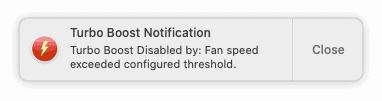
Since implementing the regimen I’ve described, my battery life has gone from under 4 hours to better than 5 hours! If you wish your MacBook battery lasted longer between charges, give the regimen a try—because it works!
Turbo Boost Switcher (free) and Turbo Boost Switcher Pro ($9.95).





How does Turbo Boost Switcher compare to Endurance?
https://enduranceapp.com
I’m not sure… I’ve never used Endurance. But it’s in SetApp (which I have), so I just installed it. It seems to do more stuff automatically, but it also costs more. We’ll see.
Thanks for the great tip!
Thanks Bob for a very good article and suggestion. My 2012 would need a new battery if I weren’t using it as a desktop. Even if I still worked and traveled (like Macworld or CES) I’d probably take a IPad Pro instead.
Hope you are well.
Bob Meyers
I hear you. I take my iPad if the work doesn’t demand a lot of typing and editing; I take my MacBook Pro if I have a lot to write or need to edit audio or video (both of which can be done on the iPad Pro but I still prefer a Mac for those tasks).
We’re doing OK (in Austin TX) so far. Hope you and yours are safe.