
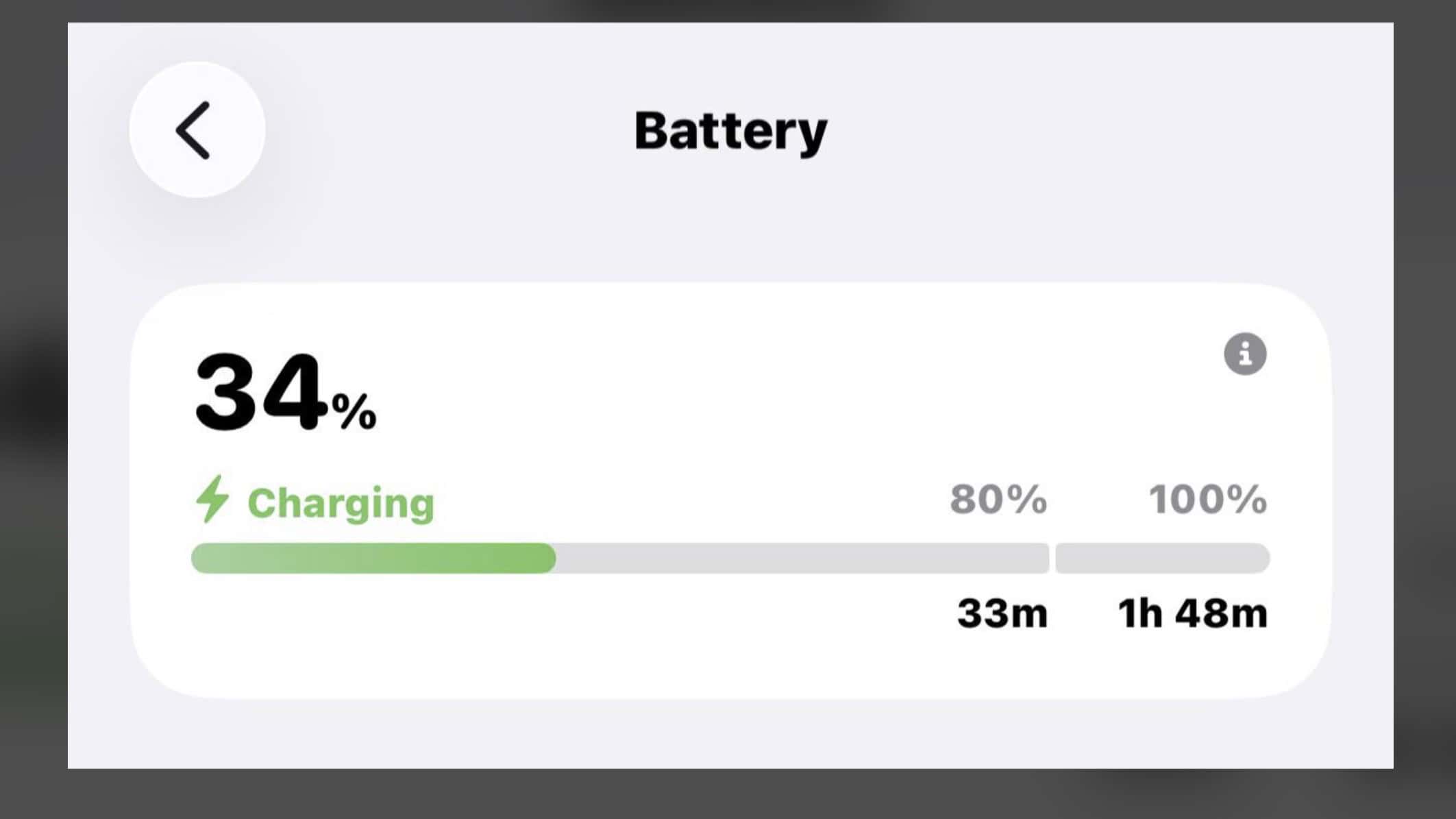
With the release of iOS 26, Apple has introduced a long-requested feature that takes the guesswork out of powering up your device: live charge-time estimates. iPhone users will now see a dynamic timer that shows exactly how long it will take to reach an 80% charge and, subsequently, how long until the battery is full or hits a user-defined limit.
This practical information is conveniently surfaced directly on the Lock Screen when you plug in your device and can also be found at the top of the page in Settings → Battery. The feature is designed to make planning quick top-ups easier and pairs perfectly with Apple’s battery-preserving charge limit options.
How the New Charging Estimates Work
The system provides a two-stage estimate to reflect how modern batteries charge. When you first plug in a low battery, you will see a banner indicating the time needed to reach the 80% mark, which is the fastest part of the charging cycle.
Once the battery level surpasses 80%, the system will then provide a second estimate for the time remaining to reach 100% or your preset limit. This feature intelligently integrates with the iPhone’s charge-limiting settings; if you’ve capped your charge at 85% to prolong battery health, the ETA will calculate the time to reach that specific target, providing a truly personalized and useful metric for daily use.
Why Your Charging ETA Can Fluctuate
While the new timer is a significant step forward, its accuracy can be affected by several real-world variables, leading to some mixed reactions. The estimate’s reliability is most impacted during the final 20% of the charge.
This is because lithium-ion batteries switch from a fast “constant current” phase to a gentler, slower “constant voltage” phase around the 80% mark. This second phase is crucial for protecting the battery’s long-term health and balancing the cells, but it is also more sensitive to external factors. Heat, background app activity, and the battery’s overall health can make this final stretch less predictable, causing the ETA to swing more than it does below 80%.
Don’t miss the best of The Mac Observer
Set us as a preferred source and our Apple reporting ranks higher in your Google Search results and Discover feed — one tap, no account changes.
Key Factors That Influence Charging Speed
Several conditions can change your iPhone’s charging speed and the stability of its ETA. The most critical factor is your charging hardware; using a 20W or higher USB-C PD adapter and a quality cable will yield the best results.
Temperature also plays a major role, as a hot phone will automatically slow its charging speed to protect its components. Furthermore, heavy background loads like gaming, using a personal hotspot, or indexing after an update will draw power and extend charging time. Finally, the battery’s age, whether you are using a wired or less-efficient MagSafe connection, and software features like Optimized Charging all contribute to the final estimate.
Tips for a Faster, More Stable Charge
To get the most accurate estimates and the fastest possible charge, a few simple steps can make a big difference. Always use a certified USB-C PD charger of at least 20W. If you notice your phone getting warm, remove it from any thick cases while charging. It is also best to avoid heavy use while plugged in, such as playing intensive games or downloading large files.
For daily use, leaving Optimized Charging enabled is recommended to reduce battery wear. However, if you are in a hurry and need a full 100% charge quickly, you can temporarily disable any charge limits and re-enable them later for regular overnight charging.
While this new feature is a welcome addition for iPhone users, it has not yet been widely implemented for iPads. Only some newer iPad models with advanced battery health options may display similar information, so behavior varies significantly by device generation.
For iPhone users, however, the new timers are a genuinely useful tool for planning your day. Expect the estimate to be highly reliable for quick top-ups below 80% and understand that the final portion is more of a flexible guideline influenced by your charger, your phone’s temperature, and what it’s doing in the background.


Discussion