

Choosing between Apple Photos and Google Photos often feels like choosing between privacy and convenience. Both services offer incredible AI features, seamless backups, and powerful editing tools. In this guide, I will compare Apple Photos and Google Photos to help you decide which one you should use.
Table of contents
Apple Photos vs Google Photos: AI Features and Editing

Google Photos has long been the king of computational photography, and with the full integration of Gemini in 2025, its Magic Editor is more powerful than ever. It allows users to reposition subjects, change the sky, and generate new background elements effortlessly.
Don’t miss the best of The Mac Observer
Set us as a preferred source and our Apple reporting ranks higher in your Google Search results and Discover feed — one tap, no account changes.
Apple Photos has closed the gap significantly with Apple Intelligence. The “Clean Up” tool works beautifully to remove photobombers, and the edits feel more grounded in reality compared to Google’s generative approach.
Key Differences:
Google Photos excels at generative creation, allowing you to reimagine a photo entirely. Apple Photos focuses on correction and enhancement, prioritizing the preservation of the original moment’s authenticity.
Search and Organization

Google Photos remains the industry leader in search. Its “Ask Photos” feature allows you to use complex natural language to find specific moments, such as “show me the license plate of the car I rented in Italy.”
Apple Photos has vastly improved its semantic search through on-device intelligence, allowing for similar natural language queries. However, because Apple Photos relies on local processing power, it can sometimes be slower to index new libraries compared to Google’s cloud supercomputers.
Key Differences:
Google Photos offers slightly superior context understanding and text recognition within images (OCR). Apple Photos is fast and capable, but prioritizes keeping the indexing index data on your device.
Privacy and Data Security

Apple Photos is built on a foundation of privacy. With the rollout of Apple Intelligence, nearly all photo analysis, such as facial recognition, object detection, and memory curation, happens on-device or via Private Cloud Compute.
Google Photos requires your data to be processed in the cloud to utilize its most advanced AI features. While Google offers strong security, their business model is historically tied to data analysis, whereas Apple makes its money on hardware and services subscriptions.
Key Differences:
Apple Photos ensures that your photo map and facial recognition data stay locked to your account and devices. Google Photos analyzes your library to train its algorithms and improve ad targeting across its other platforms, though they claim not to use photo content for ads directly.
Ecosystem and Sharing
Apple Photos creates a seamless experience for iPhone, iPad, and Mac users. iCloud Shared Photo Library is the gold standard for families, automatically sharing photos based on who is in them. Google Photos is platform-agnostic. It works just as well on iOS as it does on Android or the web. Its “Partner Sharing” feature is excellent, but it lacks the deep system integration (like the Photos widget or wallpaper shuffling) found in iOS.
Key Differences:
Apple Photos is the superior choice for all-Apple households using AirDrop and iMessage. Google Photos is essential for mixed-OS families or users who frequently switch between iPhone and Android.
Storage Costs and Tiers
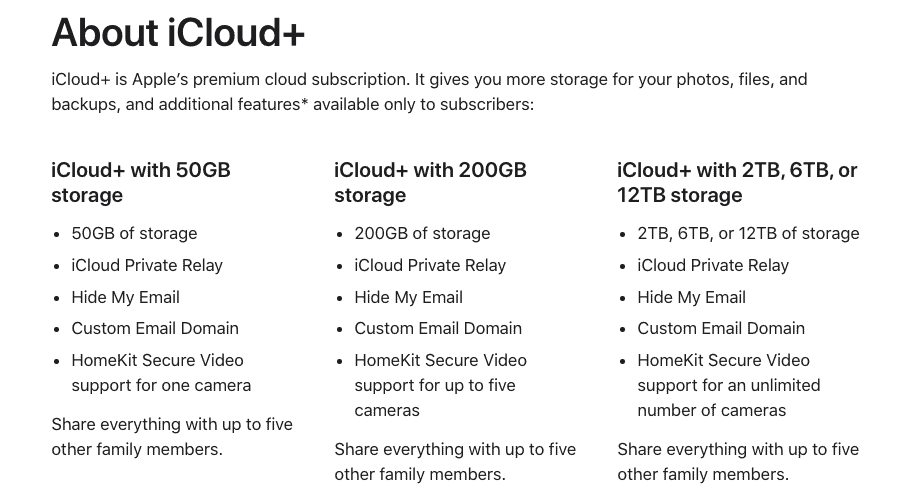
Apple Photos storage is tied to your iCloud+ subscription. The 5GB free tier is frankly unusable in 2025, forcing almost everyone to upgrade to the 200GB or 2TB plans. Google Photos shares its storage with Google Drive and Gmail via Google One. While they ended unlimited free storage years ago, their 15GB free tier is more generous than Apple’s.
Key Differences:
Google Photos offers a better free entry point. Apple Photos becomes cost-effective if you are already paying for an Apple One bundle.
Apple Photos vs Google Photos: Which Service Should You Choose?
The comparison of Apple Photos vs Google Photos comes down to your priorities regarding privacy versus AI power. Choose Apple Photos if you want end-to-end encryption, on-device processing, and a seamless experience across your Apple devices. Choose Google Photos if you want the absolute best search capabilities, cross-platform access, or aggressive generative AI editing tools.
Tips
- Use Apple Photos “Optimize Storage” setting if your iPhone is running out of space.
- Enable “Partner Sharing” in Google Photos to automatically back up your spouse’s photos.
- Tag faces early in both apps to improve the AI’s ability to generate “Memory Movies.”
- Use Google Photos as a secondary backup even if you primarily use iCloud (just turn off sync on the secondary if you want to save space).
- Check your “Recently Deleted” folder in Apple Photos; it locks behind FaceID for added security.
FAQ
No, not for unlimited storage. You get 15GB for free, shared across Drive and Gmail.
Apple has stated they do not use private user data to train their foundational models in the way other companies do; personal context is processed via Private Cloud Compute which deletes data immediately after use.
Google Photos has better creative/generative tools. Apple Photos has better fine-tuning tools for color, light, and RAW editing.
Yes. Apple and Google both participate in the Data Transfer Project, allowing for relatively easy migration tools available on their privacy pages.
Summary
- Apple Photos offers the best privacy and on-device processing.
- Google Photos delivers superior search and generative AI editing.
- Apple Photos integrates flawlessly with macOS, iOS, and tvOS.
- Google Photos is the best option for users with Android and iPhone devices.
- Apple Photos requires an iCloud subscription for meaningful backup space.
- Google Photos provides a larger free tier but analyzes data in the cloud.
Apple Photos suits users who value privacy, security, and ecosystem continuity. Google Photos fits users who prioritize search intelligence, fun AI edits, and platform flexibility. In the fight of Apple Photos vs Google Photos, the winner is the one that manages your memories the way you want them treated.


If I delete Google Photos, are they still in Apple photos?