

Microsoft Outlook for Mac now looks more native on Apple’s latest desktop software with a new app-wide Liquid Glass design update. The update brings a cleaner visual style across the app, with smoother buttons, softer corners, and interface changes that better match macOS Tahoe and Apple’s broader Liquid Glass design language.
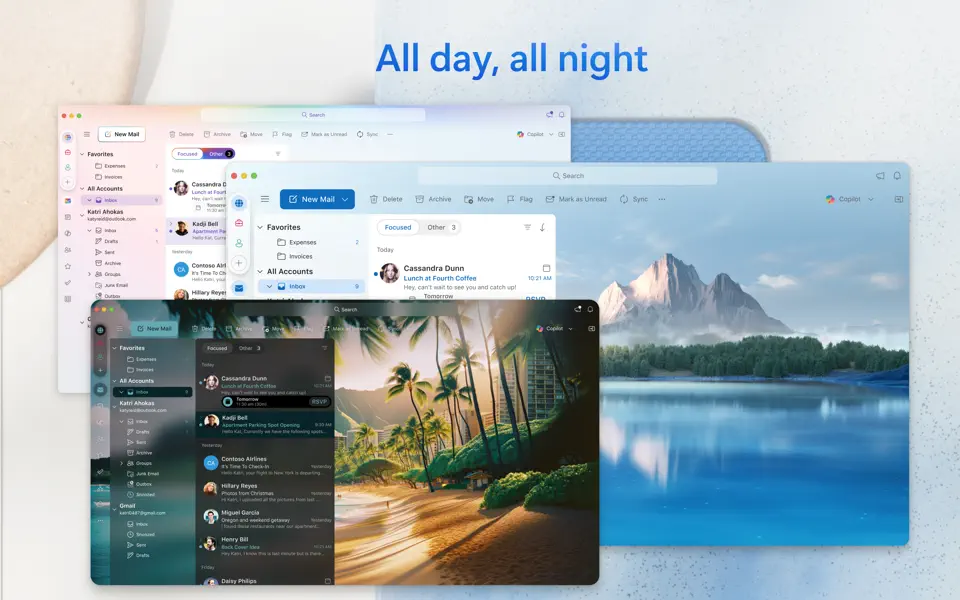
Microsoft says Outlook now applies Liquid Glass visuals across the full app, with a focus on a more expressive and cohesive Mac experience. The main “New” button has been redesigned with smoother motion and Liquid Glass effects, which should make common actions feel more polished inside the app.
The update also changes the metaOS and Profile UI controls with higher elevation and Liquid Glass background effects. Along with this, Outlook now uses increased radii across app chrome, windows, and buttons, giving the app a more familiar look for users on macOS Tahoe and macOS 26.
Don’t miss the best of The Mac Observer
Set us as a preferred source and our Apple reporting ranks higher in your Google Search results and Discover feed — one tap, no account changes.
Outlook for Mac also adds Import PST support, which lets users import emails, calendars, contacts, and other mailbox data from PST files. This feature helps users move older Outlook data into the Mac app without needing extra steps.
Microsoft also released updates for Word for Mac and PowerPoint for Mac with bug fixes and performance improvements. The latest Outlook for Mac update, version 16.110, is now available through the App Store.



Discussion