
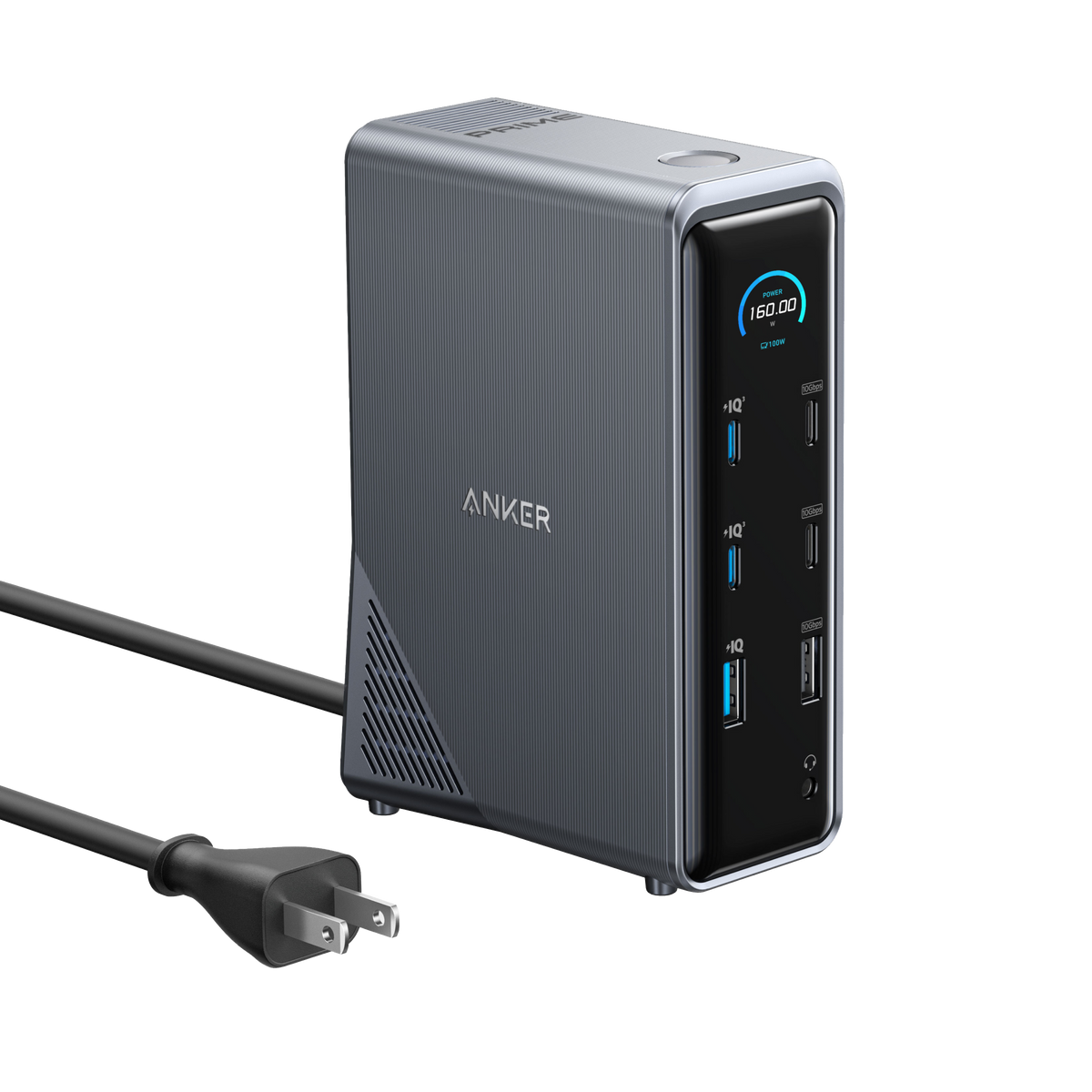
Anker’s Prime Docking Station (14-in-1) is $179.99 on Amazon, down from $269.99. That’s $90 off a dock that charges a MacBook at up to 100W and adds HDMI, Ethernet, audio and a stack of USB ports through one USB-C cable. It’s for MacBook Neo and MacBook Air owners who want to sit down, plug in once and have a full desk setup. One warning comes first, because Anker states it plainly on its own page.
We checked the price, seller and stock on Amazon on November 14, 2026. The seller is AnkerDirect, Anker’s own Amazon store, and the listing showed the dock in stock.
Anker says two monitors on a Mac show the same image through this dock
The dock has two HDMI 2.0 ports, but Anker’s product page says macOS doesn’t support Multi-Stream Transport (MST), and that on macOS the display on both external monitors will be identical. In plain terms, a Mac can drive two screens from this dock, but both show the same picture. You don’t get two separate desktops from the single cable.
Don’t miss the best of The Mac Observer
Set us as a preferred source and our Apple reporting ranks higher in your Google Search results and Discover feed — one tap, no account changes.
Your Mac sets its own limits too. Apple’s MacBook Neo spec page says the Neo supports one external display at up to 4K and 60Hz, and only its USB 3 port lists DisplayPort support. Plug the dock into that port, not the USB 2 one, or you won’t get a picture. Apple’s MacBook Air spec page says the M5 Air supports up to two external displays, so if you want two different desktops on an Air, run the second monitor straight from the Air’s other Thunderbolt 4 port.
Resolution has a catch as well. Anker rates each HDMI port at 4K and 60Hz, but its own note says two screens run at up to 2K and 60Hz on a DP 1.4 laptop, or 1080p at 60Hz on a DP 1.2 laptop. The Amazon listing adds that the dock doesn’t support 5120 by 1440 monitors, so skip it for a super ultrawide.
100W charging for your MacBook plus 13 more ports from one USB-C cable
Anker lists 160W of total output. The upstream port that connects to your MacBook delivers up to 100W, which is five times the 20W adapter Apple ships with the MacBook Neo. Here’s the port list from Anker’s spec sheet:
- Two USB-C charging ports at up to 100W each and one USB-A charging port at up to 12W
- Two USB-C data ports and one USB-A data port at 10Gbps
- Three USB-A data ports at 480Mbps for a keyboard, mouse or receiver
- Two HDMI 2.0 ports, a 1Gbps Ethernet port and an audio in and out combo jack
A small screen on the front shows the power going out of the dock, so you can see how much your MacBook is pulling. Anker lists macOS 11 or later and names MacBook and iMac among compatible host devices. For a MacBook Neo, which has only two USB-C ports and a headphone jack according to Apple, the dock turns one port into a full desk.
| Product | Amazon price | List price | Saving | Seller |
|---|---|---|---|---|
| Anker Prime Docking Station (14-in-1, 160W) | $179.99 | $269.99 | $90 | AnkerDirect |
Should you buy the Anker Prime dock for your MacBook Neo or MacBook Air
- Buy it if you use one external monitor and want charging, Ethernet and USB ports from a single cable.
- Buy it if you have a MacBook Neo, since Apple’s own limit is one external display anyway.
- Skip it if you want two extended monitors from one cable on a Mac. Anker’s page rules that out, and Anker sells a separate DisplayLink model for that job.
- Skip it if you use a 5120 by 1440 ultrawide, which the listing says it doesn’t support.
For a single-monitor MacBook desk, the Anker Prime 14-in-1 dock at $179.99 gives you a lot of ports and 100W of charging for $90 less than its list price. Just plan your monitors around Anker’s macOS note before you order. If you’re still choosing the laptop, our M5 MacBook Air deals cover current prices, and our report on external display bugs in macOS 27.0.1 is worth reading if your monitor acts up.
MacObserver may earn a commission when you buy through links on this page. It doesn’t change the price you pay.

Discussion