
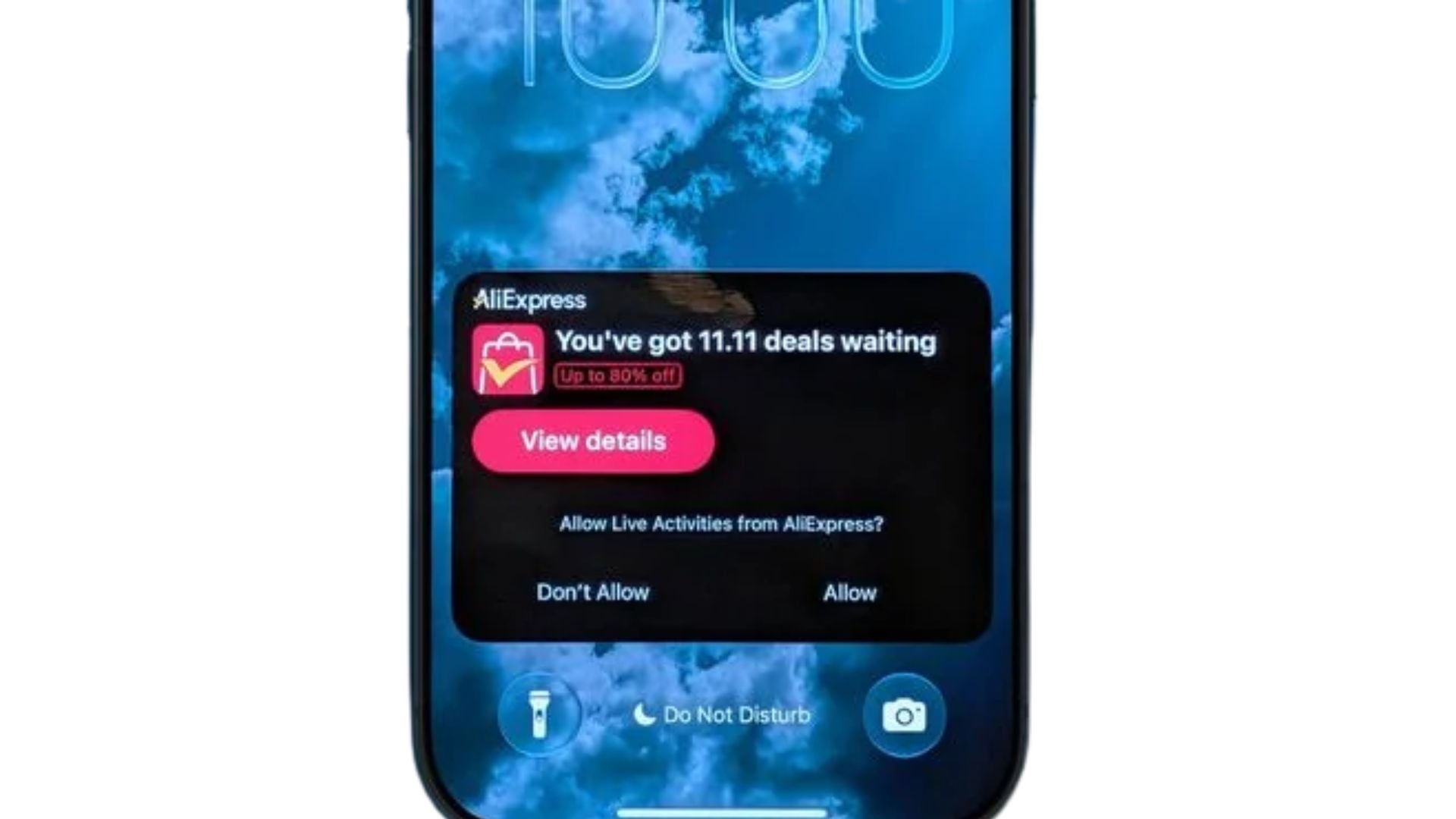
Lock screens on the iPhone are starting to look a lot like digital billboards, and users are taking notice. Even though Apple has clear App Store rules against spam, several popular apps are abusing push notifications and Live Activities to push sales pitches. Reports from MacRumors and MobileSyrup show that major food, retail, and shopping apps are ignoring user settings or bending design rules to get marketing messages onto your screen.
Food and retail apps ignore rules on promo alerts
Apple writes strict rules on paper for how developers can use push notifications. Under App Store guidelines, an app can only send promotional alerts if you explicitly opt in through clear consent language inside the app. That same app must also give you a simple way to opt out of marketing messages later.
In practice, several major brands ignore those rules. Users in Canada have pointed out that apps from Cineplex, McDonald’s, and Wendy’s send out promotional push notifications without giving any option to turn off ads separately from regular alerts.
Don’t miss the best of The Mac Observer
Set us as a preferred source and our Apple reporting ranks higher in your Google Search results and Discover feed — one tap, no account changes.
Other apps include the setting but fail to respect your choice. Canadian food delivery service Skip offers a toggle to switch off promotional notifications, yet users report receiving deal alerts long after turning that option off. DoorDash takes a different approach by showing a pop-up after you turn off promo offers and place an order. The prompt asks you to re-enable notifications so you will “never miss an order update,” even when order updates are already turned on. Tapping that button quietly switches promotional ads back on.
Not every user sees the same wave of spam, though. One MobileSyrup writer using an iPhone 17 Pro noted that the Cineplex, Skip, and Wendy’s apps never sent promo alerts on that device, showing that these ad pushes hit some accounts harder than others.
Shopping apps turn Live Activities into lock screen ad spaces
Live Activities are built to give you real-time updates on things you are actively doing. They work great for checking an Air Canada flight status, following a live sports score, or watching your progress during a workout.
Apple explicitly tells developers not to use Live Activities for ads or promotions in its app design guidelines, and App Store Rule 4.5.3 bans sending unsolicited messages through the feature. Even so, users have caught the shopping app AliExpress placing ads directly inside Live Activities, turning a helpful lock screen tracker into a persistent banner ad.
Apple sends its own promo alerts while enforcement lags behind
Part of the problem comes down to Apple not consistently enforcing its own rules when third-party apps cross the line. At the same time, the company has drawn criticism for doing something very similar with its own software.
The App Store recently sent out a push notification advertising a Paramount+ subscription deal. You can turn these off by opening the App Store, tapping your profile picture in the top-right corner, selecting Notifications, and switching off Recommendations & Offers. Still, it is unclear if Apple ever asked users to opt in first, though preinstalled apps do not technically have to follow the rules set for outside developers.
When notification rules only work on paper, lock screens quickly lose their usefulness. Until Apple starts enforcing its policies and holding repeat offenders accountable, iPhone owners may find themselves muting app alerts altogether just to get some peace.


Discussion