
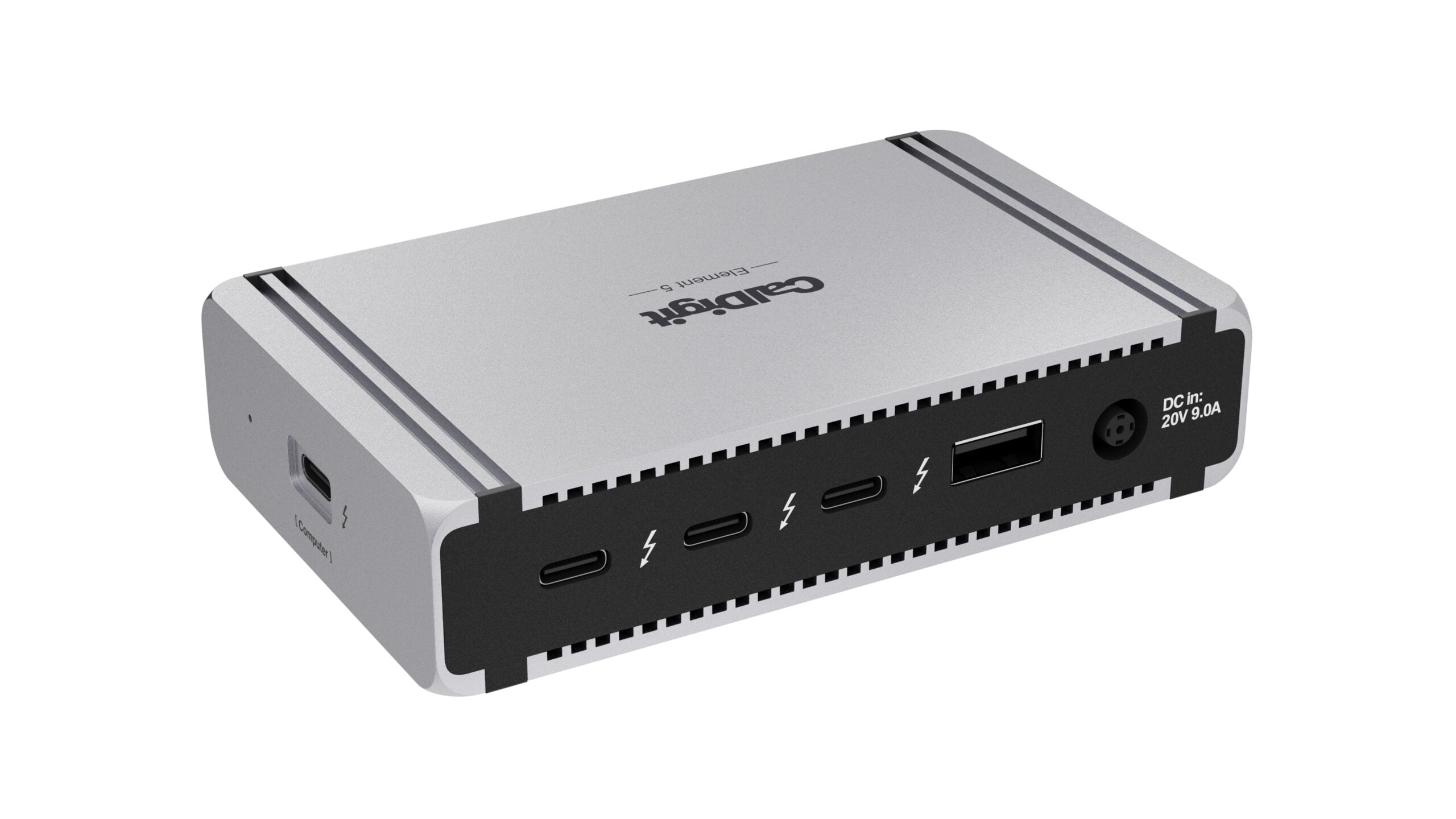
CalDigit’s Element 5 Hub is down to $212.49 on Amazon from a $249.99 list price, so you save $37.50 on a nine-port Thunderbolt 5 hub that sits next to your laptop and runs off one cable. CalDigit’s own US store shows the same $212.49 sale price against the same $249.99 regular price, so the discount is real. It’s aimed at people with a Thunderbolt 5 Mac who want fast ports and laptop charging without the size or price of a full dock.
We checked the price, seller and stock on Amazon on November 28, 2026. CalDigit, Inc. sells it and Amazon ships it, and CalDigit lists Amazon.com as one of its official stores. The listing warned “Only 6 left in stock” when we looked, and it carries Amazon’s Cyber Monday Deal badge, so this one may sell out before the price changes.
Among the Macs Apple sells now, only M5 Pro, M5 Max and M5 Ultra models have Thunderbolt 5
Here’s the surprise. Apple’s newest base chip doesn’t get Thunderbolt 5. According to Apple’s tech specs pages, these are the Macs with Thunderbolt 5 ports today:
Don’t miss the best of The Mac Observer
Set us as a preferred source and our Apple reporting ranks higher in your Google Search results and Discover feed — one tap, no account changes.
- MacBook Pro with M5 Pro or M5 Max, and the MacBook Pro with PROLED XDR Display, which only comes with those two chips
- Mac mini with M5 Pro
- Mac Studio with M5 Max or M5 Ultra
The MacBook Pro and Mac mini with the M6 chip use Thunderbolt 4, at up to 40Gb/s. So do the M5 MacBook Air and the iMac. The MacBook Neo has one USB 3 port and one USB 2 port and no Thunderbolt at all. The hub still works on those Macs, but CalDigit says Thunderbolt 4 and USB-C hosts get reduced functionality, and you’d be paying for speed your Mac can’t reach.
What nine ports, 80Gb/s downstream links and offline charging give you on a desk
CalDigit rates the host link at up to 120Gb/s. The rest of the hub breaks down like this:
- Three downstream Thunderbolt 5 ports at 80Gb/s, each with 15W of power
- Three USB-A ports and two USB-C ports, all at 10Gb/s with 7.5W each
- Up to 90W of sustained charging for your laptop from the included 180W power supply
- A 0.8m Thunderbolt 5 cable in the box, plus a two-year warranty
It measures 4.48 by 2.75 by 1.0 inches and weighs 0.44 pounds, small enough to pack. CalDigit also says all nine ports keep charging your devices when no computer is connected, and it offers a driver that lets an Apple SuperDrive run through the hub. The design is reversible too, so you can put it on either side of your laptop.
The 90W limit falls short of Apple’s 94W minimum for a 16-inch MacBook Pro
The fine print is in Apple’s specs. Apple recommends at least 60W or 70W to charge a 14-inch MacBook Pro, depending on the chip, and 96W or more to fast charge it. The hub’s 90W keeps a 14-inch model charged all day, but it won’t fast charge. The 16-inch MacBook Pro is a different story. Apple lists 94W as the minimum recommended wattage and 140W for fast charging. The hub’s 90W is under that minimum, so on a 16-inch plan to keep the MagSafe charger plugged in too.
Hub or dock: what the extra $187 for CalDigit’s TS5 buys you
A hub adds ports. A dock replaces your whole desk setup. We covered the CalDigit TS5 at $349.95 on November 25, and the TS5 is back at $399.95 on Amazon now, $187.46 more than this hub. According to CalDigit, that money gets you:
| Element 5 Hub | TS5 dock | |
|---|---|---|
| Amazon price | $212.49 (list $249.99) | $399.95 |
| Ports | 9 | 15 |
| Laptop charging | 90W | 140W |
| Ethernet | None | 2.5Gb |
| SD card slots | None | SD 4.0 and microSD 4.0 (UHS-II) |
| Audio jacks | None | Front combo plus rear in and out |
If your desk has a wired network, a camera card reader and a 16-inch MacBook Pro, the TS5 is the better buy. If you mostly plug in drives, a keyboard and a monitor or two, the hub covers it for a lot less. Our PROLED MacBook Pro ports guide has more on which charger each model needs.
Monitor support depends on your chip, from one screen on a base M3 to four on an M5 Max
CalDigit says M5 Pro and M5 Max Macs can run three displays through the hub, and an M5 Max can drive four if one of them is a daisy-chainable Thunderbolt display. Base M5, M4, and the M1 to M4 Pro and Max chips top out at two. Base M1, M2 and M3 Macs stay at one external display by design, and CalDigit says M6 Macs can’t do three. There’s no HDMI port either, so an HDMI monitor needs a USB-C to HDMI adapter.
If you own an M5 Pro or M5 Max MacBook Pro, a 14-inch especially, the Element 5 Hub at $212.49 gives you the full Thunderbolt 5 speed and enough charging power. M6, MacBook Air and MacBook Neo owners should skip it and buy a cheaper Thunderbolt 4 or USB-C hub.
MacObserver may earn a commission when you buy through links on this page. It doesn’t change the price you pay.


Discussion