
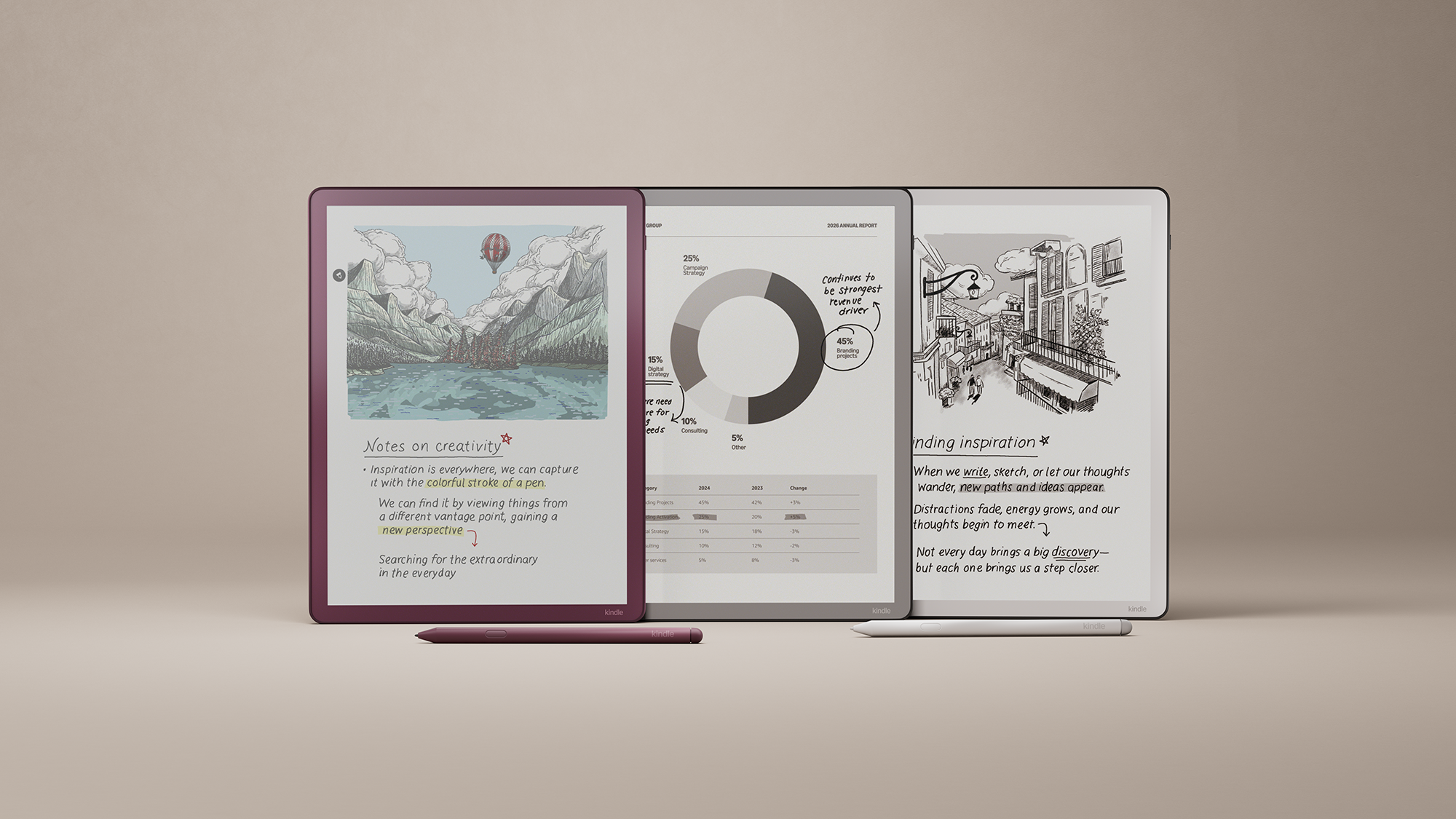
Amazon’s Kindle Scribe with front light is $349.99 for the 32GB model, down from a $499.99 list price. That’s $150 off, and Amazon labels it a Black Friday Deal. Amazon makes the Scribe, so $499.99 is its own regular price. This one is for you if you fill paper notebooks in meetings and want those pages searchable, without paying for an iPad and an Apple Pencil.
We checked the price, seller and stock on Amazon on November 23, 2026. Amazon.com sells and ships it, and it showed in stock with no low-stock note. The deal covers the third-generation Kindle Scribe in Graphite, 32GB, without the Kindle+ bundle. The Premium Pen, a USB-C cable and replacement tips come in the box. A power adapter doesn’t.
The Kindle Scribe costs $178.01 less than the cheapest iPad and Apple Pencil you can buy from Apple
Apple’s cheapest tablet is the iPad 11-inch (A16), from $449. It works with Apple Pencil (USB-C), which Apple sells for $79. That’s $528 before you write a word. The Scribe is $349.99 with the pen already included, and Amazon says that pen never needs charging or pairing.
Don’t miss the best of The Mac Observer
Set us as a preferred source and our Apple reporting ranks higher in your Google Search results and Discover feed — one tap, no account changes.
Move up to the 11-inch iPad Air at $749 with the $129 Apple Pencil Pro and you’re at $878. That’s $528.01 more than the Scribe. You get a full computer for that money. But if handwriting is the job, you’re paying for a lot you won’t use.
| Kindle Scribe (32GB) | iPad 11-inch (A16) + Apple Pencil (USB-C) | |
|---|---|---|
| Price | $349.99 on Amazon | $449 + $79 = $528 at Apple |
| Screen | 11-inch glare-free, 300 ppi, 16-level gray scale, front light | 10.86-inch Liquid Retina, LED backlit IPS |
| Weight | 400 g, pen 17 g | 477 g (Wi-Fi) |
| Battery | Up to 12 weeks reading, 3 weeks writing (30 minutes a day) | Up to 10 hours web or video |
| Storage | 32GB (23GB available) | 128GB |
| Pen | Premium Pen included, no charging | Sold separately, pairs and charges over USB-C |
| Thickness | 5.4 mm | Not compared here |
Writing feels like paper, and the AI tools turn your scribbles into searchable text
Amazon gives the Scribe a textured, paper-like display and a pen with a built-in eraser and a shortcut button for tools like the highlighter. It claims 40% faster writing and page turns than the last model. The light adjusts its brightness on its own, and you can warm it up for reading at night.
The notebook is the real reason to buy it. You can search handwritten notes by keyword, summarize up to 15 pages, and use Refine Writing to turn up to 10 pages of handwriting into a clean script font. You can also convert notes to text. Asking questions about your notes needs at least two notebooks with two or more pages each, and Amazon processes those notes in the cloud. Ask This Book, the AI reading feature, arrives later in 2026 through software updates.
Work files come in from Google Drive or Microsoft OneDrive. You mark them up by hand and export them as PDFs, or send notebooks to Microsoft OneNote. Imports make a new copy, though. Amazon says syncing back to Drive or OneDrive isn’t supported.
What iPhone and Mac owners give up when the notebook is a Kindle Scribe
There’s no Apple Notes, no iCloud Drive and no App Store. Amazon’s listing names Google Drive and OneDrive for imports, not iCloud. On a Mac, you send PDFs, Word files and EPUBs to the Scribe through Send to Kindle in a desktop web browser or the Kindle app.
Your iPhone still helps. The Kindle app for iOS shows your Scribe notebooks under More, then Notebooks. It won’t show underlines or Active Canvas notes, the ones you write inside a book. And the screen is grayscale only, so color highlighting and sketching need a different device.
If you also want to watch video, edit photos or sketch in color, an iPad is the better buy. Our iPad Pro vs iPad Air for notes guide breaks down which Apple tablet suits note takers, and our iPad mini A17 Pro deal covers the smallest one.
Who should buy the Kindle Scribe at $349.99 and who should get an iPad instead
- Buy it if you take handwritten notes all day and want weeks of battery instead of hours.
- Buy it if you read a lot of Kindle books and want to write in the margins.
- Buy it if you mark up PDFs and Word files from Google Drive or OneDrive.
- Skip it if your notes live in Apple Notes or iCloud Drive. The Scribe doesn’t connect to either.
- Skip it if you want apps, video or color. The $449 iPad does all three.
The Kindle Scribe at $349.99 is the cheaper, lighter, single-purpose notebook, and the pen is in the box. You trade Apple’s apps and iCloud for paper-like writing and weeks between charges. If that trade sounds good, $150 off makes it an easy call.
MacObserver may earn a commission when you buy through links on this page. It doesn’t change the price you pay.
Discussion