
Adobe used its MAX conference to ship a pile of AI tools for Photoshop, Premiere and Lightroom, and to promise something bigger for 2027. In its Creative Cloud announcement, Adobe says local MCP integrations will let a third-party AI agent edit your Photoshop, Illustrator, Premiere and After Effects files right on your computer, with a private beta in early 2027.
Most of what Adobe showed is out now for Mac users, though plenty of it carries a beta label. Here’s what you can use in the current apps, what’s still in testing, and what has to wait until next year.
Photoshop 28.0 adds Relight with three movable lights and Generative Restyle sliders
Adobe’s Photoshop release post lists version 28.0, which you install through the Creative Cloud desktop app. The headline tools:
Don’t miss the best of The Mac Observer
Set us as a preferred source and our Apple reporting ranks higher in your Google Search results and Discover feed — one tap, no account changes.
- Relight adds up to three light sources you can move around the canvas and adjust for color, intensity and diffusion.
- Generative Restyle turns a prompt-based edit into its own layer with a slider, so you can dial the effect up or down without typing a new prompt.
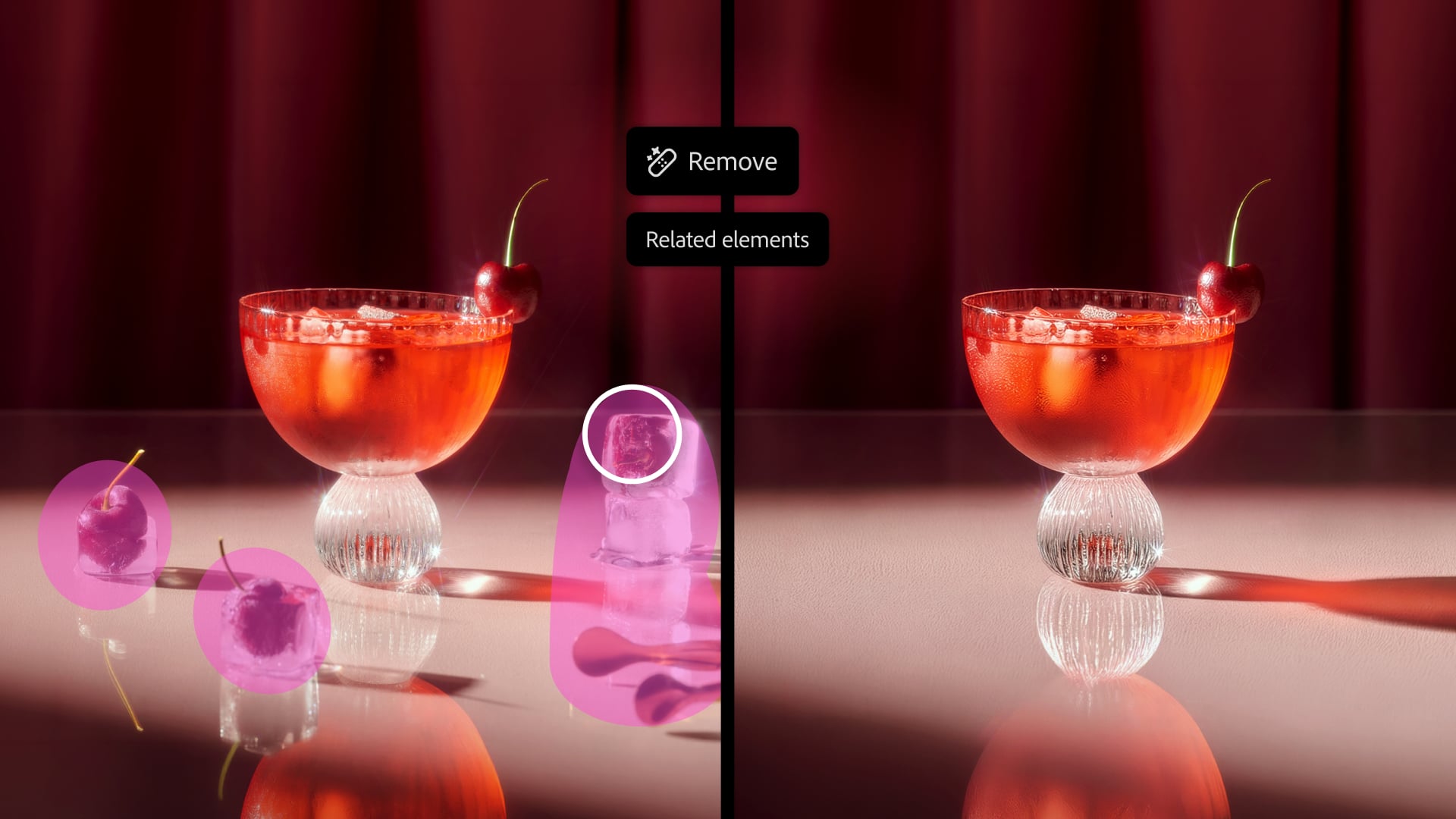
- The Remove tool can now take out related elements with an object, such as its shadow, reflection or footprints.
- Quick Compare puts a before and after slider on the canvas.
- AI Assisted Editor lets you edit with plain language, then switch to the Pro Editor for the full toolset.
Some features stay in the separate Photoshop beta app. Adobe’s MAX blog post puts Mockups, Camera Angles, Generative Recompose, Convert to Text Layers, Timelapse and Remove Ambient Effect Only there. Photoshop’s AI Assistant also lives in the beta app for now.
Premiere gets Color Mode as a finished feature and AI video generation in the timeline
Color Mode, Premiere’s dedicated grading workspace, is now generally available. Adobe calls it a “first-of-its-kind color grading system.” If you’ve been sending footage to another app for grading, that’s the change to try first.
The new Generative Media tool can create video, sound effects, soundscapes and music inside the timeline. It uses Adobe Firefly or partner models from Google, Kling, Runway and Luma. New audio tools, Enhance Audio, Separate Crosstalk and Separate Sound Source, clean up dialogue and split mixed sound. Generative Remove, which erases masked and tracked objects from video, is still in beta.
We covered Adobe’s music licensing deals for the iPhone app in Adobe’s Premiere Mobile partnership with Universal and Warner, so we’ll skip that here.
Lightroom tethering improves on Mac and iPad, and Open Eyes fixes blinks in beta
iPad owners get one concrete upgrade. Adobe says Camera Tethering is improved and expanded across Lightroom on desktop and iPad, so you can shoot straight into Lightroom and review shots live on either device. Lightroom also adds Glow, with Diffusion and Halation light effects, and Blemish Removal with more pro controls. Open Eyes, in public beta, swaps closed eyes for open ones using a reference photo from your library.
Adobe didn’t say whether Relight, Generative Restyle or the other new Photoshop tools are coming to Photoshop on iPad. Its announcements describe them as desktop features.
The same goes for touch. Adobe’s news releases don’t mention Apple’s new touchscreen MacBook Pro, even though Lightroom is among the apps getting touch support on the Mac. Instead, Adobe named Microsoft, saying it optimized Photoshop, Premiere, After Effects and Substance 3D Painter in beta for Arm-based Windows PCs, including the Surface Laptop Ultra.
What Adobe’s MCP integrations will let AI agents do in your Creative Cloud files in 2027
MCP, short for Model Context Protocol, is the standard many AI agents use to control other software. Adobe says its integrations will let you point your preferred third-party agent at Photoshop, Illustrator, Premiere and After Effects. The agent works locally on your native project files, and layers, vectors, bins and sequences stay editable, so you can take over by hand at any point. Adobe adds that the agent can also work with other MCP tools such as Google Drive, Slack and Google Docs.
That’s different from the AI Assistants Adobe already ships. Those run on Adobe’s own Creative Agent and are in beta in Premiere, Illustrator, InDesign, After Effects and Frame.io. MCP opens the apps to agents Adobe doesn’t make. Adobe says it already has connectors with Anthropic, OpenAI and Slack. The blog post says “MCP integrations are coming to Creative Cloud customers in early 2027,” starting as a private beta.
One thing Adobe’s announcements leave out is cost. None of the MAX posts list prices or generative credit charges for the new tools. Adobe’s generative features run on generative credits, so keep an eye on your balance if you lean on video generation and partner models.


Discussion