
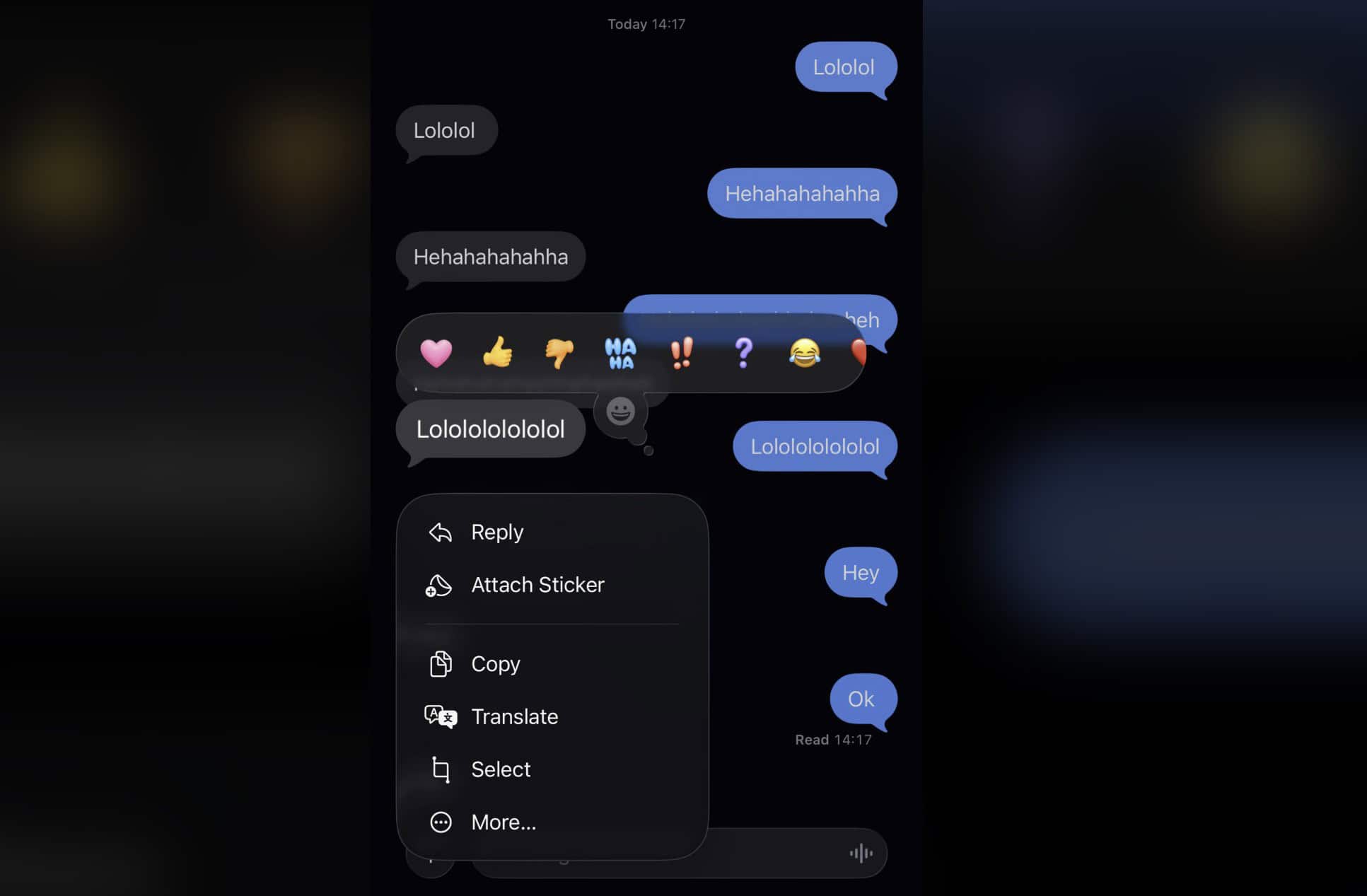
What changed
In iOS 26, a long-press (Tapback/More) on a message no longer dims or blurs the rest of the thread. The action sheet pops over a fully readable conversation, so you can’t “spotlight” a single bubble for quick screenshots or discreet sharing.
Why Apple did it
It’s part of the new Liquid Glass design push in iOS 26, which reduces heavy backdrop blur in many overlays and menus to keep the UI feeling lighter and more “glass-like.” The goal is consistency across Messages, Safari, the Home Screen, and system menus.
Fast workarounds (closest to the old effect)
Don’t miss the best of The Mac Observer
Set us as a preferred source and our Apple reporting ranks higher in your Google Search results and Discover feed — one tap, no account changes.
- Swipe-to-reply for a temporary blur: Swipe right on a bubble to open the reply view. This softens the background behind the quoted message — but note it can expose other messages in the reply context.
- Use selective copy instead of cropping: Long-press a bubble → Select → highlight only the text you need. That avoids screenshotting the entire thread.
- Set a calmer chat background: A high-contrast or solid background makes single-message captures cleaner. If you want an easy win, you can change your Messages background to something less busy.
Make iOS 26 easier on the eyes
If the new “clear” look hurts legibility, two Accessibility toggles help: Settings → Accessibility → Display & Text Size → Reduce Transparency and Increase Contrast. We show what they do (and when to use each) in our guides to sharpen icons and UI and tone down iOS 26’s animations/transparency. For a deeper explainer of the visual system itself, see Liquid Glass explained. And if you’re chasing odd visual bugs, keep an eye on our rolling list of reported iOS 26 issues and fixes.
Bottom line
This is a design decision, not a bug. You can’t “turn the blur back on” for long-press in Messages, but swipe-to-reply, selective copy, calmer chat backgrounds, and Accessibility tweaks get you most of the way there.


Por favor devuelvan el desenfoque en mensajes de whasat